

External actions
External actions enable you to trigger and execute actions and processes in external systems outside fulfillmenttools. For example, sending consumer emails, adjusting payments, and other order-related processes.
This facilitates seamless communication with third-party systems. Use the API to define the capabilities and functionalities of external actions and integrate fulfillmenttools with other systems.
There are currently three types of external actions available: LINK, FORM, and COMMENT.
The user who triggered the external action is displayed on the order history page on the right side.
Multiple external actions can be added to a process
External actions can be grouped and assigned to a theme
Links
With the LINK external action, you can attach a link or deep link to a process, enabling users to manually execute the process in the linked external system.
Forms
With the FORM external action, you can define a modal where users can input data. Upon confirmation, an external event is triggered, enabling the execution of further processes (done by a connector).
Executing an external action is logged and displayed in the order history, providing users with visibility into the actions taken throughout the order workflow.
Comment
When adding the COMMENT external action to a process, it doesn't create another entry in the three dot menu. The purpose of this action is not to trigger an action to an external system but to receive information from such a system.
There are two ways to add information:
add information to a process
add information to a process but relate it to another external action like
FORM
Adding information to the process without relation to another external action allows adding general information to the process which might be important for fulfillment. Example: A CRM system adds information about the consumer segment which informs a user that this order might be handled in a specific way.
When adding information which relates to another external action there is the possibility to store the "answer" or "reaction" of the triggered system and connect it to the technicality of the external action. Example: An external action with type "FORM" was created which triggers a payment system in order to reduce the paid amount by 10%. The payment system itself responds that the 10% were successfully reduced. In this case it would make sense that this information is not only connected to the process but connected directly to the external action FORM of this process which was originally responsible for the trigger "payment adjustment".
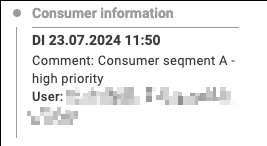
Those additional information is then displayed in the order history on the right hand side.
Create an external action with type BLANK_LINK
The following example creates an external action that renders as a link to an external system, such as a payment provider's portal. The action is configured by setting the action.type to BLANK_LINK and providing a destination URL in action.linkUrl.
Create an external action with type FORM
This example creates a form that can be used to send data to an external system, such as a payment provider. When a user submits the form, fulfillmenttools sends a webhook containing the form data.
This example adds a form that will look like this and is able to inform a payment provider system:
External action with type: 'COMMENT'
type: 'COMMENT'An external action with type: 'COMMENT' allows users to add notes to a process. These notes are then created by making a subsequent request to the logs endpoint.
First, create the COMMENT action and associate it with a process:
Once the action is created, use its externalActionRef to post a comment to the logs endpoint.
Last updated