> For the complete documentation index, see [llms.txt](https://docs.fulfillmenttools.com/documentation/llms.txt). Markdown versions of documentation pages are available by appending `.md` to page URLs; this page is available as [Markdown](https://docs.fulfillmenttools.com/documentation/integrations/commercetools-connect.md).
# commercetools connect
The [fulfillmenttools connector app](https://marketplace.commercetools.com/integration/oc-fulfillment-gmbh) in the [commercetools marketplace](https://marketplace.commercetools.com/) is a certified integration connector that synchronizes information between your commercetools and your fulfillmenttools project. It's fully customizable and easy to set up and deploy, so you can start fulfilling orders from your eCommerce system without a complicated integration process.
[commercetools Connect](https://docs.commercetools.com/connect/) lets you add functionality to your project without buying and maintaining dedicated hosting or runtime environments.
Our fulfillmenttools connector app is published as open source under the MIT license. You can check it out from our [GitHub repository](https://github.com/fulfillmenttools/commercetools-connector).
## Receiving orders at fulfillmenttools
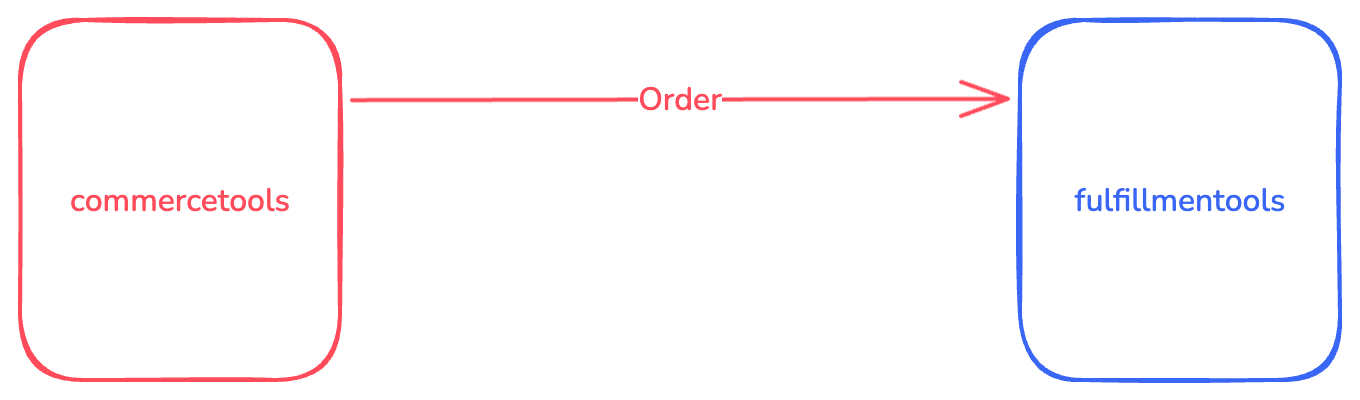
The fulfillmenttools connector app uses [commercetools subscriptions](https://docs.commercetools.com/api/projects/subscriptions) to get notified when the [commercetools OrderState](https://docs.commercetools.com/api/projects/orders#orderstate) of an order is changed to `Confirmed`. With this status, the commercetools order is ready, and a new order is created in fulfillmenttools.
Depending on the shipping method of the commercetools order, either a ship-from-store or a click-and-collect order is created in fulfillmenttools.
fulfillmenttools will process the new order and (based on its configuration) route the order to the best fulfillment location. Then the selected location executes the fulfillment process: picking, packing, and shipping.
## Fulfillment status update at commercetools
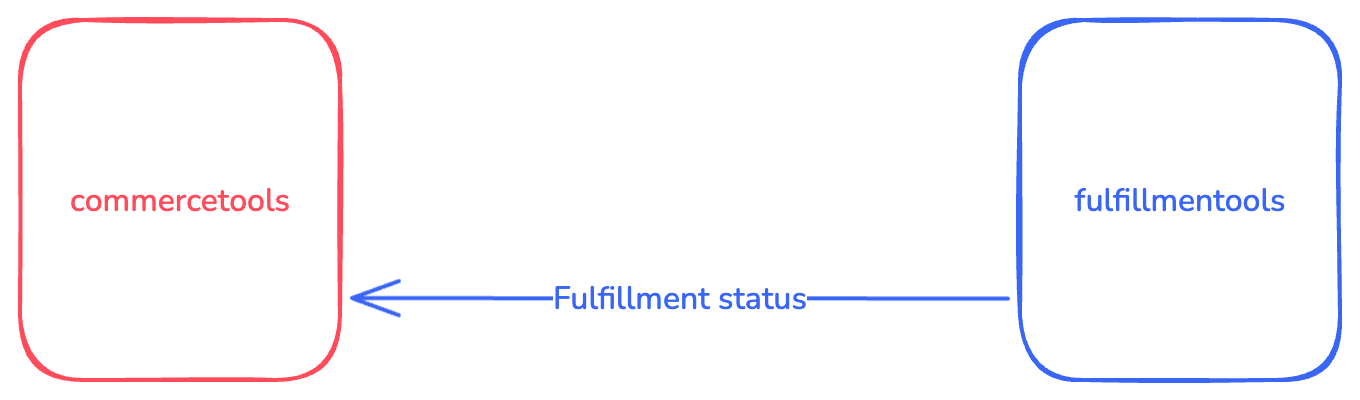
As a result of the order routing process, a pick job will be created in fulfillmenttools. During the pick job lifecycle (picking started, finished) and the corresponding handover job (created, handed over), fulfillmenttools will send out events with status updates. The fulfillmenttools connector app processes this information to update the custom fields and the [ShipmentState of the commercetools order](https://docs.commercetools.com/api/projects/orders#shipmentstate).
## Events for the commercetools order
The following [fulfillmenttools events](/documentation/getting-started/eventing/available-events.md) are used to update the commercetools order:
| Event | Action |
| --------------------------- | ------------------------------------------------------------------------- |
| `ORDER_CREATED` | Set custom field `fft_order_id` |
| `PICK_JOB_CREATED` | Set custom fields `fft_pickjob_id`, `fft_shortid`, and `fft_facility_id` |
| `PICK_JOB_PICKING_FINISHED` | Set custom field `fft_load_units_amount` |
| `HANDOVERJOB_CREATED` | Set custom field `fft_handover_job_id`, update `ShipmentState` to `Ready` |
| `HANDOVERJOB_HANDED_OVER` | Update `ShipmentState` to `Shipped` |
See the [Customization section](#commercetools-customization) for details on the data fields used.
## Channels in commercetools
The connector also synchronizes information from [commercetools channels](https://docs.commercetools.com/api/projects/channels) to create or update a fulfillmenttools [facility](https://fulfillmenttools.github.io/fulfillmenttools-api-reference-ui/#post-/api/facilities). Only channels with the `InventorySupply` role are synchronized, other roles are ignored. The created fulfillmenttools facility will be of type `STORE` and have the `SHIP_FROM_STORE` and `PICKUP` services enabled. In a future version of this connector, we will support channel custom fields to configure the facility type and services.
The channel `key` is used as facility `tenantFacilityId` to establish a relationship between the two entities. When the commercetools channel has an address, it's used as the facility's address. Otherwise, it uses a default, because an address is mandatory for a fulfillmenttools facility. In this case, you'll need to update/edit the facility with the correct data. See the [facility article in our documentation](https://docs.fulfillmenttools.com/documentation/getting-started/facilities) for details.
When you delete the commercetools channel, the related fulfillmenttools facility is not deleted. It is only set to `OFFLINE`. This prevents accidental deletion of operational data. You can still delete the facility via the API or in Backoffice.
Currently, synchronization between channels and facilities is one-way. Any changes made to a fulfillmenttools facility will not be forwarded to the related commercetools channel.
## Deploying the connection
{% hint style="success" %}
## Prerequisites
* [commercetools core commerce account](https://commercetools.com/free-trial) and [commercetools API client](https://docs.commercetools.com/merchant-center/api-clients)
* [fulfillmenttools account](https://www.fulfillmenttools.com/free-trial) and [API credentials](https://docs.fulfillmenttools.com/documentation/getting-started/access-to-fulfillmenttools-apis)
{% endhint %}
### Installing the connector
While you can deploy the connector into your core commerce project using the [Connect API](https://docs.commercetools.com/connect/deployments), the easiest way is to use the Merchant Center.
In your project go to the Connect marketplace, select the fulfillmenttools Connector, click **Install** and follow the deployment steps.
### Uninstalling the connector
You can undeploy the connector from your project using the [Connect API](https://docs.commercetools.com/connect/deployments) or use the Merchant Center.
## Development
{% hint style="success" %}
## Prerequisites
* [Node.js](https://nodejs.org/en/) 20 with [NVM](https://github.com/nvm-sh/nvm) and npm
* [Docker](https://www.docker.com/get-started) (optional)
{% endhint %}
### Setup
```shellscript
$ nvm use
```
### Building and running the apps locally
This repository contains the two Connect apps, `event` and `service`, along with a `shared` module. Each app is built and deployed separately.
The `shared` module contains functionality that is used by both apps.
All three modules are built in the same way:
```shellscript
$ npm install
$ npm run build
```
The `event` and `service` apps can be run locally using either of these goals:
```shellscript
$ npm run start
$ npm run start:dev
```
When running the app in development mode, the `.env.local` file will be used (also for running unit tests).
To run the app in production mode, provide a `.env` file (but don't check this into the Git repository).
{% hint style="warning" %}
Don't check actual passwords into the Git repository.
{% endhint %}
### Running unit tests
When running unit tests, the `.env.local` file uses placeholder settings.
```shellscript
$ npm run test
```
### Linting
```shellscript
$ npm run lint
```
## Integration of commercetools and fulfillmenttools
This section describes the steps to integrate the connector with commercetools and fulfillmenttools so order information is forwarded from commercetools to fulfillmenttools, and fulfillment status updates are sent back from fulfillmenttools to commercetools.
See the [commercetools documentation](https://docs.commercetools.com/docs/) for further details.
### commercetools API client
For each commercetools project, we need an [API client](https://docs.commercetools.com/merchant-center/api-clients). Manage this in the commercetools Merchant Center. Go to **Settings**, and then click **Developer settings**. The API client needs to have at least the following scopes:
* `manage_orders`
* `manage_states`
* `manage_subscriptions`
* `manage_types`
* `view_products`
* `view_project_settings`
* `view_published_products`
* `view_stores`
Use the received credentials to set `CTP_CLIENT_ID` and `CTP_CLIENT_SECRET` when deploying the app.
### commercetools customization
The connect apps use a configuration [custom object](https://docs.commercetools.com/api/projects/custom-objects) identified by container `fft` and key `configuration` with the following settings:
| Setting | Description |
| ---------------------------------- | ---------------------------------------------------------------------------------------------------------------------------------------------------------------------------------------------------------------------------------------------------------------------------------------------------------------------------------------------------------------------------------------------------------------------------------------------------------------------------------------------------------------------------------------- |
| `collectChannelReferenceFieldName` | Name of the custom field in a commercetools [Order](https://docs.commercetools.com/api/projects/orders) that holds the key of a channel to use for a click-and-collect order. You can define this field as you wish. When the fulfillmenttools Connect app receives a commercetools order, it checks if this custom field is present. If so, it uses the field value to identify the fulfillmenttools [facility](https://docs.fulfillmenttools.com/documentation/apps/backoffice/network-view/facilities) for a click-and-collect order. |
| `orderCustomTypeKey` | Name of the commercetools [custom type](https://docs.commercetools.com/api/projects/types) used for orders. You can choose this name. When the fulfillmenttools Connect app receives a commercetools order, it checks if it already has this type. It then adds additional [custom fields](https://docs.commercetools.com/api/projects/custom-fields) to this type and fills them with information from the fulfillmenttools process. |
| `shippingMethodMapping` | This maps to the `key` of a commercetools [shipping method](https://docs.commercetools.com/api/projects/shippingMethods). For each shipping method you want to use in your commercetools project, you have to define a mapping. The mapping's value object selects the [delivery preferences](https://docs.fulfillmenttools.com/documentation/developer-docs/more-integration-guides/place-your-first-order/ship-from-store-orders) of the fulfillmenttools order. |
Below is an example of the configuration object. The shipping method with key `dhl` is mapped to the `DHL_V2` carrier. The shipping method with key `cc` designates a click-and-collect order. In commercetools, the shipping method keys can be freely defined, while the fulfillmenttools carrier keys are fixed:
```json
{
"collectChannelReferenceFieldName": "fft_supply_channel_for_click_and_collect",
"orderCustomTypeKey": "orderCustomFields",
"shippingMethodMapping": {
"dhl": {
"serviceType": "SHIPPING",
"serviceLevel": "DELIVERY",
"carriers": ["DHL_V2"]
},
"gls": {
"serviceType": "SHIPPING",
"serviceLevel": "DELIVERY",
"carriers": ["GLS"]
},
"cc": {
"serviceType": "CLICK_AND_COLLECT"
}
}
}
```
The following order [custom fields](https://docs.commercetools.com/api/projects/custom-fields#customfields) are used by the connect apps, and the configured [custom type](https://docs.commercetools.com/api/projects/types) is automatically extended with these fields:
* `fft_order_id`
* `fft_pickjob_id`
* `fft_load_units_amount`
* `fft_handover_job_id`
* `fft_shortid`
* `fft_facility_id`
* `fft_parcels`
A commercetools subscription is automatically set up by the `connector:post-deploy` script, which is invoked after the app has been deployed into a commercetools environment.
A fulfillmenttools subscription is automatically set up by the `connector:post-deploy` script, which is invoked after the app has been deployed into a commercetools environment.
### Deactivate events/services
By default, all three events/services are activated (order sync, facility sync, and status updates). However, you can deactivate each one individually by setting the corresponding value to `false` when installing the connector.
| Variable | Description |
| --------------------------- | ------------------------------------------------------------------- |
| `FEAT_ORDERSYNC_ACTIVE` | Set to `false` to deactivate the order sync (default is `true`) |
| `FEAT_CHANNELSYNC_ACTIVE` | Set to `false` to deactivate the channel sync (default is `true`) |
| `FEAT_STATUSUPDATES_ACTIVE` | Set to `false` to deactivate the status updates (default is `true`) |
## Architecture principles
Below are the architectural principles for building a commercetools Connect application:
* Connector solutions should be lightweight.
* Connector solutions should follow test-driven development. Include unit, integration, and end-to-end tests, and ensure they pass before use.
* No hardcoding of customer-related configuration. If needed, values should be in an environment file and shouldn't be maintained in the repository.
* Connector solution should be supported with detailed documentation.
* Connectors should be point-to-point in nature. Currently, they don't support any persistence capabilities beyond in-memory persistence.
* The connector solution should use open-source technologies, although the connector itself can be private for specific customer(s).
* Code shouldn't contain console.log statements. Use [the included logger](https://github.com/commercetools/merchant-center-application-kit/tree/main/packages-backend/loggers#readme) instead.
---
# Agent Instructions
This documentation is published with GitBook. GitBook is the documentation platform designed so that both humans and AI agents can read, navigate, and reason over technical content effectively. Learn more at gitbook.com.
## Querying This Documentation
If you need additional information that is not directly available in this page, you can query the documentation by asking a question.
Perform an HTTP GET request on the following URL with the `ask` and `goal` query parameters:
```
GET https://docs.fulfillmenttools.com/documentation/integrations/commercetools-connect.md?ask=&goal=
```
`ask` is the immediate question: it should be specific, self-contained, and written in natural language.
`goal` is what the user is ultimately trying to achieve, the reason they need the answer. Sharing it helps GitBook give you a better, more relevant answer. A goal is most helpful when it describes the outcome the user wants rather than restating the question. For example, with `ask=how do I create an API token`, a goal like `automate deployments from our CI pipeline` lets GitBook tailor the answer to that use case.
The response will contain a direct answer to the question and relevant excerpts and sources from the documentation.
Use this mechanism when the answer is not explicitly present in the current page, you need clarification or additional context, or you want to retrieve related documentation sections.