> For the complete documentation index, see [llms.txt](https://docs.fulfillmenttools.com/documentation/llms.txt). Markdown versions of documentation pages are available by appending `.md` to page URLs; this page is available as [Markdown](https://docs.fulfillmenttools.com/documentation/integrations/external-actions.md).
# External actions
External actions enable you to trigger and execute actions and processes in external systems outside fulfillmenttools. For example, sending consumer emails, adjusting payments, and other order-related processes.
This facilitates seamless communication with third-party systems. Use the API to define the capabilities and functionalities of external actions and integrate fulfillmenttools with other systems.
There are currently three types of external actions available: `LINK`, `FORM`, and `COMMENT`.
The user who triggered the external action is displayed on the [order history page](/documentation/backoffice/network-view/orders/order-details-view.md#order-history) on the right side.
* Multiple external actions can be added to a process
* External actions can be grouped and assigned to a theme
## Links
With the `LINK` external action, you can attach a link or deep link to a process, enabling users to manually execute the process in the linked external system.
## Forms
With the `FORM` external action, you can define a modal where users can input data. Upon confirmation, an external event is triggered, enabling the execution of further processes (done by a connector).
Executing an external action is logged and displayed in the order history, providing users with visibility into the actions taken throughout the order workflow.
## Comment
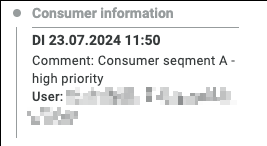
When adding the `COMMENT` external action to a process, it doesn't create another entry in the three dot menu. The purpose of this action is not to trigger an action to an external system but to receive information from such a system.
There are two ways to add information:
* Add information to a process
* Add information to a process but relate it to another external action like `FORM`
Adding information to the process without relation to another external action allows adding general information to the process which might be important for fulfillment.\
Example: A CRM system adds information about the consumer segment which informs a user that this order might be handled in a specific way.
When **adding information which relates to another external** action there is the possibility to store the "answer" or "reaction" of the triggered system and connect it to the technicality of the external action.\
Example: An external action with type "FORM" was created which triggers a payment system in order to reduce the paid amount by 10%. The payment system itself responds that the 10% were successfully reduced. In this case it would make sense that this information is not only connected to the process but connected directly to the external action FORM of this process which was originally responsible for the trigger "payment adjustment".
Those additional information is then displayed in the order history on the right hand side.
### Create an external action with type BLANK\_LINK
The following example creates an external action that renders as a link to an external system, such as a payment provider's portal. The action is configured by setting the `action.type` to `BLANK_LINK` and providing a destination URL in `action.linkUrl`.
{% code title="Request" %}
```http
POST https://ocff-{projectId}.api.fulfillmenttools.com/api/externalactions
```
{% endcode %}
{% code title="Body" %}
```json
{
"processRef": "PROCESS_REF_TO_WHICH_THE_ACTION_SHOULD_REFER",
"nameLocalized": {
"de_DE": "Zahlungen anpassen",
"en_US": "Adjust Payment"
},
"groups": [
"string"
],
"action": {
"type": "BLANK_LINK",
"linkUrl": "yourpaymentprovider.com/xyz..."
}
}
```
{% endcode %}
### Create an external action with type FORM
This example creates a form that can be used to send data to an external system, such as a payment provider. When a user submits the form, fulfillmenttools sends a webhook containing the form data.
This example adds a form that will look like this and is able to inform a payment provider system:

{% code title="Request" %}
```http
POST https://ocff-{projectId}.api.fulfillmenttools.com/api/externalactions
```
{% endcode %}
{% code title="Body" %}
```json
{
"processRef": "6aca1c80-c418-4064-b173-63fb120aef2d",
"groups": [
"Trainingsgruppe B"
],
"nameLocalized": {
"de_DE": "Zahlungen anpassen",
"en_US": "Adjust payments"
},
"action": {
"type": "FORM",
"elements": [
{
"elementType": "HEADLINE",
"title": "Adjust payments for this order",
"titleLocalized": {
"de_DE": "Zahlungen zu dieser Bestellung anpassen",
"en_US": "Adjust payments for this order"
}
}, {
"elementType": "SUBHEADLINE",
"title": "In this modal you can make payment adjustments. This can either be a percentual or a freely selected discount.",
"titleLocalized": {
"de_DE": "In diesem Modal können Sie Zahlungsanpassugen vornehmen. Dies kann entweder ein prozentualer oder ein frei gewählter Rabatt sein.",
"en_US": "This modal allows for payment adjustments. This can be either a percentage or a freely selected discount."
}
}, {
"elementType": "TEXT",
"style": "BODY",
"title": "string",
"titleLocalized": {
"de_DE": "-",
"en_US": "-"
}
}, {
"elementType": "TEXT",
"style": "BODY",
"title": "string",
"titleLocalized": {
"de_DE": "Rabatt in %",
"en_US": "Discount in &"
}
}, {
"elementType": "TEXT_INPUT",
"elementId": "4712",
"label": "string",
"titleLocalized": {
"de_DE": "%",
"en_US": "%"
},
"isMandatory": false,
"validation": {
"validationType": "FLOAT",
"minValue": 1,
"maxValue": 100
}
}, {
"elementType": "TEXT",
"style": "BODY",
"title": "string",
"titleLocalized": {
"de_DE": "-",
"en_US": "-"
}
}, {
"elementType": "TEXT",
"style": "BODY",
"title": "string",
"titleLocalized": {
"de_DE": "Rabatt in €",
"en_US": "Discount in €"
}
}, {
"elementType": "TEXT_INPUT",
"elementId": "4713",
"label": "string",
"titleLocalized": {
"de_DE": "€",
"en_US": "€"
},
"isMandatory": false,
"validation": {
"validationType": "INTEGER",
"minValue": 1,
"maxValue": 1000
}
}, {
"elementType": "TEXT",
"style": "INFO",
"title": "string",
"titleLocalized": {
"de_DE": "Die Anpassung der Abrechnung wird durch ein Fremdsystem durchgeführt.",
"en_US": "The billing adjustment is carried out by a third-party system."
}
}
],
"success": {
"label": "string",
"labelLocalized": {
"de_DE": "Bestätigen",
"en_US": "CONFIRM"
}
},
"cancel": {
"label": "string",
"labelLocalized": {
"de_DE": "Abbrechen",
"en_US": "CANCEL"
}
}
}
}
```
{% endcode %}
### External action with `type: 'COMMENT'`
An external action with `type: 'COMMENT'` allows users to add notes to a process. These notes are then created by making a subsequent request to the logs endpoint.
First, create the `COMMENT` action and associate it with a process:
```http
POST https://{YOUR_TENANT_NAME}.api.fulfillmenttools.com/api/externalactions
```
```json
{
"processRef": "6aca1c80-c418-4064-b173-63fb120aef2d",
"nameLocalized": {
"de_DE": "Zusatzinformation Kunde",
"en_US": "Additional customer information"
},
"groups": [
"additional-information"
],
"action": {
"type": "COMMENT"
}
}
```
Once the action is created, use its `externalActionRef` to post a comment to the logs endpoint.
```http
POST https://ocff-{projectId}.api.fulfillmenttools.com/api/externalactions/{externalActionRef}/logs
```
```json
{
"requiresAnonymization": false,
"actionPayload": {
"comment": "Consumer segment A - high priority",
"externalActionRef": "9e4a3c11-a582-4c60-9118-1a5a2a2eda87"
}
}
```
---
# Agent Instructions
This documentation is published with GitBook. GitBook is the documentation platform designed so that both humans and AI agents can read, navigate, and reason over technical content effectively. Learn more at gitbook.com.
## Querying This Documentation
If you need additional information that is not directly available in this page, you can query the documentation by asking a question.
Perform an HTTP GET request on the following URL with the `ask` and `goal` query parameters:
```
GET https://docs.fulfillmenttools.com/documentation/integrations/external-actions.md?ask=&goal=
```
`ask` is the immediate question: it should be specific, self-contained, and written in natural language.
`goal` is what the user is ultimately trying to achieve, the reason they need the answer. Sharing it helps GitBook give you a better, more relevant answer. A goal is most helpful when it describes the outcome the user wants rather than restating the question. For example, with `ask=how do I create an API token`, a goal like `automate deployments from our CI pipeline` lets GitBook tailor the answer to that use case.
The response will contain a direct answer to the question and relevant excerpts and sources from the documentation.
Use this mechanism when the answer is not explicitly present in the current page, you need clarification or additional context, or you want to retrieve related documentation sections.