> For the complete documentation index, see [llms.txt](https://docs.fulfillmenttools.com/documentation/llms.txt). Markdown versions of documentation pages are available by appending `.md` to page URLs; this page is available as [Markdown](https://docs.fulfillmenttools.com/documentation/about-fulfillmenttools/release-notes.md).
# Release notes
This page highlights recent updates, new features, and product improvements delivered across our API and Apps.
{% hint style="info" %}
Subscribe to updates using the **RSS feed** button or sign up for our monthly newsletter using the [form on our website](https://fulfillmenttools.com/newsletter-abo-release-summary/).
{% endhint %}
The below release notes focus on the current calendar year (2026). For previous years, see the [2025](/documentation/about-fulfillmenttools/release-notes/release-notes-2025.md) or [2024](/documentation/about-fulfillmenttools/release-notes/release-notes-2024.md) release notes.
{% updates format="full" %}
{% update date="2026-10-20" tags="backoffice,order-management" %}
## Alert filter added to Backoffice
We've added a new filter to the Network order view in Backoffice.
Now you can filter orders by alerts using either the alert type or the affected area. Both active and inactive alerts are included, making it easier to analyze current issues as well as previously triggered alerts.
See the [Network order view article](/documentation/backoffice/network-view/orders.md) for more information.
{% endupdate %}
{% update date="2026-10-12" tags="apis,store-operations,apps" %}
## Configurable position of the ID check in handovers
In the latest release of the Store Operations app (v37 (Android) and v15 (iOS)), we've added the possibility to configure whether a customer ID check occurs at the beginning or end of the handover process.
This setting is defined in the remote configuration as either `BEFORE_REMARK` (ID check at the beginning of the handover) or `AFTER_SUMMARY` (ID check at the end).
See the [Remote configuration article](/documentation/by-pillar/store-operations/remote-configuration.md) for more information.
{% endupdate %}
{% update date="2026-10-09" tags="apis,advanced-order-routing" %}
## Reroute limit reached event after maximum reroute attempts
We've added support for the `TIME_TRIGGERED_REROUTE_LIMIT_REACHED` event. The event is emitted once when a pick job reaches the configured `rerouteAttemptThreshold`, and no further time-triggered reroute will be executed. This lets external systems react operationally through the existing notification and webhook mechanisms.
For more information, see the [Reroute article](/documentation/by-pillar/advanced-order-routing/reroute.md).
{% endupdate %}
{% update date="2026-10-06" tags="mcp,apis,beta" %}
## AI Sidekick and MCP updates
We've released more functionality in our AI Sidekick and added a fulfillmenttools API MCP.
The AI Sidekick in Backoffice now has read access to your entire tenant so that you can ask any question about your fulfillment network. For example, how many open pick jobs there are, or how much stock is at a particular facility.
The fulfillmenttools MCP Server on `/fft` gives AI agents read access to the fulfillmenttools API. It runs alongside our [onX MCP Server](/documentation/integrations/mcp-servers/mcp-server-onx.md). The onX Server offers a fixed set of tools defined by the onX protocol. The `/fft` server works with the fulfillmenttools data model itself: pick jobs, pack jobs, handover jobs, shipments, parcels, carriers, facilities, routing, stock, and about 70 resources in total.
For more information, see the [MCP Server (fulfillmenttools API) article](/documentation/integrations/mcp-servers/mcp-server-fulfillmenttools-api.md) and the [AI Sidekick article](/documentation/backoffice/ai-sidekick.md).
{% endupdate %}
{% update date="2026-09-29" tags="backoffice,advanced-order-routing" %}
## Updating routing node configuration in Backoffice
We've redesigned the screen for configuring nodes in the routing strategy in Backoffice.
The new view brings several improvements:
* **Easy-to-use UI**: Fences and ratings are now separated into different sections, with the active ones filtered by default.
* **Trade-off display for ratings**: See the relation between two ratings directly while you adjust them.
* **Inheritance transparency**: See at a glance which fences and ratings are inherited from a preceding node and which ones override an inherited value.
* **Search and filters**: Added to every rule list, with active rules shown by default.
The previous view remains the default and can be selected at any time using the **Switch to classic view** button in the banner. The new view will replace the previous one on 30 November 2026.
For more information, see the [Routing strategy article](/documentation/backoffice/network-view/routing.md).
{% endupdate %}
{% update date="2026-09-28" tags="apis,global-inventory-hub" %}
## Inventory events moved to GA
We've moved the listing events below to GA:
* `LISTINGS_CREATED`
* `LISTINGS_DELETED`
* `LISTINGS_INFORMATION_CHANGED`
* `LISTINGS_STATUS_CHANGED`
* `LISTINGS_STOCK_CONFIGURATIONS_CHANGED`
* `INVENTORY_STOCKS_CREATED`
* `INVENTORY_STOCKS_DELETED`
* `INVENTORY_STOCKS_LOCATION_CHANGED`
* `INVENTORY_STOCKS_VALUE_CHANGED`
For more information, see the [Available events article](/documentation/getting-started/eventing/available-events.md).
{% endupdate %}
{% update date="2026-09-23" tags="store-operations,apps" %}
## Extended handover process in the Store Operations app
We've released the latest versions of the Store Operations app for Android and iOS. In v36 (Android) and v14 (iOS), you'll find the changes below.
**New features:**
* Extended click-and-collect handover functionality
* Container scan validation during handover preview
* Item selection, remarks, and an editable summary with pricing
* Pickup services:
* Customer ID check
* Customer details capture (address, salutation) with review before completing
* Digital signature
* Handover summary screen refined with clearer pricing display and a back button
* Support for substitutes set up on listing and order level
* Search orders directly from the home screen (including scanning)
* "Customer did not show" option directly in the order overview
* Single documents selected for printing will keep the filename given by the API
{% hint style="info" %}
Some of these features must be enabled via the [remote configuration](/documentation/by-pillar/store-operations/remote-configuration.md).
{% endhint %}
**Bug fixes:**
* Fixed missing container information in item overlays
* Fixed custom item attributes propagation
* We now respect the local timezone when entering shipping information like pickup time
{% endupdate %}
{% update date="2026-09-17" tags="order-management,backoffice" %}
## Order view improvements for transparency and operational control
We've introduced several operational improvements across order management, fulfillment processing, and their visibility to provide greater transparency and control throughout the order lifecycle.
The latest enhancements include:
* Address changes in Backoffice now require a change reason, and all changes are tracked in the [Order event history](/documentation/backoffice/network-view/orders/order-details-view.md#event-history).
* Picking tasks can now be canceled directly from the [Order overview](/documentation/backoffice/network-view/orders.md) and the [Order details view](/documentation/backoffice/network-view/orders/order-details-view.md). Note that it doesn't cancel the order.
* Creation date column added to [Order overview](/documentation/backoffice/network-view/orders.md) table, with filtering and sorting capabilities.
* Recorded attributes captured during fulfillment operations are now displayed in the [Fulfillment status quick view](/documentation/backoffice/network-view/orders.md#fulfillment-status-quick-view).
* Consumer ID added to the **Addresses** section in the [Order details view](/documentation/backoffice/network-view/orders/order-details-view.md#consumer), which has also been renamed to **Consumer**.
{% endupdate %}
{% update date="2026-09-17" tags="backoffice,apis,beta,order-management" %}
## Order records released to Beta
We've released order records to Beta. Order records represent the finalized state of an order that has already been completed. Unlike an order, an order record doesn't express customer intent that needs to be fulfilled. It captures what happened.
Order records give you the ability to add and view orders that come from offline or historical data to have a record of previous orders.
For more information, see the [Order records](https://docs.fulfillmenttools.com/documentation/by-pillar/order-management/order-records) and [Order records in Backoffice](https://docs.fulfillmenttools.com/documentation/backoffice/network-view/orders/order-records) articles.
{% endupdate %}
{% update date="2026-09-15" tags="order-management,backoffice,apis,beta" %}
## Pricing enhancements and order totals in Beta
We've introduced a new pricing model that allows fulfillmenttools to store and process pricing information throughout the entire order lifecycle while maintaining full transparency and traceability.
The new pricing capabilities support:
* **Line item pricing**, including base prices, discounts, taxes, and surcharges
* **Order-level pricing**, including discounts, fees, and tax summaries
* **Deterministic calculation of derived pricing values and order totals**
* **Complete price reconstruction** based solely on pricing data stored with the order
With this release, fulfillmenttools acts as a transparent pricing data container and calculator, storing all pricing inputs as provided and deriving operational totals through deterministic arithmetic calculations. fulfillmenttools doesn't apply pricing, tax, or business logic and isn't intended to serve as a financial or invoicing system of record.
#### Order total in order details
As part of this enhancement, the order total now appears directly in the order details view in Backoffice. This gives you immediate visibility into the overall order value without needing access to external systems.
{% hint style="info" %}
The pricing values and derived totals calculated by fulfillmenttools are intended solely for operational and fulfillment purposes. Customers remain responsible for maintaining authoritative pricing, invoicing, accounting, tax, and financial reporting processes in their own systems.
{% endhint %}
For more information, please refer to the [Pricing data model article](/documentation/by-pillar/order-management/pricing-data-model.md).
{% endupdate %}
{% update date="2026-09-10" tags="apis,store-operations" %}
## Additional handover job line items
We've added the ability to add and remove additional line items at handover.
With the `additionalHandoverJobLineItems` array, you can now add line items to the handover job in case the consumer wants to add extra items when they pick up their order.
See the [Handover article](/documentation/by-pillar/store-operations/handover.md) for more information.
{% endupdate %}
{% update date="2026-08-18" tags="apps,store-operations" %}
## Returns integrated into the Store Operations app
We've integrated returns processing into the latest version of the Store Operations app (v34 for Android and v12 for iOS).
This means you can now process the full returns flow directly in the app, without switching to the standalone app.
This has also allowed us to improve the returns flow, making it easier to use with better messaging and error handling.
We've also added new [remote configurations](/documentation/by-pillar/store-operations/remote-configuration.md) so you can tailor the returns experience to your team's workflows.
See the [Returns article](/documentation/apps/store-operations-app/returns-beta.md) for more information.
As part of this release, we've also simplified the snackbar behavior so that a new snackbar dismisses the current one instead of queuing.
{% endupdate %}
{% update date="2026-08-11" tags="apps,store-operations" %}
## Store Operations app new versions released
We've released the latest versions of the Store Operations app for Android and iOS. In v30 (Android) and v10 (iOS), you'll find the changes below.
**New features:**
* Added three new [remote configurations](/documentation/by-pillar/store-operations/remote-configuration.md#store-operations-app), all deactivated by default:
* Assign location in packing.
* Deactivate scanning in picking and packing.
* Auto-select system default printer.
* Released multi-document printing for iOS devices.
* Added support for laser scanning in the packing packages overview.
**UI changes:**
* Enhanced the scanning experience for connecting the mobile app to Backoffice.
* Updated the picking status icons in the order overview screen to clearly illustrate the differences between the statuses.
* Adjusted wording and translations for clarity.
**Quality of life:**
* Added a loading spinner before showing the start packing button in the picking summary screen.
* Added the ability to see the container sequence numbers in packing.
* Improved the packing experience for when only one target container is configured by automatically selecting it.
* Added the ability to see load unit IDs in the pack job preparation screen.
* Changed the order of the filter chips in the order overview to show job entities (pick, service, pack, and so on) as the first filters by default. You can configure this via the remote config.
* Enhanced the printing experience so that selected documents are automatically deselected after a successful print.
**Bugfixes:**
* Stopped blocking users with multiple assigned roles from using the app. Note that the app still only uses and supports the first assigned role of a user.
* Released various other small technical bug fixes.
{% endupdate %}
{% update date="2026-08-04" tags="backoffice,apis,order-management" %}
## **New alerts for fulfillment risks and exceptions**
We've introduced new operational alerts as a new column in the order overview in Backoffice.
Alerts provide additional visibility into fulfillment conditions that may require attention, helping you to identify discrepancies and potential delays during order execution.
The initial release includes alerts for stuck, mismatch, and delayed conditions. These indicators are also available through the process API as status and substatuses.
{% hint style="info" %}
Newly introduced columns are added to the end of the table by default. If alerts are relevant to your workflow, you can reposition the column within the table according to your preferences.
{% endhint %}
For more information, see the [Order overview article](/documentation/backoffice/network-view/orders.md#order-table-field-definitions).
{% endupdate %}
{% update date="2026-08-03" tags="apis" %}
## OpenID Connect identity-only role management
We've added a new OIDC provider configuration mode: `IDP_IDENTITY_ONLY`.
When enabled, the Identity Provider (for example, Microsoft Entra ID or Keycloak) is used only for authentication and user identity management. Roles and facility assignments are managed directly in fulfillmenttools and are no longer overwritten during login.
This is useful for organizations that manage authorization and facility assignments outside of their Identity Provider.
For more information, see the [OIDC role management modes article](/documentation/integrations/openid-connect/openid-connect-role-management-modes.md).
{% endupdate %}
{% update date="2026-07-28" tags="apis,global-inventory-hub,beta" %}
## Event scopes in Beta
We've introduced event scopes to public Beta.
You can now create a scope key that includes facilities or facility groups that will aggregate an event. For now, this is only for the `INVENTORY_ARTICLE_AVAILABILITY_CHANGED` event type.
This is so you get aggregated information within the event, to make it easier for tracking.
For more information, see the [Eventing article](/documentation/getting-started/eventing.md#event-scopes).
{% endupdate %}
{% update date="2026-07-21" tags="store-operations,apis" %}
## New pick job actions added
We've added three new pick job actions to support the headless picking process.
See the [pick job actions endpoint](/documentation/apis/api-reference/picking.md#post-api-pickjobs-pickjobid-actions) and the [headless picking article](/documentation/by-pillar/store-operations/picking/headless-picking.md) for more information.
{% endupdate %}
{% update date="2026-07-22" tags="store-operations,apps" %}
## Store Operations app now available on iOS
The Store Operations app is now available in the Apple App Store.
The iOS version offers the same functionality as the Android version. So now, stores can choose their devices freely and use iOS and Android devices side by side without any difference in functionality.
No separate setup is required. The app is configured the same way, and the existing documentation applies to iOS as well.\
\
For more information, see the [Store Operations App article](/documentation/apps/store-operations-app.md).
{% endupdate %}
{% update date="2026-07-20" tags="backoffice" %}
## Improved navigation and spotlights in Backoffice
We've introduced several improvements to the Backoffice navigation. These include an updated design and structure, personalized navigation preferences, and improved usability across different screen sizes. We've also streamlined and refreshed parts of our icon set to ensure a more consistent visual language.\
\
These enhancements help you work more efficiently, reduce navigation effort, and deliver a cleaner, more consistent experience throughout Backoffice.\
\
We're also introducing spotlights to highlight important updates and new features directly within Backoffice. Spotlights help you to quickly discover and understand relevant changes after a release, making new functionality easier to find and use.
For more information on the new navigation structure, see the [Network view article](/documentation/backoffice/network-view.md).
{% endupdate %}
{% update date="2026-07-08" tags="backoffice,order-management,apis" %}
## Locked order enhancements
We've introduced a new `LOCKED_ORDER_CREATED` event. The event is now also available in the notification center and can be used for subscriptions and automated monitoring.
We've also enhanced the order event history to include the reason why an order was locked. This information will be available for newly created events. It's also displayed in the order details view in Backoffice, providing users with more context when investigating locked orders.
For more information, see the [Notification center,](/documentation/getting-started/eventing/notification-center.md) [Order event history](/documentation/by-pillar/order-management/order-event-history.md), and [order details view](/documentation/backoffice/network-view/orders/order-details-view.md#order-history) articles.
{% endupdate %}
{% update date="2026-07-03" tags="apis" %}
## Support for Bruno and Insomnia
In addition to Postman, we now also offer collections for the API client tools [Bruno](https://www.usebruno.com/) and [Insomnia](https://insomnia.rest/).
This gives you more flexibility to use different API client tools more easily.
Find the collections in [our public repository](https://github.com/fulfillmenttools/fulfillmenttools-api-reference) and see the [Access to fulfillmenttools APIs article](https://docs.fulfillmenttools.com/documentation/getting-started/access-to-fulfillmenttools-apis) for instructions on using them.
{% endupdate %}
{% update date="2026-06-26" tags="store-operations,apps" %}
## Store Operations app moved to GA
The Store Operations app has been released to General Availability (GA). It can be downloaded from the Google Play Store.
The app has been redesigned with a simplified navigation structure to make it easy to use. With a new home screen, and improved picking, packing, and handover processes, our new app ensure smooth operations.
For more information, see the [Store Operations app article](/documentation/apps/store-operations-app.md).
{% endupdate %}
{% update date="2026-06-11" tags="backoffice,order-management" %}
## New returns module in Backoffice
We've introduced a new returns module in the order details view, providing a structured overview of all items returned in an order.
This enables users to quickly understand the current status of returned items, identify issues, and track the progress of return handling in detail directly from the order details view.
For more information, see the [Order details view article](/documentation/backoffice/network-view/orders/order-details-view.md#returns).
{% endupdate %}
{% update date="2026-06-03" tags="order-management,apis" %}
## New order events
We've added two new events to improve transparency in order processing and exception handling:
* **Reroute failed:** Indicates that an attempted rerouting of the order was unsuccessful.
* **Picking paused:** Signals a temporary halt in the picking process.
For more information, see the [Order event history article](/documentation/by-pillar/order-management/order-event-history.md).
{% endupdate %}
{% update date="2026-06-03" tags="order-management,backoffice" %}
## Backoffice order improvements
We’ve introduced several improvements to the order overview and order details view in Backoffice to streamline workflows and improve visibility.
* **New sorting options**: Facility, carrier, order type, and target country.
* **New column in overview**: Tracking link for direct access to shipment tracking.
* **Added title**: Professional title is now displayed in the order details.
Also, all relevant order actions are now available directly in the order overview via the more icon (three dots). This reduces the need to switch to the detail view and speeds up handling.
{% endupdate %}
{% update date="2026-05-26" tags="apis,store-operations" %}
## Moving handover job line items
We've released the ability to move handover job line items via API.
With this change, you're now able to update `expectedLineitems` to `lineItems` so that the status of a handover job can be updated.
For more information, see the [Handover article](/documentation/by-pillar/store-operations/handover.md#moving-handover-job-line-items).
{% endupdate %}
{% update date="2026-05-20" tags="apis,store-operations,beta" %}
## Service containers for service jobs
We've released our service container endpoints to Beta.
Each service container holds a set of line items (articles with quantities) and is linked to a facility through its referenced service jobs.
With this endpoint, service containers are either created manually or automatically to link to a service job. This aligns behavior with packing, picking, and handover jobs, making it easier to manage service jobs.
For more information, see the [Service container article](/documentation/by-pillar/store-operations/services/service-container.md).
{% endupdate %}
{% update date="2026-05-19" tags="apis,beta,mcp" %}
## fulfillmenttools MCP Server (onX)
The fulfillmenttools MCP Server (onX) is now available in public Beta. It's a new integration that enables standardized, AI-driven agentic access to fulfillment capabilities via the Model Context Protocol (MCP).
It allows you to seamlessly integrate with MCP-enabled clients (for example, Claude), and work with the AI agents either on user instruction or as part of automated workflows.
For now, fulfillmenttools MCP Server supports read-only capabilities, such as querying inventory, products, and variants. This is to deliver early value while ensuring data security. In the future, we'll expand capabilities, including order management operations.
For more information, see the [fulfillmenttools MCP Server article](/documentation/integrations/mcp-servers/mcp-server-onx.md).
{% endupdate %}
{% update date="2026-05-19" tags="apis,advanced-order-routing,beta" %}
## Packaging units for shipping cost calculation
We've released our packaging units endpoints to Beta.
With this endpoint, you can provide configurations for different packaging unit types, including pricing. This allows you to calculate better transport costs for interfacility transfers and shipments to consumers.
We've also improved our algorithm to apply even smarter logic, making it more effective at bin packing.
For more information, see the [Transport cost calculation logic article](/documentation/by-pillar/advanced-order-routing/complex-routing-with-combinatorics/calculations-within-routing/transport-cost-calculation-logic.md).
{% endupdate %}
{% update date="2026-05-11" tags="backoffice,apis,apps" %}
## Upcoming changes to password policies
To further improve account security, we'll update the password policies for fulfillmenttools accounts.
The new policies will apply different password requirements depending on the user role. Accounts with elevated permissions will need stronger passwords and extra security checks against commonly known compromised passwords.
This change will only affect you when changing a password for non-SSO accounts.
The password policy settings remain configurable. If needed, you can make adjustments via [a service request](https://ocfulfillment.atlassian.net/servicedesk/customer/portal/1/group/11), including stricter or more lenient requirements. However, we strongly recommend keeping the default settings or increasing them only.
For more information, see the [User management article](/documentation/getting-started/authentication-and-authorization/user-management.md#user-creation).
{% endupdate %}
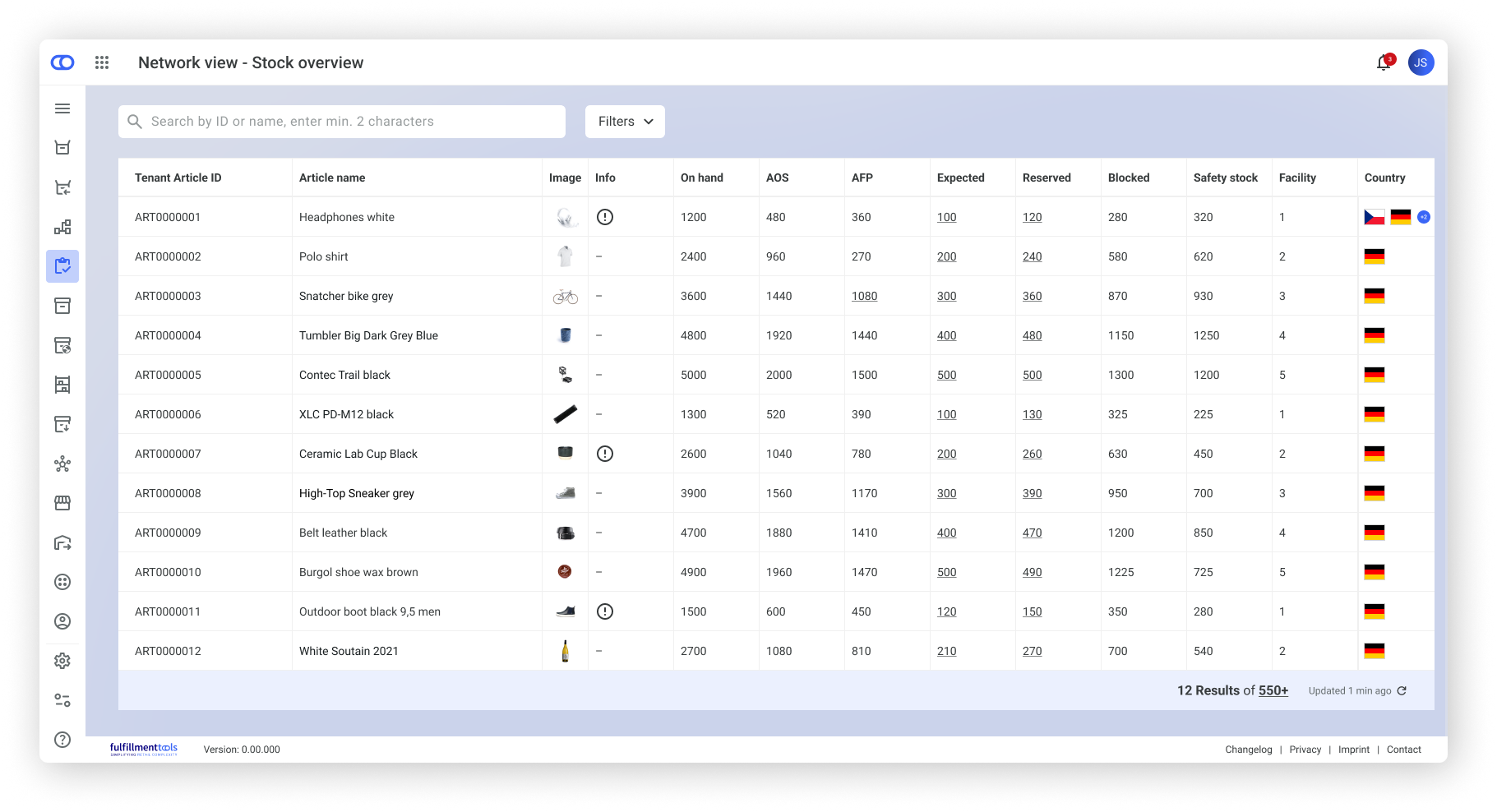
{% update date="2026-05-07" tags="backoffice,global-inventory-hub" %}
## Inventory update in Backoffice
The [Inventory detail view](/documentation/backoffice/network-view/inventory/stock-detail-view.md) in Backoffice has been redesigned to improve usability and expand operational capabilities. Key changes include:
* **Customizable modules and tables:** rearrange and show/hide sections to fit your workflow
* **Advanced filtering and sorting options:** narrow down inventory data more precisely
* **Editing of safety stock values:** directly adjustable from the detail page
* **Over-reservation warnings:** visual alerts when reservations exceed facility capacity
{% endupdate %}
{% update date="2026-04-29" tags="backoffice,beta" %}
## AI Sidekick for Backoffice released in Beta
The fulfillmenttools AI Sidekick is now available in Backoffice in Beta.
Our AI Sidekick provides clear, contextual guidance about using fulfillmenttools, reducing the need to search through documentation or contact support. Questions are turned into immediate, actionable insights, which helps speed up onboarding, improve efficiency, and make everyday tasks easier to understand.
The feature is primarily designed for administrators and operations‑focused users, but can be used by anyone working in Backoffice.
Access to the AI Sidekick is controlled via the `AI_ASSISTANT_ACCESS` permission and is available by default for standard [SUPERVISOR and ADMINISTRATOR roles](/documentation/backoffice/network-view/users-roles-and-permissions.md).
{% hint style="info" %}
The AI Sidekick currently answers questions based on documented knowledge only and doesn't have access to live Backoffice data such as orders or consumer information.
{% endhint %}
For more information, see [the AI Sidekick article](/documentation/backoffice/ai-sidekick.md).
{% endupdate %}
{% update date="2026-04-20" tags="backoffice,order-management" %}
## Preferred date editable via order edit
We've added the ability to add or edit the preferred date directly from the **Edit order** screen, accessible via the three‑dot menu on the [order details page](/documentation/backoffice/network-view/orders/order-details-view.md#order-modification-and-operational-actions).
This allows you to quickly adjust delivery or handover dates when plans change.
The feature is available when order modification is enabled and the required permissions are assigned.
For more information, see the [Order modification article](/documentation/by-pillar/order-management/order-modification.md).
{% endupdate %}
{% update date="2026-04-16" tags="backoffice,advanced-order-routing" %}
## Routing simulation in Backoffice
The routing simulation feature is now available. It enables the creation and evaluation of test orders directly in Backoffice.
Test orders are processed using the currently active routing strategy, and the resulting metrics provide insights into assignment quality, delivery performance, and cost implications. This allows administrators to validate routing behavior without affecting live operations.
For more information, see the [Routing simulation article](/documentation/backoffice/network-view/routing/routing-simulation.md).
{% endupdate %}
{% update date="2026-04-14" tags="store-operations,apps,beta" %}
## Store Operations app released to Beta
The whole new Store Operations app is now available in public beta. For now, this is for Android devices only.
With a new home screen, and improved picking, packing, and handover processes, our new app ensure a smooth operation.
This version is currently available as a [Beta release](/documentation/apps/mobile-app-availability.md) via the Google Play Store. To access it, you need to be enrolled in our beta program. If you'd like to participate, [contact us using our Support portal](https://ocfulfillment.atlassian.net/servicedesk/customer/portal/1/group/11/create/39) to request access.
For more information, see the [Store Operations app Beta articles](/documentation/apps/store-operations-app.md).
The planned release date for General Availability is 9 June 2026.
{% endupdate %}
{% update date="2026-04-09" tags="backoffice,store-operations" %}
## Tags available in facility settings
We've added the option to assign pre‑defined tags to facilities directly in the facility settings. This allows teams to better categorize and organize facilities based on operational needs. Tagging supports faster filtering, improved navigation, and clearer segmentation across different facility groups.
The facility table now displays all assigned tags, and a new tag filter makes it easier to narrow facility lists by specific tags.
For more information, see the [Facility settings in Backoffice article](/documentation/backoffice/network-view/facilities.md#facility-data).
{% endupdate %}
{% update date="2026-04-09" tags="backoffice" %}
## New KPIs available in the Network view
We've introduced new KPIs on the Backoffice Network view homepage. This shows you key performance indicators, such as a list of high‑performing facilities or the distribution of entered short‑pick reasons. These KPIs provide a more timely and focused overview of recent activity.
The visibility of these KPIs depends on two factors:
* The **permissions** assigned to the user
* The **availability of relevant data** on the tenant
This ensures that every user sees only KPIs that are meaningful and relevant to their role and data context.
For more details, see the [Available KPIs in the Backoffice](/documentation/backoffice/network-view.md#operation-overview) and [Permissions to view KPIs](/documentation/backoffice/network-view/users-roles-and-permissions/backoffice-permissions.md#view-kpis-on-network-view) articles.
{% endupdate %}
{% update date="2026-04-08" tags="order-management,backoffice" %}
## Free‑text search improved in the order view
We've changed the default settings in the Order view of Backoffice. Orders from the last 12 months are now shown.
We've also removed the automatic date filter when you use the search bar. This means that older orders are included right from the start.
We've changed the default sort order of the table so that older orders now appear first. To change the table to show the latest orders first, click the sorting arrow in the column header.
See the [Orders in Backoffice article](/documentation/backoffice/network-view/orders.md) for more information.
{% endupdate %}
{% update date="2026-03-27" tags="apis,global-inventory-hub" %}
## API lifecycle updates
We've updated the lifecycle status of several API endpoints as part of our continuous effort to increase stability and transparency.
The following endpoints have matured from Alpha to Beta and are now considered feature-complete with improved stability:
* `GET /api/externalstockchangereasons`
* `POST /api/externalstockchangereasons`
* `GET /api/externalstockchangereasons/{externalStockChangeReasonId}`
* `PUT /api/externalstockchangereasons/{externalStockChangeReasonId}`
* `GET /api/reservations`
* `GET /api/reservations/{reservationId}`
* `GET /api/stowjobs`
* `POST /api/stowjobs`
* `GET /api/stowjobs/{stowJobId}`
* `PATCH /api/stowjobs/{stowJobId}`
* `POST /api/stowjobs/{stowJobId}/actions`
The following endpoints have progressed from Beta to General Availability (GA). They're now fully supported for production use:
* `PUT /api/listings`
* `POST /api/inboundprocesses/{inboundProcessId}/receipts`
* `POST /api/inboundprocesses/search`
* `PUT /api/inboundprocesses/{inboundProcessId}/purchaseorder`
* `POST /api/listings/search`
* `POST /api/stocks/search`
* `POST /api/storagelocations/search`
* `POST /api/zones/search`
See the [API lifecycle article](/documentation/apis/api-versioning-and-lifecycle.md) or the [API reference section](/documentation/apis/api-reference.md) for more information.
{% endupdate %}
{% update date="2026-03-26" tags="apis,order-management" %}
## API lifecycle updates
We've updated the lifecycle status of several API endpoints as part of our continuous effort to increase stability and transparency.
The following endpoints have matured from Alpha to Beta and are now considered feature-complete with improved stability:
* `POST /api/orders/search`
* `POST /api/processes/search`
The following endpoints have progressed from Beta to General Availability (GA). They're now fully supported for production use:
* `GET /api/configurations/ordercancelation`
* `GET /api/configurations/tags/order`
* `GET /api/process`
* `GET /api/processes/{processId}`
* `POST /api/processes/{processId}/documents`
See the [API lifecycle article](/documentation/apis/api-versioning-and-lifecycle.md) or the [API reference section](/documentation/apis/api-reference.md) for more information.
{% endupdate %}
{% update date="2026-03-24" tags="store-operations,apps,beta" %}
## Picking released to Beta in the new Store Operations app
The new Store Operations app now includes a fully redesigned picking experience, available in public beta.
You're guided step-by-step through the picking process, no matter which method you use. This makes it easier to complete the picking process and ensures a smooth operation.
This version is currently available as a [Beta release](/documentation/apps/mobile-app-availability.md) via the Google Play Store. To access it, you need to be enrolled in our beta program. If you'd like to participate, [contact us using our Support portal](https://ocfulfillment.atlassian.net/servicedesk/customer/portal/1/group/11/create/39) to request access.
For more information, see the [Beta picking article](/documentation/apps/store-operations-app/picking.md).
{% endupdate %}
{% update date="2026-03-24" tags="backoffice,store-operations" %}
## **Notification center introduced in Backoffice**
Backoffice now includes a [**Notification center** in the top bar](/documentation/backoffice/network-view/notification-center.md), giving operational teams immediate visibility into critical order-, reservation-, and process-related issues.
This ensures faster reaction times, more consistent exception handling across tenants and facilities, and improved operational reliability across the entire fulfillment network.
The feature centralizes alerts from multiple system processes, such as routing issues, new pick jobs, or upcoming reroutes, and provides a unified entry point for monitoring and assessing operational health.
More technical information about notifications can be found in the [Notification Center article](/documentation/getting-started/eventing/notification-center.md).
{% endupdate %}
{% update date="2026-03-02" %}
## Documentation navigation change
We updated the navigation in our documentation, so all articles are now in a single section.
This reduces duplicate articles, removes short or redundant articles, improves search results, and introduces a new homepage.
This change results in many changes to article URLs. Redirects will be in place where possible, but this could result in dead links. Ensure you've updated any bookmarks you have.
{% endupdate %}
{% update date="2026-02-25" tags="backoffice" %}
## Custom roles in Backoffice
We've introduced a new **Roles** page in Backoffice. It allows you to create your own custom roles, either by starting with a [role template](/documentation/backoffice/network-view/users-roles-and-permissions.md#create-a-role-with-role-templates) or by [building a role from scratch](/documentation/backoffice/network-view/users-roles-and-permissions.md#create-a-role-with-the-customizer).
This update gives more flexibility and control over permission management in Backoffice. It supports clearer access structures and helps ensure that users only receive the permissions they need.
See the [Backoffice permissions](/documentation/backoffice/network-view/users-roles-and-permissions/backoffice-permissions.md) and [users, roles, and permissions articles](/documentation/backoffice/network-view/users-roles-and-permissions.md) for more information.
{% endupdate %}
{% update date="2026-02-11" tags="backoffice,order-management" %}
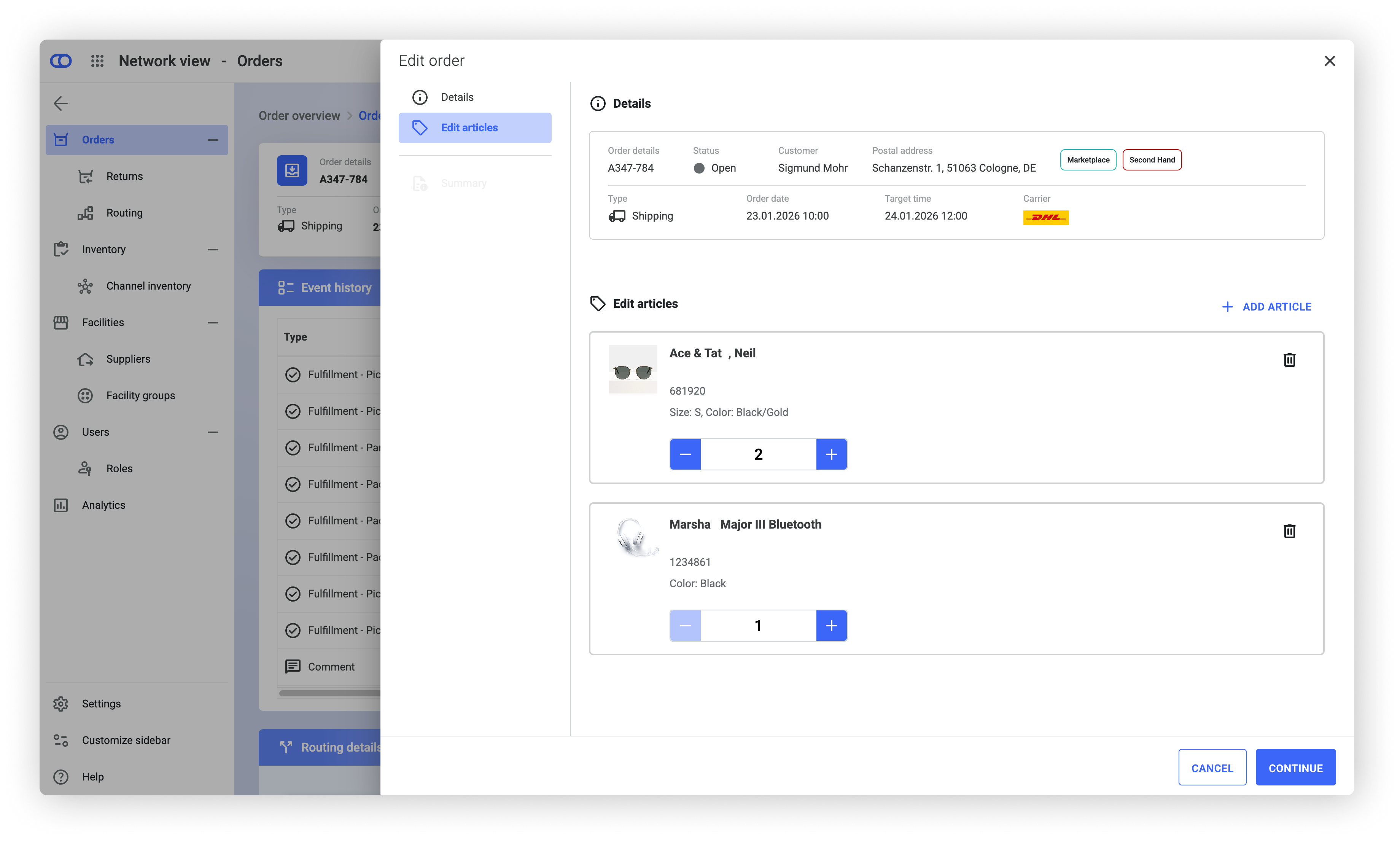
## Edit orders
We've introduced the ability to modify an order directly from the three‑dot menu in the **Order items** module of Backoffice.
You can now adjust quantities, cancel items, or add new items as long as operational processing has not yet started.
This update gives you more flexibility while managing orders.
Order modification must be enabled via the API and can be further controlled through role‑based permissions. Any change to the order currently triggers a reroute.
For more information, see the [orders detail view section of the documentation.](/documentation/backoffice/network-view/orders/order-details-view.md)
{% endupdate %}
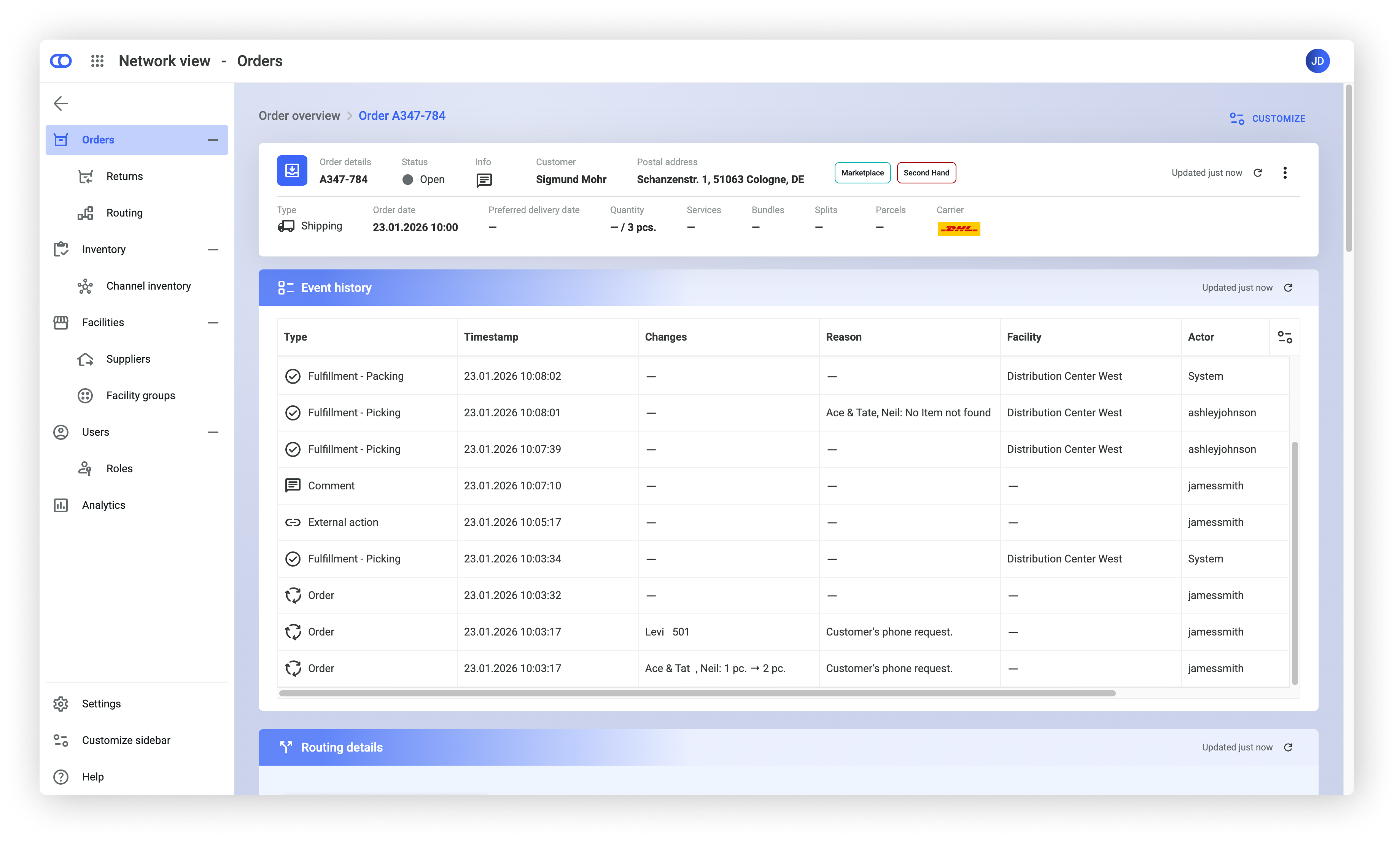
{% update date="2026-02-11" tags="backoffice" %}
## Event history
We've introduced a new module in the order details that provides a chronological timeline of all system events and operational actions throughout an order's lifecycle.
Each entry includes a timestamp, event type, and contextual details to help understand why the event occurred and how it impacted the order. This gives you more transparency in the order journey.
Where allowed by GDPR‑compliant actor anonymization, the triggering user is also shown. Access to this information depends on the role's assigned permissions. All event history data is also available via the [Process history log REST API](https://fulfillmenttools.github.io/fulfillmenttools-api-reference-ui/#get-/api/processes/-processId-/historylogs) for integration into external systems or reporting workflows.
For more information, see the [orders detail view section of the documentation](/documentation/by-pillar/order-management/orders.md).
{% endupdate %}
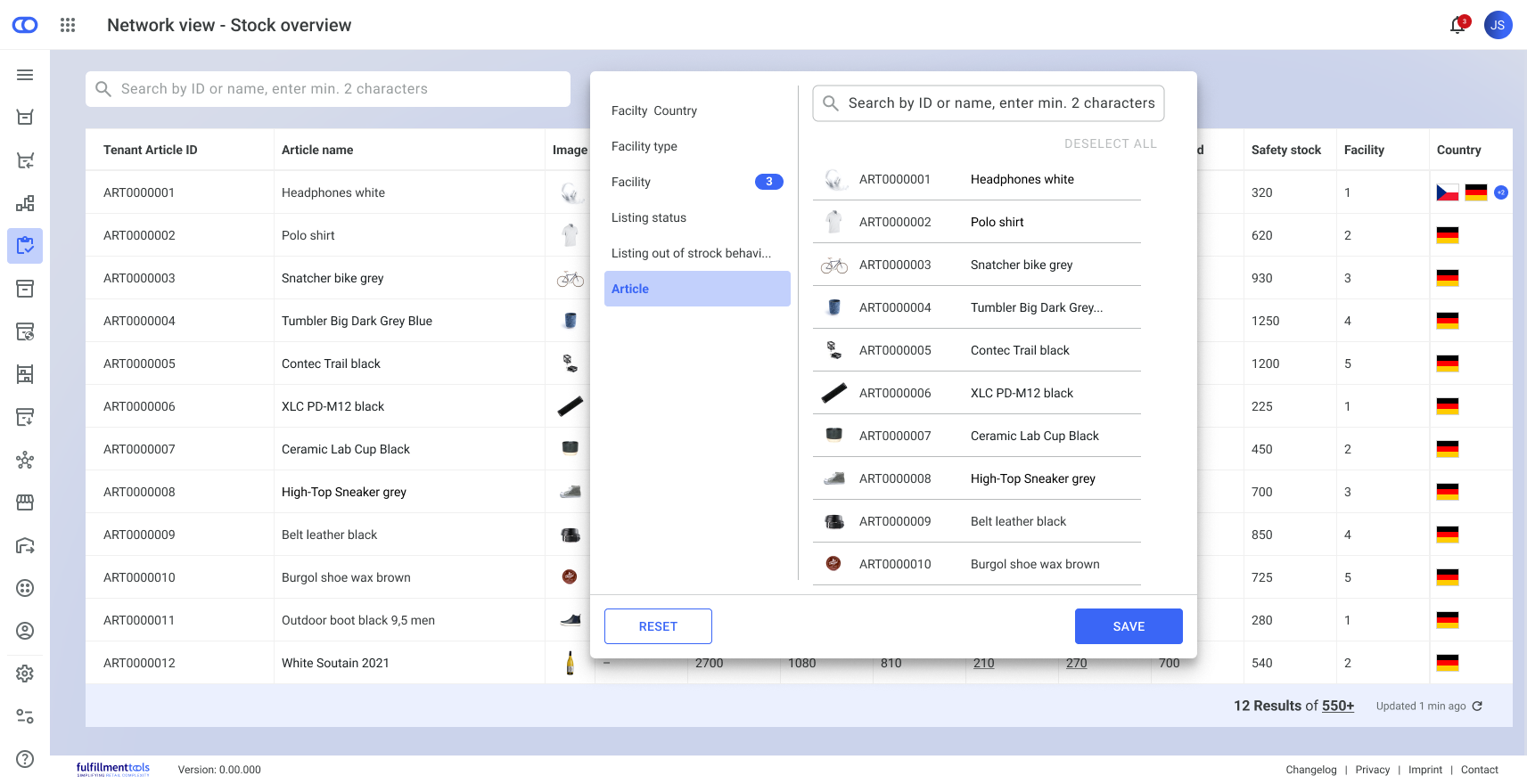
{% update date="2026-02-05" tags="backoffice" %}
## Unified filter button for tables
We've changed the way filters are displayed across all tables in Backoffice.
Instead of showing all available filters side by side under the search bar, each table now provides a single **Filter** button. On click, a dropdown allows you to select which filters to apply. Once filters are active, the button displays the number of applied filters.
This update reduces visual noise and frees up valuable horizontal space, allowing more table content to be displayed without sacrificing functionality.
{% endupdate %}
{% update date="2026-02-04" tags="backoffice" %}
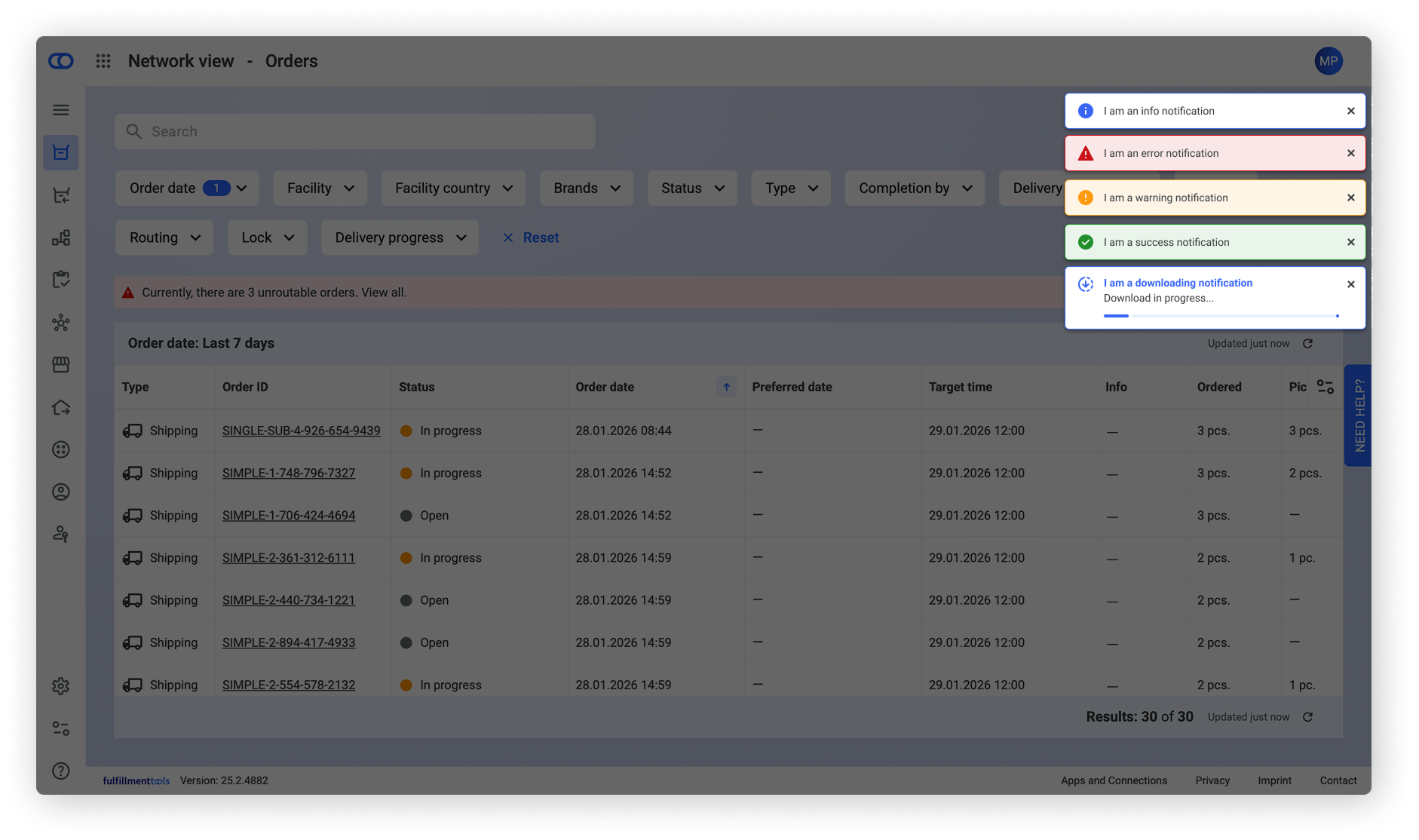
## New toast notification pattern
We've introduced a new toast-based notification pattern to replace the previous blocking notification style.
This update improves accessibility and ensures that essential UI elements remain usable while notifications are displayed.
Notifications now appear in the top‑right corner of the screen. Success and information notifications disappear automatically after 8 seconds, while warning and error notifications will remain visible until you manually close them.
For more information, see the [Backoffice section of the documentation](/documentation/backoffice/accessing-backoffice.md).
{% endupdate %}
{% update date="2026-02-04" tags="backoffice,advanced-order-routing" %}
## Routing details view
You can now access a dedicated routing details section in the order overview.
{% hint style="warning" %}
This view is only available when “complex routing with combinatorics” is enabled.
If you'd like to use these functionalities, [contact our Support team](https://ocfulfillment.atlassian.net/servicedesk/customer/portal/1/group/11/create/39) for more information and activation support.
{% endhint %}
This view shows the complete routing decision of an order, including facility assignments, transfers, carrier information, package calculations, timestamps, and the routing rules applied. It also displays the rating statistics used during the routing evaluation.
This gives you complete transparency into how the sourcing decision for an order was made. It also supports you in operational analysis and helps you troubleshoot problems more easily.
For more information, see the [orders detail view section of the documentation](/documentation/backoffice/network-view/orders/order-details-view.md).
{% endupdate %}
{% update date="2026-02-04" tags="apps,store-operations,beta" %}
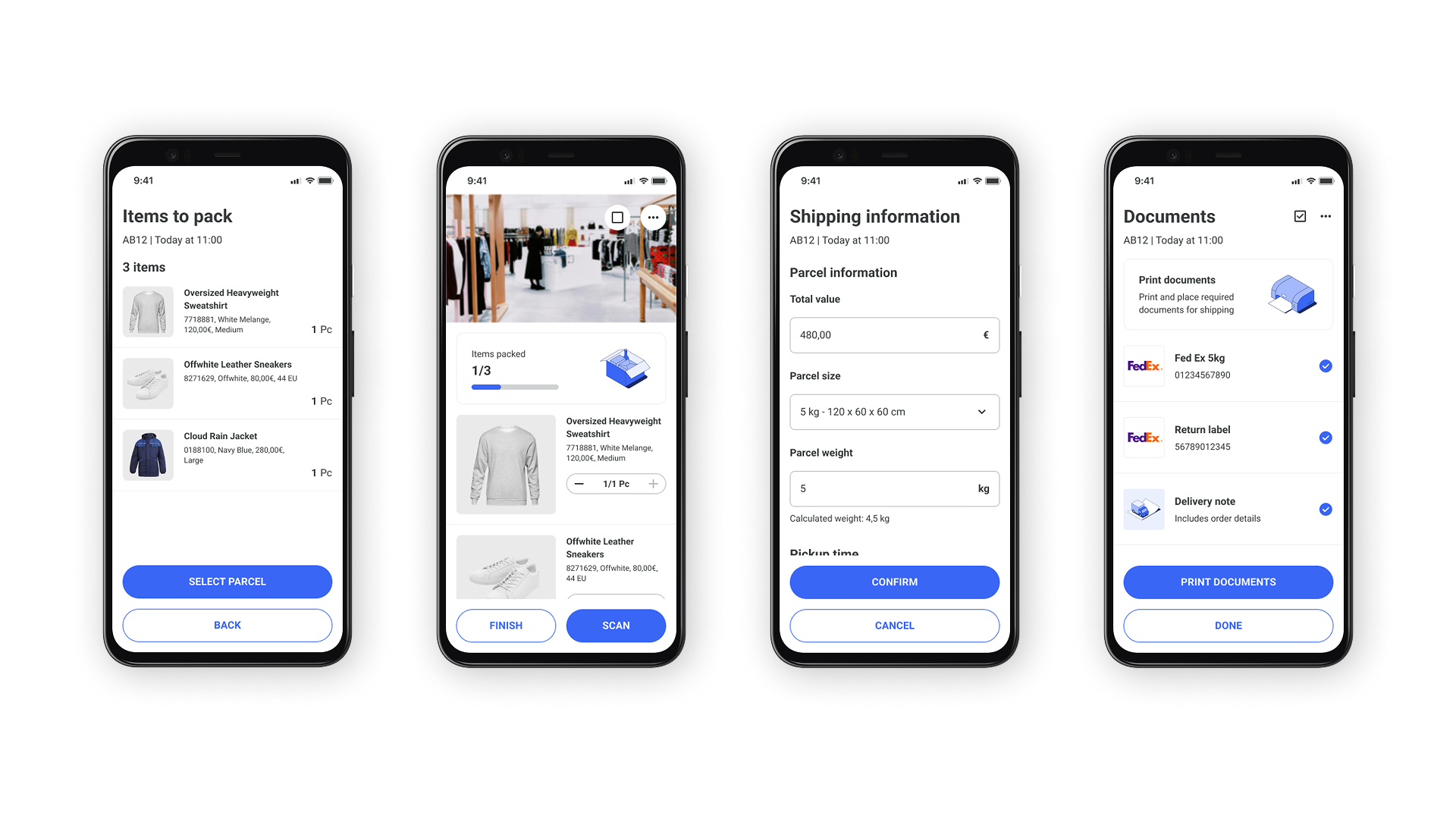
## Guided packing and printing Beta release
The packing process in the Operations app has been redesigned as a guided flow for packing items into one or multiple parcels.
You're guided step-by-step from starting the packing process to completing all required parcels, instead of working with an open list. This makes it easier to complete the packing process and ensures a smooth operation.
This version is currently available as a [Beta release](/documentation/apps/mobile-app-availability.md) via the Google Play Store. To access it, you need to be enrolled in our beta program. If you'd like to participate, [contact us using our Support portal](https://ocfulfillment.atlassian.net/servicedesk/customer/portal/1/group/11/create/39) to request access.
For more information, see the [Beta packing and printing article.](/documentation/apps/store-operations-app/beta-packing-and-printing-android-app.md)
{% endupdate %}
{% update date="2026-02-01" tags="backoffice,order-management" %}
## Orders view moved to GA
The Orders (Beta) Network view in Backoffice has been released to General Availability (GA). This means that the legacy Orders view has been removed from the navigation. You can still access it using the URL, but this will be turned off on 31 March 2026.
For more information, see the [Orders Backoffice documentation](/documentation/backoffice/network-view/orders.md).
{% endupdate %}
{% update date="2026-01-27" tags="apis,global-inventory-hub" %}
## Expected stock configuration
You can now automatically create expected stock during advanced order routing.
When activated, routing plans generate expected stock entries for incoming goods and reserve them immediately. As physical stock arrives, these reservations are transferred from expected to available stock.
This means incoming stock is made visible without using the inbound module.
The configuration is available at the network level through the [Stock Configuration REST API](https://fulfillmenttools.github.io/fulfillmenttools-api-reference-ui/#put-/api/configurations/stock).
{% endupdate %}
{% update date="2026-01-20" tags="apis,global-inventory-hub" %}
## Reserved stock configuration added
You can now define which event triggers the removal of reservations and their stock.
This means you can align with your individual operational workflows instead of relying on the default `PICK_JOB_CLOSED` event.
{% hint style="warning" %}
This configuration should be set during initial setup to avoid inconsistent reservation states.
{% endhint %}
See the [reserved stock configuration section of the Configurations article](/documentation/by-pillar/global-inventory-hub/configurations.md#reserved-stock-configuration) for more information.
{% endupdate %}
{% update date="2026-01-14" tags="apis,global-inventory-hub" %}
## Versionless stock updates
The `UPDATE_VERSIONLESS` action in the **stock actions** REST API enables versionless creation or update of stock quantities.
* Supports two operation types:
* `CREATE` – Creates a new stock record for a specific `tenantArticleId` and `facilityRef`.
* `UPDATE` – Updates an existing stock record identified by `id`.
{% hint style="info" %}
More information can be found under [REST API documentation - Stock Actions](https://fulfillmenttools.github.io/fulfillmenttools-api-reference-ui/#post-/api/stocks/actions).
{% endhint %}
{% endupdate %}
{% endupdates %}
---
# Agent Instructions
This documentation is published with GitBook. GitBook is the documentation platform designed so that both humans and AI agents can read, navigate, and reason over technical content effectively. Learn more at gitbook.com.
## Querying This Documentation
If you need additional information that is not directly available in this page, you can query the documentation by asking a question.
Perform an HTTP GET request on the following URL with the `ask` and `goal` query parameters:
```
GET https://docs.fulfillmenttools.com/documentation/about-fulfillmenttools/release-notes.md?ask=&goal=
```
`ask` is the immediate question: it should be specific, self-contained, and written in natural language.
`goal` is what the user is ultimately trying to achieve, the reason they need the answer. Sharing it helps GitBook give you a better, more relevant answer. A goal is most helpful when it describes the outcome the user wants rather than restating the question. For example, with `ask=how do I create an API token`, a goal like `automate deployments from our CI pipeline` lets GitBook tailor the answer to that use case.
The response will contain a direct answer to the question and relevant excerpts and sources from the documentation.
Use this mechanism when the answer is not explicitly present in the current page, you need clarification or additional context, or you want to retrieve related documentation sections.


.png?alt=media&token=80cd073f-02e7-4568-9986-5ecb54ebac34)


.png?alt=media&token=57d0dd70-71fb-45c6-8689-a1f4d6cd3eaa)