> For the complete documentation index, see [llms.txt](https://docs.fulfillmenttools.com/documentation/llms.txt). Markdown versions of documentation pages are available by appending `.md` to page URLs; this page is available as [Markdown](https://docs.fulfillmenttools.com/documentation/by-pillar/advanced-order-routing.md).
# Advanced Order Routing
Our Advanced Order Routing pillar ensures the optimal allocation of customer orders to fulfillment locations based on configurable rules. Already accepted orders can be managed manually or automatically based on customizable configurations.
Dynamic routing in fulfillmenttools finds the best option (facility) to fulfill an order. You can define multiple factors which should be considered when making the decision for the best fulfillment location.
The order routing can receive orders and order requests from any commerce channel and decides from where and how they can be fulfilled best, taking various flexible and configurable routing rules into account. If there is no fixed facility defined where the order has to be fulfilled, we will determine which facility is the best fit for fulfilling an order.
The system allows to define fences and ratings:
* [**Fences**](/documentation/by-pillar/advanced-order-routing/fences.md): Exclude facilities from order routing according to the fences selected
* [**Ratings**](/documentation/by-pillar/advanced-order-routing/ratings.md): Weigh facilities against each other according to the ratings selected
## Routing plan
The main entity of routing is the routing plan. It can be seen as a vehicle which informs and enables the systems downstream of DOMS in the fulfillment process (like picking) about the routing decision.
The routing plan contains all the information that was relevant for the orchestration of an order like ordered items or delivery preferences. Ultimately, the routing plan contains the result(s) of the routing decision.
{% hint style="info" %}
More information about the routing plans can be found in the [routing plans REST API documentation](https://fulfillmenttools.github.io/fulfillmenttools-api-reference-ui/#get-/api/routingplans).
{% endhint %}
### Difficulties while routing
It's possible that an order could not be routed, for example, because all available facilities do not pass a fence. In such a case, the order is retried whenever another order is passed to the DOMS. After a configurable amount of time, such an order is set to an "unroutable” state if it could not be routed to any facility beforehand. The default is set to 8 hours.
{% hint style="info" %}
More information on unroutable orders can be found in the [Unroutable orders article](/documentation/by-pillar/advanced-order-routing/unroutable-orders.md).
{% endhint %}
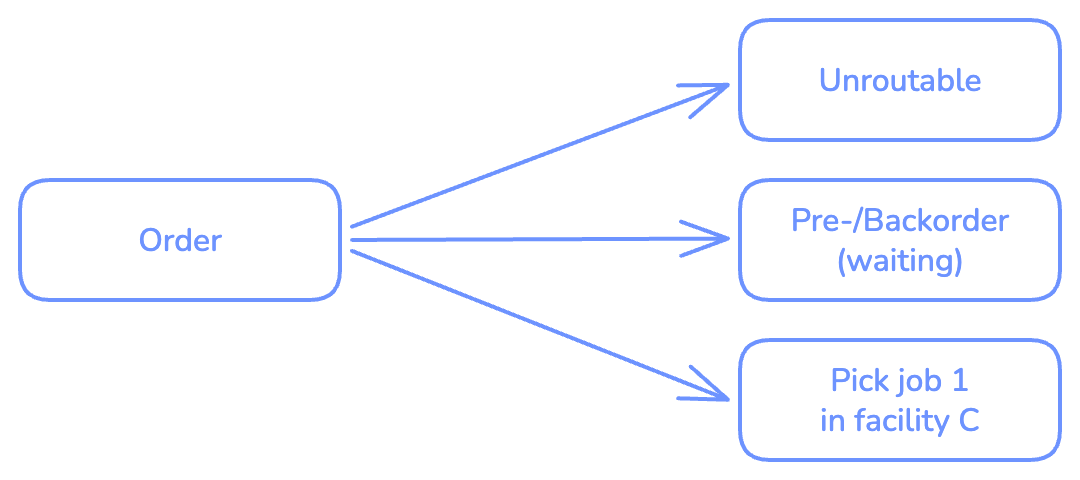
### Examples of routing decisions for an order
An order can be assigned directly to a facility:
An order can be split and assigned to multiple facilities:
An order can become unroutable:
An order might have to wait for routing:
An order can be routed but be locked to avoid direct fulfillment:
An order can have a mixture of the above decisions:
fulfillmenttools routes orders to the optimal facility for fulfillment using a combination of fences (mandatory criteria) and ratings (preference criteria) to determine the best facility.
Historically, routing was based on static rulesets. fulfillmenttools enables these rules to be dynamic, allowing the system to select the most suitable facility at the moment of routing.
## Fences
Fences function as filters, removing facilities that do not match defined criteria. For example, a tenant, LU.XY, wants to ensure that the service type requested in an order matches the service type offered by the facility. Additionally, they are connected to a marketplace that preselects which facilities LU.XY can use for fulfillment.
To handle this, the following fences must be enabled:
* Service type
* Preselected facilities
## Ratings
After the system applies fences, a subset of facilities remains. Without ratings, the system would randomly assign a pick job to one of the eligible facilities. Ratings allow the system to score each remaining facility to determine the best option for a given pick job.
In the LU.XY example, the business prefers the facility that is closest to the customer and offers the fastest delivery. Since employee performance is measured by Key Performance Indicators (KPIs), the workload should also be balanced across facilities. Furthermore, stores are categorized as "A stores" and "B stores." A stores have high foot traffic from walk-in customers, so online orders should be preferentially routed to B stores.
To achieve this, the following ratings are applied:
* Geodistance
* Workload balancing
* A custom rating based on facility tags
The details of these ratings are explained below. To maximize fulfillment potential, order splitting is also activated in the routing ruleset.
## Apply the standard routing rules
{% hint style="info" %}
For more details, see the [Routing strategies API documentation](/documentation/apis/api-reference/routing-strategy-doms.md).
{% endhint %}
To begin configuring routing options, first retrieve the current ruleset with a `GET` request.
```http
GET https://{YOUR-TENANT-NAME}.api.fulfillmenttools.com/api/routing/strategies
```
200 OK response
```json
{
"version": 13,
"created": "2023-07-10T12:55:06.393Z",
"globalRoutingConfiguration": {
"defaultPrice": 10
},
"lastModified": "2024-01-30T10:05:20.077Z",
"prioritizationRules": [],
"routingRule": {
"fences": [
{
"implementation": "FACILITY-BUSINESSTYPE",
"active": false,
"id": "07573113-10b1-44d9-b9ea-28c343684a32",
"name": "Service type",
"supportedModes": [
"static"
],
"activeMode": "static",
"description": "Facilities that do not support the service type required by an order are not taken into consideration when performing an order routing."
},
{
"implementation": "STOCK-AVAILABILITY",
"active": false,
"id": "d98effb6-cf9f-4aeb-889f-9b1e876463ac",
"name": "Complete stock",
"supportedModes": [
"static",
"reactive"
],
"activeMode": "static",
"description": "Facilities that do not have all ordered items in stock are not taken into consideration when performing an order routing."
},
{
"implementation": "FACILITY-CARRIERAVAILABILITY",
"active": false,
"id": "5e0d9990-331f-407c-9b50-d6ba73e2bdc0",
"name": "Carrier availability",
"supportedModes": [
"static"
],
"activeMode": "static",
"description": "Facilities that do not support a specific carrier which has been requested by a customer are not taken into consideration when performing an order routing."
},
{
"implementation": "FACILITY-COUNTRY",
"active": false,
"id": "8a23fd25-9023-45bf-8aab-3c56c24ba2e5",
"name": "Country borders",
"supportedModes": [
"static"
],
"activeMode": "static",
"description": "Cross-country routing is prevented."
},
{
"implementation": "FACILITY-PICKING-TIME-CAPACITY",
"active": false,
"id": "33c5ff6d-a0a1-4b91-be2c-a49c72d0d196",
"name": "Facility capacity",
"supportedModes": [
"static"
],
"activeMode": "static",
"description": "Facilities, for which the maximum amount of orders that can be fulfilled has been exceeded are not taken into consideration when performing an order routing."
},
{
"implementation": "PRESELECTED-FACILITY",
"active": true,
"id": "a68c4f4e-dd31-4eb2-917b-d21f18150008",
"name": "Preselected facilities",
"supportedModes": [
"static"
],
"activeMode": "static",
"description": "Facilities that are not specified in a predefined list are not taken into consideration when performing an order routing."
},
{
"implementation": "SAMEDAY-POSSIBLE",
"active": false,
"id": "204899bb-1247-45c2-a26f-aae4761b7ec5",
"name": "Same Day delivery possible",
"supportedModes": [
"static"
],
"activeMode": "static",
"description": "Facilities that cannot ensure a same day delivery are not taken into consideration when performing an order routing."
}
],
"ratings": [
{
"implementation": "STOCK-BALANCING",
"active": false,
"id": "de855bab-b318-4815-8a71-a26658ebd4e9",
"name": "Stock balancing",
"maxPenalty": 0,
"description": "Facilities that have high stock levels of the ordered items are favored by this rating."
},
{
"implementation": "GEO-DISTANCE",
"active": false,
"id": "07bceadb-95ed-49f0-aa3c-73816ba17fc4",
"name": "Geodistance",
"maxPenalty": 0,
"description": "Facilities that are nearby a consumer are favored by this rating."
},
{
"implementation": "TURNOVER",
"active": false,
"id": "bd9d5cb8-2d2b-4698-b7f2-7e2b67fe5c8e",
"name": "Maximizing turnover",
"maxPenalty": 0,
"description": "Facilities that generate the highest turnover based on what the customer has ordered are favored by this rating."
},
{
"implementation": "STOCK-AVAILABILITY",
"active": false,
"id": "a7eed71c-ee15-4f04-8d99-74cab2c31de8",
"name": "Stock availability",
"maxPenalty": 0,
"description": "Facilities that have the highest amount of items in stock that are ordered by a customer are favored by this rating."
},
{
"implementation": "WORKLOAD-BALANCING",
"active": false,
"id": "296b8469-2e54-440a-a793-c38514755394",
"name": "Workload balancing",
"maxPenalty": 0,
"description": "Facilities that have a low workload while performing a routing decision are favored by this rating."
},
{
"implementation": "MATCHING-BUSINESSTYPE",
"active": false,
"id": "c2207eb3-5cf5-491c-b4bd-d148d5e9b97b",
"name": "Matching service type",
"maxPenalty": 0,
"description": "Facilities that have the same service type as requested in the order are favored by this rating."
},
{
"implementation": "PREFER-STORE",
"active": false,
"id": "68f870f0-f379-466f-83d5-6ee565bf6506",
"name": "Prefer stores",
"maxPenalty": 0,
"description": "Facilities that have the facility type store are favored by this rating."
},
{
"implementation": "PREFER-WAREHOUSE",
"active": false,
"id": "ba888667-b678-4af4-bcad-eee92c92bea7",
"name": "Prefer warehouses",
"maxPenalty": 0,
"description": "Facilities that have the facility type warehouse are favored by this rating."
},
{
"implementation": "ZONE",
"active": false,
"id": "34975c54-7ee2-41cd-b0ce-e15d0fa2b2dc",
"name": "Stocks in preferred zone",
"maxPenalty": 0,
"description": "Facilities where the ordered inventory is located in a preferred zone are given priority in routing."
},
{
"implementation": "EXPIRY-DATE",
"active": false,
"id": "1d908d52-b1ac-42ba-a81b-23e66396f6f4",
"name": "Expiration/Best-before date",
"maxPenalty": 0,
"description": "Facilities where demanded inventory has a shorter expiration date are given priority in routing. Markdowns are reduced as a result."
},
{
"implementation": "CAPACITY",
"active": false,
"id": "8fa06ea4-eb88-473b-89bc-84c0382e97d0",
"name": "Capacity",
"maxPenalty": 0,
"description": "Facilities where capacity for fulfillment is available in a timely manner are given priority in routing."
},
{
"implementation": "DELIVERY-COSTS",
"active": false,
"id": "b134593a-6e90-4214-ad17-66014186b2ce",
"name": "Lowest delivery fee",
"maxPenalty": 0,
"description": "TODO"
},
{
"implementation": "DELIVERY-TIME",
"active": false,
"id": "22c92c9c-2766-41e7-a2df-f6299022bb9a",
"name": "Fastest delivery speed",
"maxPenalty": 0,
"description": "TODO"
}
],
"orderSplit": {
"active": false,
"orderSplitType": "FIXED_COUNT"
}
}
}
```
* `globalRoutingConfiguration.defaultPrice`: This value is used for the `Maximizing turnover` rating. It should be a standard value for the industry (e.g., 100 EUR for fashion, 500 EUR for electronics).
* `prioritizationRules`: This is a legacy field that is no longer used.
* `routingRule.fences`: This array lists all available standard `fences`. To activate a fence, use the properties `id`, `active` and `activeMode`.
* `routingRule.ratings`: This array lists all standard `ratings`. The `maxPenalty` property defines the weight of each rating in the routing decision. A higher `maxPenalty` gives the rating more importance. While the Backoffice UI limits this value to a range of 1 to 10, the API allows higher values.
* `orderSplit`: This object controls whether order splitting is active.
For this use case, activate `orderSplit` and the required fences. The `ratings` will be weighted as follows:
* `GEO-DISTANCE`: 1
* `WORKLOAD-BALANCING`: 4
Apply the desired rules by sending a `PATCH` request to the routing configuration endpoint.
PATCH https://{YOUR-TENANT-NAME}.api.fulfillmenttools.com/api/configurations/routing
```json
{
"version": 13,
"actions": [
{
"action": "ModifyOrderSplit",
"active": true
},
{
"action": "ModifyFence",
"id": "07573113-10b1-44d9-b9ea-28c343684a32",
"active": true,
"activeMode": "static"
},
{
"action": "ModifyFence",
"id": "a68c4f4e-dd31-4eb2-917b-d21f18150008",
"active": true,
"activeMode": "static"
},
{
"action": "ModifyRating",
"id": "07bceadb-95ed-49f0-aa3c-73816ba17fc4",
"maxPenalty": 1
},
{
"action": "ModifyRating",
"id": "296b8469-2e54-440a-a793-c38514755394",
"maxPenalty": 4
}
]
}
```
200 OK response
```json
{
"id": "routing",
"version": 14,
"created": "2023-07-10T12:55:06.393Z",
"globalRoutingConfiguration": {
"defaultPrice": 10
},
"lastModified": "2024-01-31T12:48:35.274Z",
"prioritizationRules": [],
"routingRule": {
"fences": [
{
"implementation": "FACILITY-BUSINESSTYPE",
"active": true,
"id": "07573113-10b1-44d9-b9ea-28c343684a32",
"name": "Service type",
"supportedModes": [
"static"
],
"activeMode": "static",
"description": "Facilities that do not support the service type required by an order are not taken into consideration when performing an order routing."
},
{
"implementation": "STOCK-AVAILABILITY",
"active": false,
"id": "d98effb6-cf9f-4aeb-889f-9b1e876463ac",
"name": "Complete stock",
"supportedModes": [
"static",
"reactive"
],
"activeMode": "static",
"description": "Facilities that do not have all ordered items in stock are not taken into consideration when performing an order routing."
},
{
"implementation": "FACILITY-CARRIERAVAILABILITY",
"active": false,
"id": "5e0d9990-331f-407c-9b50-d6ba73e2bdc0",
"name": "Carrier availability",
"supportedModes": [
"static"
],
"activeMode": "static",
"description": "Facilities that do not support a specific carrier which has been requested by a customer are not taken into consideration when performing an order routing."
},
{
"implementation": "FACILITY-COUNTRY",
"active": false,
"id": "8a23fd25-9023-45bf-8aab-3c56c24ba2e5",
"name": "Country borders",
"supportedModes": [
"static"
],
"activeMode": "static",
"description": "Cross-country routing is prevented."
},
{
"implementation": "FACILITY-PICKING-TIME-CAPACITY",
"active": false,
"id": "33c5ff6d-a0a1-4b91-be2c-a49c72d0d196",
"name": "Facility capacity",
"supportedModes": [
"static"
],
"activeMode": "static",
"description": "Facilities, for which the maximum amount of orders that can be fulfilled has been exceeded are not taken into consideration when performing an order routing."
},
{
"implementation": "PRESELECTED-FACILITY",
"active": true,
"id": "a68c4f4e-dd31-4eb2-917b-d21f18150008",
"name": "Preselected facilities",
"supportedModes": [
"static"
],
"activeMode": "static",
"description": "Facilities that are not specified in a predefined list are not taken into consideration when performing an order routing."
},
{
"implementation": "SAMEDAY-POSSIBLE",
"active": false,
"id": "204899bb-1247-45c2-a26f-aae4761b7ec5",
"name": "Same Day delivery possible",
"supportedModes": [
"static"
],
"activeMode": "static",
"description": "Facilities that cannot ensure a same day delivery are not taken into consideration when performing an order routing."
}
],
"ratings": [
{
"implementation": "STOCK-BALANCING",
"active": false,
"id": "de855bab-b318-4815-8a71-a26658ebd4e9",
"name": "Stock balancing",
"maxPenalty": 0,
"description": "Facilities that have high stock levels of the ordered items are favored by this rating."
},
{
"implementation": "GEO-DISTANCE",
"active": false,
"id": "07bceadb-95ed-49f0-aa3c-73816ba17fc4",
"name": "Geodistance",
"maxPenalty": 1,
"description": "Facilities that are nearby a consumer are favored by this rating."
},
{
"implementation": "TURNOVER",
"active": false,
"id": "bd9d5cb8-2d2b-4698-b7f2-7e2b67fe5c8e",
"name": "Maximizing turnover",
"maxPenalty": 0,
"description": "Facilities that generate the highest turnover based on what the customer has ordered are favored by this rating."
},
{
"implementation": "STOCK-AVAILABILITY",
"active": false,
"id": "a7eed71c-ee15-4f04-8d99-74cab2c31de8",
"name": "Stock availability",
"maxPenalty": 0,
"description": "Facilities that have the highest amount of items in stock that are ordered by a customer are favored by this rating."
},
{
"implementation": "WORKLOAD-BALANCING",
"active": false,
"id": "296b8469-2e54-440a-a793-c38514755394",
"name": "Workload balancing",
"maxPenalty": 4,
"description": "Facilities that have a low workload while performing a routing decision are favored by this rating."
},
{
"implementation": "MATCHING-BUSINESSTYPE",
"active": false,
"id": "c2207eb3-5cf5-491c-b4bd-d148d5e9b97b",
"name": "Matching service type",
"maxPenalty": 0,
"description": "Facilities that have the same service type as requested in the order are favored by this rating."
},
{
"implementation": "PREFER-STORE",
"active": false,
"id": "68f870f0-f379-466f-83d5-6ee565bf6506",
"name": "Prefer stores",
"maxPenalty": 0,
"description": "Facilities that have the facility type store are favored by this rating."
},
{
"implementation": "PREFER-WAREHOUSE",
"active": false,
"id": "ba888667-b678-4af4-bcad-eee92c92bea7",
"name": "Prefer warehouses",
"maxPenalty": 0,
"description": "Facilities that have the facility type warehouse are favored by this rating."
},
{
"implementation": "ZONE",
"active": false,
"id": "34975c54-7ee2-41cd-b0ce-e15d0fa2b2dc",
"name": "Stocks in preferred zone",
"maxPenalty": 0,
"description": "Facilities where the ordered inventory is located in a preferred zone are given priority in routing."
},
{
"implementation": "EXPIRY-DATE",
"active": false,
"id": "1d908d52-b1ac-42ba-a81b-23e66396f6f4",
"name": "Expiration/Best-before date",
"maxPenalty": 0,
"description": "Facilities where demanded inventory has a shorter expiration date are given priority in routing. Markdowns are reduced as a result."
},
{
"implementation": "CAPACITY",
"active": false,
"id": "8fa06ea4-eb88-473b-89bc-84c0382e97d0",
"name": "Capacity",
"maxPenalty": 0,
"description": "Facilities where capacity for fulfillment is available in a timely manner are given priority in routing."
},
{
"implementation": "DELIVERY-COSTS",
"active": false,
"id": "b134593a-6e90-4214-ad17-66014186b2ce",
"name": "Lowest delivery fee",
"maxPenalty": 0,
"description": "TODO"
},
{
"implementation": "DELIVERY-TIME",
"active": false,
"id": "22c92c9c-2766-41e7-a2df-f6299022bb9a",
"name": "Fastest delivery speed",
"maxPenalty": 0,
"description": "TODO"
}
],
"orderSplit": {
"active": true,
"orderSplitType": "FIXED_COUNT",
"activeForSameDay": false,
"fixedCountConfiguration": {
"maxSplitCount": 1
}
}
}
}
```
## Set facility rating
The facility rating is implemented using a `tag`. First, a tag definition must be created before it can be assigned to a facility.
{% hint style="info" %}
For more details, see the [Tags API documentation](https://fulfillmenttools.github.io/fulfillmenttools-api-reference-ui/#get-/api/tags).
{% endhint %}
POST https://{YOUR-TENANT-NAME}.api.fulfillmenttools.com/api/tags
```json
{
"id": "facilityRating",
"allowedValues": [
"A",
"B"
]
}
```
201 CREATED response
```json
{
"id": "facilityRating",
"allowedValues": [
"A",
"B"
],
"version": 1,
"created": "2024-01-30T14:58:24.468Z",
"lastModified": "2024-01-30T14:58:24.468Z"
}
```
Next, assign this tag to a facility using a `PATCH` request to the facility endpoint.
PATCH https://{YOUR-TENANT-NAME}.api.fulfillmenttools.com/api/facilities/{FACILITY-ID}
```json
{
"version": 3,
"actions": [
{
"action": "ModifyFacility",
"tags": [
{
"id": "facilityRating",
"value": "B"
}
]
}
]
}
```
The API responds with `200 OK` and the complete facility object.
200 OK response
```json
{
"name": "LU.XY Fashion flagship store",
"address": {
"companyName": "lu.xy fashion GmbH",
"country": "DE",
"postalCode": "60316",
"city": "Frankfurt",
"street": "Sandweg",
"houseNumber": "61",
"phoneNumbers": [
{
"value": "+49 69 580775",
"type": "PHONE",
"label": "Landline"
}
],
"emailAddresses": [
{
"value": "lu.xy.flagship.FRA1@example.com",
"recipient": "LU.XY Frankfurt 1"
}
],
"resolvedCoordinates": {
"lon": 8.69702981904918,
"lat": 50.1203720202354
},
"resolvedTimeZone": {
"offsetInSeconds": 3600,
"timeZoneId": "Europe/Berlin",
"timeZoneName": "W. Europe Standard Time"
}
},
"locationType": "STORE",
"tenantFacilityId": "1",
"status": "ONLINE",
"services": [
{
"type": "SHIP_FROM_STORE"
},
{
"type": "PICKUP"
}
],
"pickingTimes": {
"monday": [
{
"start": {
"hour": 8,
"minute": 0
},
"end": {
"hour": 17,
"minute": 0
},
"capacity": 20
}
],
"tuesday": [
{
"start": {
"hour": 8,
"minute": 0
},
"end": {
"hour": 17,
"minute": 0
},
"capacity": 20
}
],
"wednesday": [
{
"start": {
"hour": 8,
"minute": 0
},
"end": {
"hour": 17,
"minute": 0
},
"capacity": 20
}
],
"thursday": [
{
"start": {
"hour": 8,
"minute": 0
},
"end": {
"hour": 17,
"minute": 0
},
"capacity": 20
}
],
"friday": [
{
"start": {
"hour": 8,
"minute": 0
},
"end": {
"hour": 17,
"minute": 0
},
"capacity": 15
}
],
"saturday": [
{
"start": {
"hour": 8,
"minute": 0
},
"end": {
"hour": 17,
"minute": 0
},
"capacity": 10
}
]
},
"fulfillmentProcessBuffer": 240,
"capacityEnabled": false,
"pickingMethods": null,
"created": "2023-11-14T15:26:43.165Z",
"lastModified": "2024-01-30T15:06:30.562Z",
"version": 4,
"id": "d286e108-698b-4f6c-97b7-21f090f17e46",
"tags": [
{
"id": "facilityRating",
"value": "B"
}
]
}
```
## Configuring custom routing rules
If the standard routing configurations do not meet specific business needs, you can create custom routing rules. For the LU.XY use case, a custom rating is needed to prefer certain facilities.
Custom routing rules compare attributes between two entities, such as an `order`, a `facility`, or a `carrierconnection`. A typical rule compares an attribute on the `order` with an attribute on the `facility`.
In this example, the goal is to create a rating that applies to all orders and prefers facilities tagged as "B-stores".
* The `order` side of the rule will check for a property that is always present, such as the `order.id`, to ensure it applies universally.
* The `facility` side of the rule will check if the `facilityRating` tag has a value of `B`.
A `maxPenalty` of 40 is recommended to give this rating a high weight.
{% hint style="info" %}
For more details, see the [Routing strategy API documentation](/documentation/apis/api-reference/routing-strategy-doms.md).
{% endhint %}
POST https://{YOUR-TENANT-NAME}.api.fulfillmenttools.com/api/configurations/routing/toolkit/ratings
```json
{
"entity1": "ORDER",
"entity2": "FACILITY",
"active": true,
"name": "Prefer B Stores",
"nameLocalized": {
"de_DE": "Bevorzuge B-Filialen",
"en_UK": "Prefer B-Stores"
},
"description": "Prefer B Stores for all orders",
"rule": {
"operator": "EQUALS",
"leftPart": {
"predicates": [
{
"entityOperator": "VALUE_NOT_EQUALS",
"expectedValue": " ",
"propertyPath": "$.id"
}
]
},
"rightPart": {
"predicates": [
{
"entityOperator": "EVERY_VALUE_EQUALS",
"expectedValue": "B",
"propertyPath": "$.tags[?(@.id === \"facilityRating\")].value"
}
]
}
},
"maxPenalty": 10
}
```
201 CREATED response
```json
{
"entity1": "ORDER",
"entity2": "FACILITY",
"active": true,
"name": "Prefer B Stores",
"nameLocalized": {
"de_DE": "Bevorzuge B-Filialen",
"en_UK": "Prefer B-Stores"
},
"description": "Prefer B Stores for all orders",
"rule": {
"operator": "EQUALS",
"leftPart": {
"predicates": [
{
"entityOperator": "VALUE_NOT_EQUALS",
"expectedValue": " ",
"propertyPath": "$.id"
}
],
"predicateConnector": "AND"
},
"rightPart": {
"predicates": [
{
"entityOperator": "EVERY_VALUE_EQUALS",
"expectedValue": "B",
"propertyPath": "$.tags[?(@.id === \"facilityRating\")].value"
}
],
"predicateConnector": "AND"
}
},
"maxPenalty": 10,
"created": "2024-01-31T14:18:52.255Z",
"lastModified": "2024-01-31T14:18:52.255Z",
"version": 1,
"id": "c1104460-4bd2-4082-b4b1-53d1b2787171"
}
```
Additional rules can be created for other store ratings (e.g., A stores, B stores, C stores). A separate API call is required for each custom rule.
{% hint style="info" %}
Our Advanced Order Routing is a powerful and complex feature. For further assistance with advanced routing configurations, contact our Support team.
{% endhint %}
---
# Agent Instructions
This documentation is published with GitBook. GitBook is the documentation platform designed so that both humans and AI agents can read, navigate, and reason over technical content effectively. Learn more at gitbook.com.
## Querying This Documentation
If you need additional information that is not directly available in this page, you can query the documentation by asking a question.
Perform an HTTP GET request on the following URL with the `ask` and `goal` query parameters:
```
GET https://docs.fulfillmenttools.com/documentation/by-pillar/advanced-order-routing.md?ask=&goal=
```
`ask` is the immediate question: it should be specific, self-contained, and written in natural language.
`goal` is what the user is ultimately trying to achieve, the reason they need the answer. Sharing it helps GitBook give you a better, more relevant answer. A goal is most helpful when it describes the outcome the user wants rather than restating the question. For example, with `ask=how do I create an API token`, a goal like `automate deployments from our CI pipeline` lets GitBook tailor the answer to that use case.
The response will contain a direct answer to the question and relevant excerpts and sources from the documentation.
Use this mechanism when the answer is not explicitly present in the current page, you need clarification or additional context, or you want to retrieve related documentation sections.