> For the complete documentation index, see [llms.txt](https://docs.fulfillmenttools.com/documentation/llms.txt). Markdown versions of documentation pages are available by appending `.md` to page URLs; this page is available as [Markdown](https://docs.fulfillmenttools.com/documentation/getting-started/eventing/event-export.md).
# Event export
The system logs all [fulfillmenttools events](/documentation/getting-started/eventing/available-events.md) and makes them available in a daily export. The daily event files are saved in a [Google Cloud Storage](https://cloud.google.com/storage/docs) bucket, enabling users to leverage data from their fulfillment process for additional processing and analytics.
{% hint style="info" %}
Event export functionality isn't activated by default. Use the [contact form](https://ocfulfillment.atlassian.net/servicedesk/customer/portal/1/group/11/create/39) to ask us to enable it for you.
{% endhint %}
## Accessing the bucket
[Google offers multiple client libraries](https://cloud.google.com/storage/docs/reference/libraries) for accessing Google Cloud Storage buckets, and you can also use the [Google Cloud Storage API](https://cloud.google.com/storage/docs/apis) directly. Another alternative is to use the [gcloud CLI](https://cloud.google.com/sdk/docs/install) from the Google Cloud SDK.
Accessing the bucket requires a [Google service account](https://cloud.google.com/docs/authentication#service-accounts). Upon request, fulfillmenttools provides a service account key for authentication. This service account grants access only to this specific bucket. It can't be used to access the fulfillmenttools API or its client applications.
The service account key will be a file named `{YOUR_TENANT_NAME}-{KEY_ID}.json`. This file contains a JSON representation of the service account.
{% hint style="info" %}
This file contains the service account key and allows access to the bucket, so make sure to store it securely. See the [official Google documentation](https://cloud.google.com/iam/docs/best-practices-for-managing-service-account-keys?_ga=2.192306863.-481233758.1659361152) for further information.
{% endhint %}
## File and folder structure
The bucket is named `{YOUR_TENANT_NAME}-{TIER}-public-events-export-bucket` and is only accessible by authorized accounts.
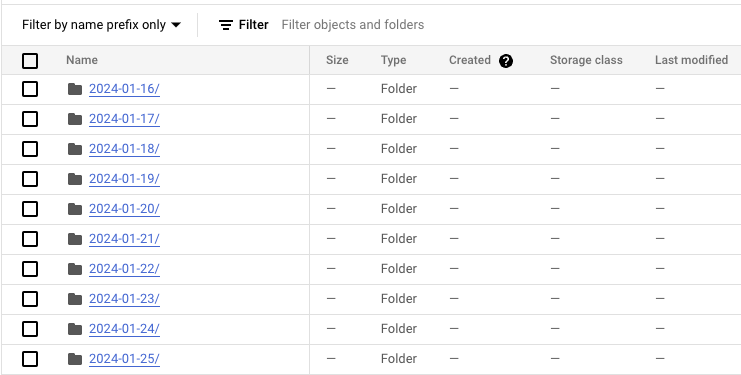
For each day, the system creates a folder in the bucket with the pattern `YYYY-MM-DD` that contains the events for that day.
Bucket folder structure
Each folder contains one or more gzipped files. Each of these files contains multiple lines, each corresponding to an event in fulfillmenttools.
Files inside folder
Each line of a file is a JSON object containing metadata fields (`id`, `eventName`, `created`) and the event `payload`.
```json
{
"id": "b0a0e08e-d7d0-4694-ad6c-bbf47b3fc1c6",
"eventName": "order-created_event-v1",
"payload": {
... // Event
},
"created": "2024-02-01T09:20:39.411067+00:00"
}
```
## Retention
The system stores data in the buckets for 90 days. After this period, the data is automatically deleted.
## gcloud CLI example
The following example demonstrates how to copy files from a Google Cloud Storage bucket using the [Google Cloud CLI.](https://docs.cloud.google.com/sdk/docs/initializing)
{% hint style="info" %}
Check the official [Google documentation about gsutil](https://cloud.google.com/storage/docs/gsutil) for further details.
{% endhint %}
### Activate the service account
The service account email ID is located in the `client_email` field of the provided key file. Use this ID to activate the service account:
```sh
$ gcloud auth activate-service-account {SERVICE_ACCOUNT_EMAIL_ID} --key-file={PATH_TO_KEY_FILE}
```
The command `gcloud auth list` lists all credentialed accounts and shows the active one. The `gcloud config list` command can be used to check the current configuration.
### List files in the bucket
The following commands list the contents of the bucket:
```sh
# List all date folders in the bucket
$ gcloud storage ls gs://{YOUR_TENANT_NAME}-{TIER}-public-events-export-bucket
gs://ocff-mytenant-pre-public-events-export-bucket/2024-01-16/
gs://ocff-mytenant-pre-public-events-export-bucket/2024-01-17/
gs://ocff-mytenant-pre-public-events-export-bucket/2024-01-18/
gs://ocff-mytenant-pre-public-events-export-bucket/2024-01-19/
...
# List all files for a specific date
$ gcloud storage ls gs://{YOUR_TENANT_NAME}-{TIER}-public-events-export-bucket/2024-02-01
gs://ocff-mytenant-pre-public-events-export-bucket/2024-02-01/000000000000.json.gz
gs://ocff-mytenant-pre-public-events-export-bucket/2024-02-01/000000000001.json.gz
```
### Download the whole bucket
Individual files or the entire bucket can be downloaded to a local folder:
```sh
$ gcloud storage cp gs://{YOUR_TENANT_NAME}-{TIER}-public-events-export-bucket
```
---
# Agent Instructions
This documentation is published with GitBook. GitBook is the documentation platform designed so that both humans and AI agents can read, navigate, and reason over technical content effectively. Learn more at gitbook.com.
## Querying This Documentation
If you need additional information that is not directly available in this page, you can query the documentation by asking a question.
Perform an HTTP GET request on the following URL with the `ask` and `goal` query parameters:
```
GET https://docs.fulfillmenttools.com/documentation/getting-started/eventing/event-export.md?ask=&goal=
```
`ask` is the immediate question: it should be specific, self-contained, and written in natural language.
`goal` is what the user is ultimately trying to achieve, the reason they need the answer. Sharing it helps GitBook give you a better, more relevant answer. A goal is most helpful when it describes the outcome the user wants rather than restating the question. For example, with `ask=how do I create an API token`, a goal like `automate deployments from our CI pipeline` lets GitBook tailor the answer to that use case.
The response will contain a direct answer to the question and relevant excerpts and sources from the documentation.
Use this mechanism when the answer is not explicitly present in the current page, you need clarification or additional context, or you want to retrieve related documentation sections.