> For the complete documentation index, see [llms.txt](https://docs.fulfillmenttools.com/documentation/llms.txt). Markdown versions of documentation pages are available by appending `.md` to page URLs; this page is available as [Markdown](https://docs.fulfillmenttools.com/documentation/by-pillar/advanced-order-routing/routing-strategy.md).
# Routing strategy
The routing configuration can be adapted to different levels of complexity based on individual requirements.
In more **homogeneous setups** — where the logistics network, product portfolio, and sales markets are relatively uniform — a largely standardized routing strategy is often sufficient. In this simpler variant, all orders follow the same routing rules regarding [fences](/documentation/by-pillar/advanced-order-routing/fences.md), [ratings](/documentation/by-pillar/advanced-order-routing/ratings.md), and [order splits](/documentation/by-pillar/advanced-order-routing/order-split.md). This means, for example, that an order split can either be allowed or restricted for all orders.
Additionally, settings related to the possible consecutive routing decision also apply uniformly to all orders. For example, [manual rerouting](/documentation/by-pillar/advanced-order-routing/reroute.md#rerouting-reroutetaskmanually) can be either allowed or restricted for all orders without distinction.
Routing configuration for homogenous setups
In **more complex setups**, the 'routing strategy' concept enables differentiation across multiple context-specific routing configurations within the same tenant. In regards to the example above, this means that order splits can, for example, be allowed for orders from the sales channel 'Webshop' while being restricted for orders from the sales channel 'Amazon'.
This also includes distinctions in consecutive routing actions. For instance, manual rerouting could be permitted for orders from the company’s own web shop while being restricted for marketplace orders.
This level of configurability ensures greater flexibility in handling diverse order sources and business requirements.
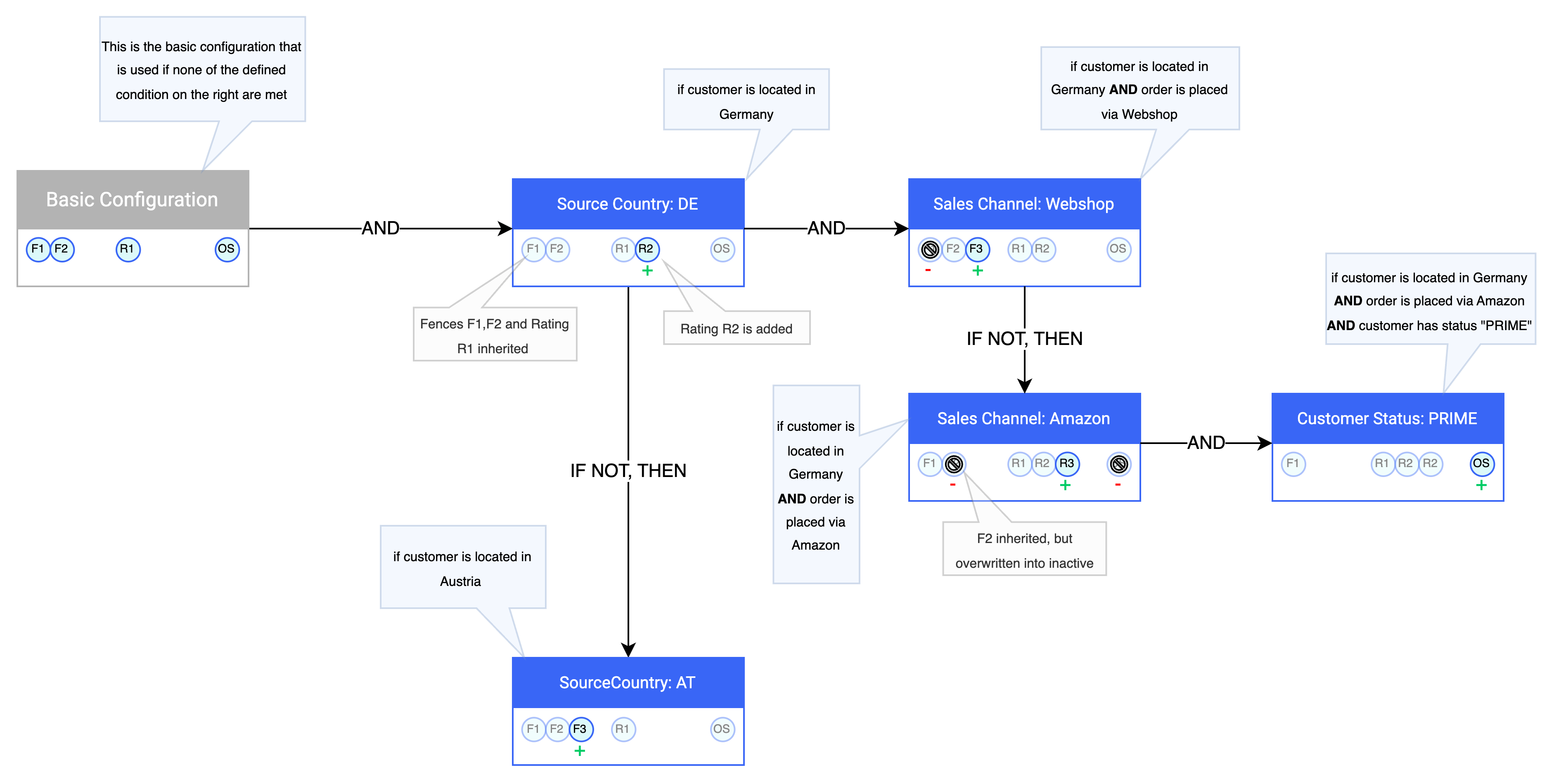
Complex routing config with context based differentiations
## Functionality of the routing strategy
### Basic configuration
The **basic configuration** serves as the foundation of the routing strategy, defining all essential routing settings such as **fences, ratings, order split behaviour, and rerouting rules**. The basic configuration **cannot be deactivated or deleted**. All settings defined within the basic configuration are **inherited by subsequent nodes** but can be **overridden or extended** at the node level if needed.
For **simple and homogeneous setups**, the basic configuration is usually sufficient to cover all necessary use cases without requiring additional nodes.
### Nodes and the principle of inheritance
For more complex setups, any number of **nodes** can be added on top of the **basic configuration**. Each node defines **specific conditions** that determine which **orders or requests** it applies to, along with the ability to **override or extend routing rules** inherited from the basic configuration or previous nodes.
The **conditions** within a node can reference any property/attribute of an **`order`**, an `ordering facility` or an `ordering facility group`. When these conditions are met, the system first evaluates whether a subsequent node’s conditions also apply. If so, the process continues with that node. If no additional nodes match, the **last positively evaluated node** serves as the **final aggregation point** for the routing configuration. Starting from the basic configuration, all applicable nodes contribute their respective rules based on the described **inheritance principle**, forming the final **rule set** that determines how the order or request is routed.
As a fundamental rule, **all settings from a previous node are inherited by the next one**, ensuring a structured and flexible approach to the routing configuration.
Nodes and the principle of inheritance
#### Activating, deactivating, and deleting nodes
Each **node**, except for the **basic configuration**, can be individually **activated or deactivated**. If a node is in an **inactive state**, it is skipped during the evaluation of the **routing strategy**, and its routing configurations are not considered.
Activating or deactivating a node also has **implicit effects** on any subsequent nodes that are directly linked to it.
**Example:** If the **"Amazon" node** is deactivated, the **"PRIME" node**, which is dependent on it, is automatically set to inactive as well.
In addition to activation and deactivation, nodes can also be **deleted**. There are two ways to do this:
* **Deleting a single node:** In this case, subsequent nodes **shift up** to maintain continuity in the routing structure.
* **Deleting an entire branch:** This removes the selected node along with **all directly or indirectly connected nodes**, effectively eliminating the entire path originating from that node.
#### Scheduled Activation and Deactivation
In addition to **manual activation/deactivation**, a **timeframe** can be configured to automatically **activate or deactivate** a specific node (and any dependent nodes) at a predefined time. This feature allows for dynamic adjustments to routing strategies based on operational needs.
For example, a **specific routing configuration** can be set up to handle **increased order volumes** during peak periods. Once the defined timeframe expires, the node is automatically **deactivated**, reverting to the default routing setup without requiring manual intervention.
{% hint style="info" %}
As a prerequisite, you should understand [Advanced Order Routing](/documentation/by-pillar/advanced-order-routing.md) before starting this integration guide.
{% endhint %}
## Why a dynamic strategy is needed
The standard `RoutingConfiguration` accommodates a wide range of applications but has limitations in specific use cases. For example, different countries may require different configurations for legal or economic reasons. In some regions, demand might call for fast deliveries, while in others, there is no economic incentive for features such as order splitting. Another use case is to treat certain ratings, like the `Geodistance` rating, differently for orders that require pallets and freight forwarding.
## Basic concepts
The routing configuration is a tree-like structure called a `RoutingStrategy`. Every `RoutingStrategy` has a mandatory `RootNode` that serves as an entry point and contains the baseline routing configuration. This baseline can be extended and altered by nested nodes.
A node can be active or inactive and can be followed by a condition. The condition defines a rule that, if met, leads to the evaluation of a specified node. The condition may also define a subsequent condition to check if the initial criteria are not met.
## Setup
This section describes the entities involved in building a `RoutingStrategy`.
### Entities
#### RoutingStrategy
This is the top-level entity that encompasses all configurations. Multiple `RoutingStrategy` entities can be defined, but only one may be active at a time, denoted by the `inUse` flag. It requires a localized name to distinguish between different strategies. The `revision` number indicates the latest version of the strategy. When a new `RoutingStrategy` is created, the system automatically assigns it the highest revision number.
```json
{
"nameLocalized": {
"en_US": "Routing strategy",
"de_DE": "Routingstrategie"
},
"rootNode": {
// RoutingStrategyNode
},
"globalConfiguration": {
// RoutingStrategyGlobalConfiguration
},
"version": 1,
"revision": 3
}
```
#### RoutingStrategyGlobalConfiguration
This entity contains global settings that apply to the entire routing process.
```json
{
"stopRoutingAttemptsAfterTime": "PT1M",
"defaultPrice": 10,
"timeTriggered": {
"shipFromStoreDeliveryReroute": {
// ...
},
"shipFromStoreSameDayReroute": {
// ...
},
"clickAndCollectReroute": {
// ...
}
}
}
```
#### RoutingStrategyNode
These entities contain the actual routing configurations and specific rules. At least one `RootNode` must be defined for any strategy. A node may define a condition that references another node.
For a node to be applied, two criteria must be met: the `active` field must be `true`, and at least one of its `ActivationTimeFrame` definitions must be valid. An inactive node (where `active` is `false`) is never applied, regardless of its `activationTimeFrames`.
```json
{
"nameLocalized": {
"en_US": "Routing strategy node",
"de_DE": "Routingstrategieknoten"
},
"active": true,
"config": {
// RoutingStrategyNodeConfig
},
"nextCondition": {
// optional, RoutingStrategyCondition
},
"activationTimeFrames": []
}
```
#### ActivationTimeFrame
This entity defines a valid timeframe for a node to be active, such as for a seasonal sale. The recurrence can be `NONRECURRING` or `YEARLY`. When `recurrence` is set to `YEARLY`, the timeframe repeats annually based on the defined start and end dates.
```json
{
"activeFrom": "2024-12-24",
"activeUntil": "2024-12-31",
"recurrence": "YEARLY"
}
```
#### RoutingStrategyCondition
A condition is a fundamental part of the dynamic routing rules. It contains a rule and links to a `RoutingStrategyNode` that applies if the rule is matched. It may also define a subsequent condition to be evaluated if the rule does not apply. Like a node, a condition can also define one or more `ActivationTimeFrame`s.
```json
{
"nameLocalized": {
"en_US": "Orders to Germany",
"de_DE": "Bestellungen nach Deutschland"
},
"rule": {
"predicateConnector": "OR",
"predicates": [{
"propertyPath": "$.order.consumer.addresses[?(@.type === 'POSTAL_ADDRESS')].country",
"expectedValue": "Germany",
"entityOperator": "ANY_VALUE_EQUALS"
}]
},
"nextNode": {
// RoutingStrategyNode
},
"nextCondition": {
// optional, could be a condition checking for another address country
},
"activationTimeFrames": {
// ActivationTimeFrame
},
}
```
#### RoutingStrategyNodeConfig
A routing configuration is defined by each `RoutingStrategyNode`. Any part of this configuration can be overwritten or extended by more deeply nested `RoutingStrategyNodeConfigs`. These entities contain the core DOMS routing functionality, such as `Fences`, `Ratings`, and order-split and reroute configurations. Both standard and toolkit fences and ratings are configured in the same location within this entity.
```json
{
"fences": [
// RoutingStrategyStandardFence and RoutingStrategyToolkitFence
],
"ratings": [
// RoutingStrategyStandardRating and RoutingStrategyToolkitRating
],
"orderSplit": {
// RoutingStrategyOrderSplitConfig
},
"reroute": {
// RoutingStrategyRerouteConfig
}
}
```
#### RoutingStrategyStandardFence
A fence that uses a predefined implementation. It is nearly identical to the previous `Fence` model but includes a `type` field to denote it as a `StandardFence`.
```json
{
"type": "StandardFence",
"referenceId": "unique-id",
"rule": {
// ToolkitRule
},
"comparisonRule": {
// ToolkitComparisonRule, mutually exclusive with ToolkitRule
},
}
```
#### RoutingStrategyToolkitRating
A rating created using toolkit functionality. A `referenceId` is required to uniquely identify a toolkit rating, as it may appear on multiple layers of the `RoutingStrategy`, and changes to it can affect more than one entity. Similar to its standard counterpart, a required `type` field is added to denote it as a `ToolkitRating`.
```json
{
"type": "ToolkitRating",
"referenceId": "unique-id",
"rule": {
// ToolkitRule
},
"comparisonRule": {
// ToolkitComparisonRule, mutually exclusive with ToolkitRule
},
}
```
### Example: Routing strategy with special configurations for pallet articles
View the final configuration
```json
{
"id": "some-unique-id-set-by-the-backend",
"name": "Initial RoutingStrategy",
"nameLocalized": { "en_US": "Initial RoutingStrategy" },
"version": 3,
"revision": 1,
"rootNode": {
"id": "some-unique-id-set-by-the-backend",
"name": "Root Node",
"nameLocalized": { "en_US": "Root Node" },
"config": {
"fences": [],
"ratings": []
},
"nextCondition": {
"id": "some-unique-id-set-by-the-backend",
"nameLocalized": { "en_US": "Order requires pallets" },
"active": true,
"rule": {
"predicates": [
{
"propertyPath": "$.order.orderLineItems[?(@.tags.find(tag => tag.id === 'load-unit' && tag.value === 'pallet'))]",
"transformation": "COUNT",
"entityOperator": "GREATER_EQUALS",
"expectedValue": 1
}
],
"predicateConnector": "AND"
},
"nextNode": {
"id": "some-unique-id-set-by-the-backend",
"active": true,
"nameLocalized": { "en_US": "Pallet routing configuration" },
"config": {
"ratings": [
{
"implementation": "GEO-DISTANCE",
"type": "StandardRating",
"maxPenalty": 1000,
"active": true
}
]
}
}
}
}
}
```
{% hint style="info" %}
**Best Practice**: With every Application Programming Interface (API) operation, it is good practice to note the `version` and `id` of the entity being manipulated or accessed, as they are likely needed in future steps. Saving the entire entity can also be helpful, especially for `PUT` operations.
{% endhint %}
#### Step 1: Set up the routing strategy using the API
Before you get started, request a new auth token and add the headers as described in the [access to fulfillmenttools APIs article](/documentation/getting-started/access-to-fulfillmenttools-apis.md). The `baseURL` variable will be `https://{YOUR-TENANT-NAME}.api.fulfillmenttools.com` when using the REST API. When using GraphQL, replace the `api` subdomain with `graphql`.
The first step is to create a `RoutingStrategyForCreation`. The absolute minimum required is a localized name to distinguish it from other strategies. This example uses the name “Initial RoutingStrategy” for the English locale and leaves other fields empty.
{% tabs %}
{% tab title="GraphQL API" %}
The following mutation creates the initial routing strategy. This mutation can be used in any GraphQL client (such as Altair) with valid authorization headers.
```graphql
mutation createRoutingStrategy {
createRoutingStrategy(input: { nameLocalized: { en_US: "Initial RoutingStrategy" }}) {
routingStrategy {
id
version
nameLocalized
rootNodeRef
nodes {
id
active
nameLocalized
name
config {
fences {
__typename
... on RoutingStrategyStandardFence {
implementation
name
active
}
}
ratings {
__typename
... on RoutingStrategyStandardRating {
implementation
name
active
}
}
}
}
}
}
}
```
If everything has worked out you should see that we have a basic routing strategy with all standard fences with active set to false and no additional configurations. However it won’t be active yet so let’s do that now.
{% endtab %}
{% tab title="REST API" %}
With a REST client such as Postman, send a `POST` request to `{baseURL}/api/routing/strategies` with the following JSON body. The request requires the standard bearer token authorization header.
```json
{
"nameLocalized": {
"en_US": "Initial RoutingStrategy"
}
}
```
A successful request returns the created routing strategy. It contains a global routing configuration and a root node with a basic configuration where all standard ratings and fences are present but inactive. The routing strategy itself is also inactive until it is explicitly activated.
{% endtab %}
{% endtabs %}
#### Step 2: Add a condition and node to the routing strategy
This example creates a new condition that applies to orders having line items with pallet articles. It assumes the `OrderLineItem` has a tag that looks as follows: `{ id: ‘load-unit’, value: ‘pallet’ }`. This is used to build a toolkit rule that evaluates to `true` if a line item with this tag exists.
**Create the JSONPath**
The entities to be evaluated have the following schema:
```typescript
{
order: OrderForCreation,
routingPlan?: RoutingPlan
}
```
Therefore, the JSONPath pointing to the tag is:
`$.order.orderLineItems[?(@.tags.find(tag => tag.id === 'load-unit' && tag.value === 'pallet'))]`
**Create the `ToolkitPredicate` with the JSONPath**
This JSONPath selects all `OrderLineItems` that have the defined tag with the appropriate value. Because the result is an array, the `COUNT` transformer can be used to check if at least one `OrderLineItem` satisfies the properties. To confirm that there is one or more such line items, the predicate is defined as follows:
```json
{
"propertyPath": "$.order.orderLineItems[?(@.tags.find(tag => tag.id === 'load-unit' && tag.value === 'pallet'))]",
"transformation": "COUNT",
"entityOperator": "GREATER_EQUALS",
"expectedValue": 1
}
```
**Create a `RoutingStrategyCondition` with the `ToolkitPredicate`**
The assembled `ToolkitRulePart` contains an array with this single predicate and a `ToolkitPredicateConnector`, which becomes important as more predicates are added. In this case, it is set to `AND`. The condition containing the rule looks as follows:
```json
{
"nameLocalized": {
"en_US": "Order requires pallets"
},
"active": true,
"rule": {
"predicates": [
{
"propertyPath": "$.order.orderLineItems[?(@.tags.find(tag => tag.id === 'load-unit' && tag.value === 'pallet'))]",
"transformation": "COUNT",
"entityOperator": "GREATER_EQUALS",
"expectedValue": 1
}
],
"predicateConnector": "AND"
},
"nextNode": {}
}
```
The node created should have a configuration that applies only to orders fulfilling that condition, so it should have a config that extends the existing default routing configuration.
**Create a `RoutingStrategyNode`**
With the `ToolkitRulePart` created, a `RoutingStrategyCondition` can be defined that uses this rule. This example names the node "Pallet routing configuration" and adds the appropriate routing configuration to it. The `RoutingStrategyNode` could look as follows:
```json
{
"active": true,
"nameLocalized": {
"en_US": "Pallet routing configuration"
},
"config": {
"ratings": [
{
"implementation": "GEO-DISTANCE",
"type": "StandardRating",
"maxPenalty": 1000,
"active": true
}
]
}
}
```
The configuration of this node contains only one rating. In practice, this means every other configuration (fences, other ratings, reroute configuration) is inherited from the root configuration, and only this particular rating is overwritten.
**Update the `RoutingStrategy` with the new node and condition**
The `RoutingStrategy` can be updated via the GraphQL or REST API.
{% tabs %}
{% tab title="GraphQL API" %}
The following mutation adds the `RoutingStrategyNode` and `RoutingStrategyCondition` to the root node. The following variables must be provided:
* `strategyRef`: The ID of the created `RoutingStrategy`.
* `routingStrategyVersion`: The current version of the `RoutingStrategy` from the last response.
* `node`: The `RoutingStrategyNode` created in the previous step.
* `condition`: The `RoutingStrategyCondition` created in the previous step.
```graphql
mutation appendRoutingStrategyConditionAndNodeToNode ($node: RoutingStrategyNodeCreationInput!, $condition: RoutingStrategyConditionCreationInput!, $strategyRef: String!, $rootNodeRef: String!, $routingStrategyVersion: Int!) {
appendRoutingStrategyConditionAndNodeToNode(
input: {
strategyRef: $strategyRef
nodeRef: $rootNodeRef
condition: $condition
node: $node
routingStrategyVersion: $routingStrategyVersion
}
) {
routingStrategy {
id
created
lastModified
version
revision
inUse
nameLocalized
name
rootNodeRef
nodes {
active
nameLocalized
config {
ratings {
__typename
... on RoutingStrategyStandardRating {
active
maxPenalty
implementation
}
}
}
}
conditions {
active
nameLocalized
rule {
predicateConnector
predicates {
propertyPath
entityOperator
expectedValue
transformation
}
}
}
}
routingStrategyVersion
}
}
```
{% endtab %}
{% tab title="REST API" %}
Using REST requires sending the entire `RoutingStrategy` in the request body, so the entity must be assembled manually.
1. Retrieve the current `RoutingStrategy`. Use the `GET /api/routing/strategies/:strategyId` endpoint if needed.
2. Locate the `rootNode` field in the `RoutingStrategy`.
3. Add a field named `nextCondition` to the `rootNode`.
4. Set the `nextCondition` field to the `RoutingStrategyCondition` created in the previous step.
5. Add the `nextNode` field to the `RoutingStrategyCondition`.
6. Within the `RoutingStrategyCondition`, set the `nextNode` field to the `RoutingStrategyNode` created in the previous step.
{% endtab %}
{% endtabs %}
#### Step 3: Create an order to test the configuration
The purpose of a dynamic routing configuration is to behave differently depending on the context. To test this, two different orders are created.
**Create a regular order**
First, test that a regular order (one that does not satisfy the defined condition) uses the default configuration, meaning all standard fences and ratings are inactive. The order could look like this:
```json
{
"consumer": {
"addresses": [
{
"city": "Cologne",
"country": "Germany",
"street": "Schanzenstrasse",
"postalCode": "51063"
}
]
},
"orderDate": "2025-01-30T08:15.000Z",
"orderLineItems": [
{
"article": {
"title": "Gaffel Wiess"
},
"quantity": 4711
}
]
}
```
**Create a special order**
Next, define an order that does meet the condition. The order is mostly the same except for the discriminator, which is the `tags` array on the `OrderLineItem`.
```json
{
"consumer": {
"addresses": [
{
"city": "Cologne",
"country": "Germany",
"street": "Schanzenstrasse",
"postalCode": "51063"
}
]
},
"orderDate": "2025-01-30T08:15.000Z",
"orderLineItems": [
{
"article": {
"title": "Gaffel Wiess vom Fass"
},
"quantity": 100,
"tags": [
{
"id": "load-unit",
"value": "pallet"
}
]
}
]
}
```
#### Step 4: Test the routing strategy evaluation
This step uses the REST API to test the evaluation.
1. Prepare a `POST` request to `api/routing/strategies/:strategyId/actions`.
2. Set the `strategyId` path parameter to the ID of the `RoutingStrategy` being tested.
3. Set the request body to the `OrderForCreation` JSON of the order to test.
4. The response contains `evaluatedPath` and `evaluatedConfig`.
5. The `evaluatedConfig` contains the actual `RoutingStrategyNodeConfig` that would be used for routing this particular order.
6. The `evaluatedPath` contains the evaluation path for transparency and debugging.
7. Examine the `evaluatedConfig` and inspect the `GeodistanceRating`.
8. When the first order (without tags) is sent, the rating should be inactive with a `maxPenalty` of `0`.
9. When the second order (with the pallet tag) is sent, the rating should be active with a `maxPenalty` of `1000`.
10. Repeat the steps for the other order to confirm both paths work as expected.
{% hint style="warning" %}
It is recommended to perform this validation for every change. Do not activate the `RoutingStrategy` until this step is successfully completed and all configurations are verified.
{% endhint %}
#### Step 5: Activate the routing strategy
{% hint style="danger" %}
**Feature Activation**: Assuming the dynamic routing feature is enabled on the tenant, activating a `RoutingStrategy` makes it the single source of truth for all routing decisions. Do not proceed until all configurations are verified.
{% endhint %}
{% tabs %}
{% tab title="GraphQL API" %}
Use the `activateRoutingStrategy` mutation, which requires an `activateRoutingStrategyInput` containing the `routingStrategyId` and `version`.
{% hint style="info" %}
**Query for Strategy ID** If the strategy ID and version are not available, use the following query to retrieve them.
```graphql
query routingStrategies {
routingStrategies(first: 1) {
pageInfo {
hasNextPage
}
edges {
node {
id
}
}
}
}
```
{% endhint %}
```graphql
mutation activateRoutingStrategy {
activateRoutingStrategy(
activateRoutingStrategyInput: { routingStrategyId: "string", version: 1 }
) {
routingStrategy {
inUse
}
routingStrategyVersion
}
}
```
A successful response shows the `RoutingStrategy` now has its `inUse` property set to `true`.
{% endtab %}
{% tab title="REST API" %}
Send a `POST` request to the `{baseURL}/api/routing/strategies/:strategyId/actions` endpoint with the following body to activate the `RoutingStrategy`.
```json
{
"name": "ACTIVATE"
}
```
{% endtab %}
{% endtabs %}
---
# Agent Instructions
This documentation is published with GitBook. GitBook is the documentation platform designed so that both humans and AI agents can read, navigate, and reason over technical content effectively. Learn more at gitbook.com.
## Querying This Documentation
If you need additional information that is not directly available in this page, you can query the documentation by asking a question.
Perform an HTTP GET request on the following URL with the `ask` and `goal` query parameters:
```
GET https://docs.fulfillmenttools.com/documentation/by-pillar/advanced-order-routing/routing-strategy.md?ask=&goal=
```
`ask` is the immediate question: it should be specific, self-contained, and written in natural language.
`goal` is what the user is ultimately trying to achieve, the reason they need the answer. Sharing it helps GitBook give you a better, more relevant answer. A goal is most helpful when it describes the outcome the user wants rather than restating the question. For example, with `ask=how do I create an API token`, a goal like `automate deployments from our CI pipeline` lets GitBook tailor the answer to that use case.
The response will contain a direct answer to the question and relevant excerpts and sources from the documentation.
Use this mechanism when the answer is not explicitly present in the current page, you need clarification or additional context, or you want to retrieve related documentation sections.
.png?alt=media&token=6fd28c4a-b148-4252-b111-98c3e2980fd0)
.png?alt=media&token=6414a3be-bc1c-49f7-b141-7ccfeb4dcf01)