> For the complete documentation index, see [llms.txt](https://docs.fulfillmenttools.com/documentation/llms.txt). Markdown versions of documentation pages are available by appending `.md` to page URLs; this page is available as [Markdown](https://docs.fulfillmenttools.com/documentation/backoffice/facility-view/inventory.md).
# Inventory
{% hint style="info" %}
This article focuses on using Backoffice. For information on APIs and customizations, see the [Global Inventory Hub section](/documentation/by-pillar/global-inventory-hub.md).
{% endhint %}
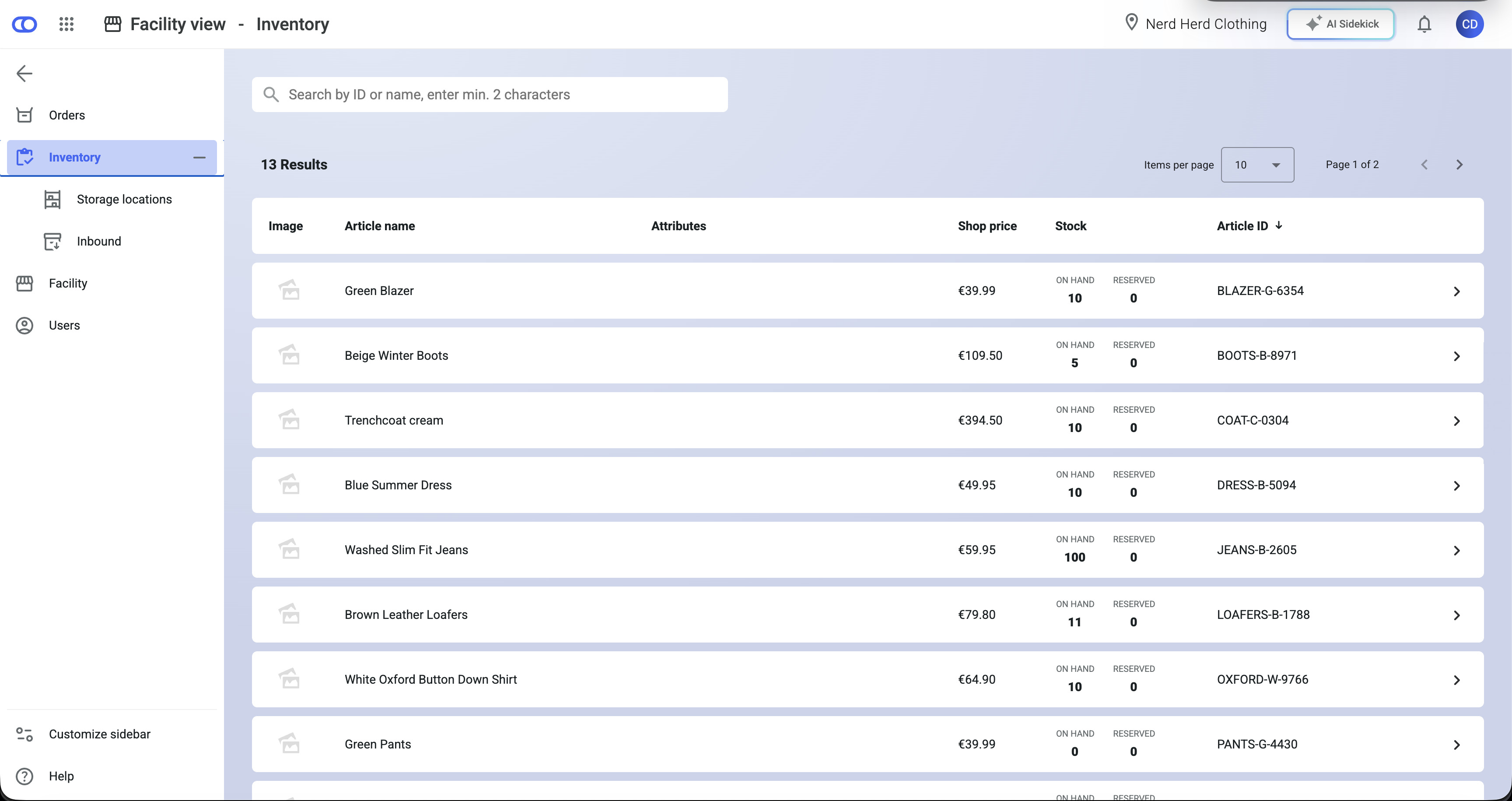
The inventory view is the list of all articles in the facility.
The view shows all information, such as the title, price, and attributes that was configured in the listing.
Within the **Stock** column, you can see the number of [stock on hand](/documentation/by-pillar/global-inventory-hub/stock/stock-availability.md) (currently present for that item in the facility), and the quantity that's [reserved](/documentation/by-pillar/global-inventory-hub/reservations.md) for accepted customer orders.
If you click on the arrow on the right of an item's row, it will open the [listing detail view](#listing-detail-view).
## Listing detail view
The listing detail view is divided into sections, offering information on both listing data and inventory data.
You can customize which sections are shown and in what order. See the [Customization section](#customization) for more details.
Use the search bar to look for other items, and go directly to that listing's detail view.
### Header
The header displays the listing title and the tenant article ID. Availability values provide insights on the [stock availability](/documentation/by-pillar/global-inventory-hub/stock/stock-availability.md) of the listing. The stock values are broken down into the following categories:
* **On hand**: The total amount of stock that is physically present in a facility.
* **Available on Stock (AOS):** The total stock on hand minus reservations, blocked stock, and safety stock.
* **Available for Picking (AFP):** The total stock on hand marked as `PICKABLE`, minus reservations, blocked stock, and safety stock.
* **Expected:** The amount of stock that's expected to arrive or be produced, based on deliveries of goods, production, or transfers from other facilities.
* **Reserved:** The sum of reservations on stock, expected stock, and over-reservations.
* **Blocked:** Stock that is not accessible for sale because it is stored in locked locations.
* **Safety stock:** Stock held back for offline sales. Safety stock can be edited in the [Network inventory view](/documentation/backoffice/network-view/inventory.md).
See the [Stock availability article](/documentation/by-pillar/global-inventory-hub/stock/stock-availability.md) for full details on stock definitions.
### Item details
The item details section shows the listing's article ID, title, all entries stored in the [listing attributes](/documentation/by-pillar/global-inventory-hub/articles/article-attributes.md), [tags](/documentation/getting-started/tags.md), image, [shop price](/documentation/getting-started/facilities/prices.md#shop-price), [out of stock behavior and configuration](/documentation/by-pillar/global-inventory-hub/listing.md#out-of-stock-behaviour), and the listing's [measurement unit key](/documentation/by-pillar/global-inventory-hub/listing.md#measurement-units).
You can customize which columns are shown and in what order. See the [Customization section](#customization) for more details.
### Stock information
The stock information section provides further details on the number of items, reservations, [stock properties](/documentation/by-pillar/global-inventory-hub/stock.md#stock-properties), and stock [traits](/documentation/by-pillar/global-inventory-hub/inventory-traits.md).
If no stock exists, you can add stock by clicking the **Add stock** button. The stock you add will automatically be set to pickable.
Existing stock can be edited by hovering over the item, clicking the more icon, and selecting **Change stock**. If the stock is not pickable, and changes are made to the stock level, this will not change that trait.
{% hint style="info" %}
You'll only see the editing options if manual stock level changes are permitted. To change this setting, go to the **Network view,** select **Settings** in the sidebar, activate the Manual stock adjustment toggle, and click **Save**. You'll need to have the relevant role or permission to make this change.
{% endhint %}
You can customize which columns are shown and in what order. See the [Customization section](#customization) for more details.
### Storage locations
The storage location section shows all [storage locations](/documentation/backoffice/facility-view/inventory/storage-locations.md) where the respective article is located in the facility. It provides further details on the number of items stored, reservations, [stock properties](/documentation/by-pillar/global-inventory-hub/stock.md#stock-properties), and the location's [traits](/documentation/by-pillar/global-inventory-hub/inventory-traits.md). The stock at each location can be edited via the more icon. Storage locations can be edited on the [Storage location page](/documentation/backoffice/facility-view/inventory/storage-locations.md).
You can customize which columns are shown and in what order. See the [Customization section](#customization) for more details.
### Sales prices
The sales price is the amount at which articles are sold to other facilities in the network and is always stored by the facility selling the articles. The module allows users to create and delete sales prices.
You can customize which columns are shown and in what order. See the [Customization section](#customization) for more details.
{% hint style="info" %}
More information can be found in the [Prices article](/documentation/getting-started/facilities/prices.md).
{% endhint %}
### Purchase prices
The purchase price refers to the price at which articles are acquired from other facilities within the network. It is not stored in fulfillmenttools but depends on the facility from which an article is sourced. The purchase price will only be displayed if there is a [facility connection](/documentation/by-pillar/advanced-order-routing/complex-routing-with-combinatorics/network-model/facility-connection.md) between the selling and purchasing facility. [Discounts](/documentation/getting-started/facilities/prices.md) can be applied to the purchase price of an article and are defined by the selling facility.
{% hint style="info" %}
More information can be found in the [Prices article](/documentation/getting-started/facilities/prices.md).
{% endhint %}
### Future availabilities
The future availability graph shows the development of stock that will be [available for picking](/documentation/by-pillar/global-inventory-hub/stock/stock-availability.md). The table on the right provides more details about the events that triggered the respective change in stock levels. Stock levels can change due to:
* **Delivery of goods**: A [purchase order](/documentation/by-pillar/global-inventory-hub/inbound-process.md#purchase-order) was created indicating that stock is expected to be delivered for the specified article.
* **Stock expiry**: Stock has exceeded its [available until date](/documentation/by-pillar/global-inventory-hub/listing.md#availability-timeframe).
If no deliveries of goods are announced and no stock is scheduled to expire, no data will be displayed in the module.
{% hint style="warning" %}
The graph doesn't estimate future sales or other stock movements that fulfillmenttools is not yet aware of.
{% endhint %}
### Customization
You can customize the listing detail view page to suit your needs. If you click the **Customize** button, you can choose to include or exclude certain sections in the view. You can also reorder the sections that appear on the page.
In each section, you can choose to include or exclude certain columns in the relevant table view. Use the customize icon at the end of the table headers. You can also rearrange the columns using the more icon next to each column header.
Using the **Reset** button in both cases will reset the view to the default ordering and visibility.
---
# Agent Instructions
This documentation is published with GitBook. GitBook is the documentation platform designed so that both humans and AI agents can read, navigate, and reason over technical content effectively. Learn more at gitbook.com.
## Querying This Documentation
If you need additional information that is not directly available in this page, you can query the documentation by asking a question.
Perform an HTTP GET request on the following URL with the `ask` and `goal` query parameters:
```
GET https://docs.fulfillmenttools.com/documentation/backoffice/facility-view/inventory.md?ask=&goal=
```
`ask` is the immediate question: it should be specific, self-contained, and written in natural language.
`goal` is what the user is ultimately trying to achieve, the reason they need the answer. Sharing it helps GitBook give you a better, more relevant answer. A goal is most helpful when it describes the outcome the user wants rather than restating the question. For example, with `ask=how do I create an API token`, a goal like `automate deployments from our CI pipeline` lets GitBook tailor the answer to that use case.
The response will contain a direct answer to the question and relevant excerpts and sources from the documentation.
Use this mechanism when the answer is not explicitly present in the current page, you need clarification or additional context, or you want to retrieve related documentation sections.