> For the complete documentation index, see [llms.txt](https://docs.fulfillmenttools.com/documentation/llms.txt). Markdown versions of documentation pages are available by appending `.md` to page URLs; this page is available as [Markdown](https://docs.fulfillmenttools.com/documentation/about-fulfillmenttools/release-notes/release-notes-2025.md).

# Release notes 2025

This page highlights recent updates, new features, and product improvements delivered across our API and Apps.

{% hint style="info" %}
Subscribe to updates using the **RSS feed** button or sign up for our monthly newsletter using the [form on our website](https://fulfillmenttools.com/newsletter-abo-release-summary/).
{% endhint %}

The below release notes focus on the 2025. For other years, see the [2026](/documentation/about-fulfillmenttools/release-notes.md) or [2024](/documentation/about-fulfillmenttools/release-notes/release-notes-2024.md) release notes.

{% updates format="full" %}
{% update date="2025-12-18" tags="backoffice" %}

## Password self service

Backoffice now provides a password reset option at login.

Users can also change their own password directly in the user profile. Password resets are only available when an email address is configured.

{% hint style="info" %}
More information can be found under [Backoffice access and authentication](/documentation/backoffice/accessing-backoffice.md).
{% endhint %}
{% endupdate %}

{% update date="2025-11-20" tags="apis,order-management" %}

## Order modification update

The order modification feature allows users to adjust original order details.

* Update order line items (cancel or adjust quantities).
* Update delivery or handover dates.

This feature is activated by default and can be deactivated via [REST API](/documentation/by-pillar/order-management/order-modification.md). Every order update triggers a re‑route to ensure compliance with all routing rules.

{% hint style="info" %}
More information can be found under [Order modification](/documentation/by-pillar/order-management/order-modification.md).
{% endhint %}
{% endupdate %}

{% update date="2025-11-13" tags="backoffice,order-management" %}

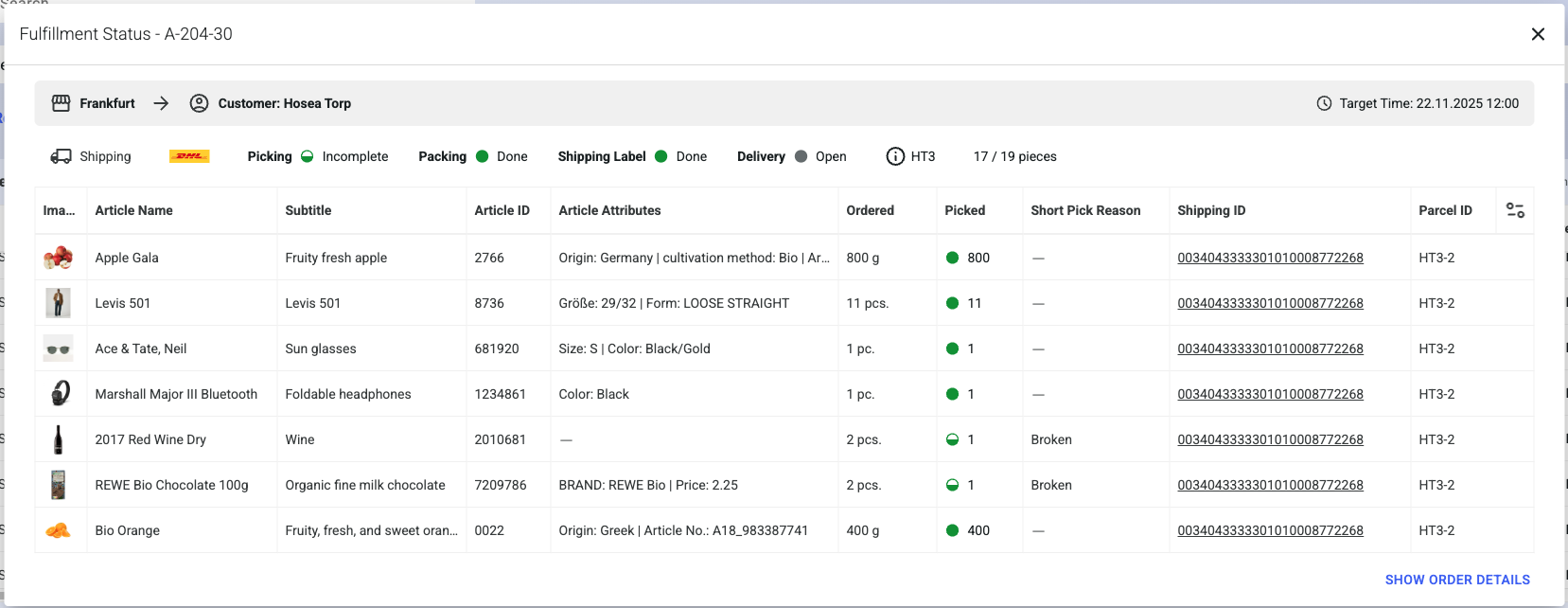
## Order (beta) fulfillment status pop-up

The new **Fulfillment statu**s pop‑up enables quick cross‑checks without leaving the overview and offers all standard functions, including column rearrangement, show/hide options, and actions such as reset or restart. The pop-up opens by clicking on the order ID in the overview.

<figure><img src="https://4170739437-files.gitbook.io/~/files/v0/b/gitbook-x-prod.appspot.com/o/spaces%2FLrrr5jgTsDuR38gNJIrm%2Fuploads%2FOWtCI45vACUJB2sCJD5m%2FBildschirmfoto%202025-12-17%20um%2012.59.51.png?alt=media&amp;token=5da00fa4-aa7d-40fc-9f50-71adc373e30e" alt=""><figcaption></figcaption></figure>
{% endupdate %}

{% update date="2025-11-11" tags="backoffice,apis" %}

## Facility discounts

Facility discounts determine the value by which the [sales price](/documentation/getting-started/facilities/prices.md#sales-price) of the facility's listings is reduced for a specific group. It is configured on the facility that supplies the listing to other facilities.

The facility discounts are displayed on the facility detail page in the Backoffice.

{% hint style="info" %}
More information can be found under [Facility discounts](/documentation/getting-started/facilities/prices.md).
{% endhint %}

<figure><img src="https://4170739437-files.gitbook.io/~/files/v0/b/gitbook-x-prod.appspot.com/o/spaces%2FLrrr5jgTsDuR38gNJIrm%2Fuploads%2FsKDZSHSzAZ6GsyjJp8Rq%2FFacility%20Settings_Discounts%20(1).png?alt=media&amp;token=4e152d60-146c-4874-a631-fc05af9ae7db" alt=""><figcaption></figcaption></figure>
{% endupdate %}

{% update date="2025-11-07" tags="backoffice,global-inventory-hub" %}

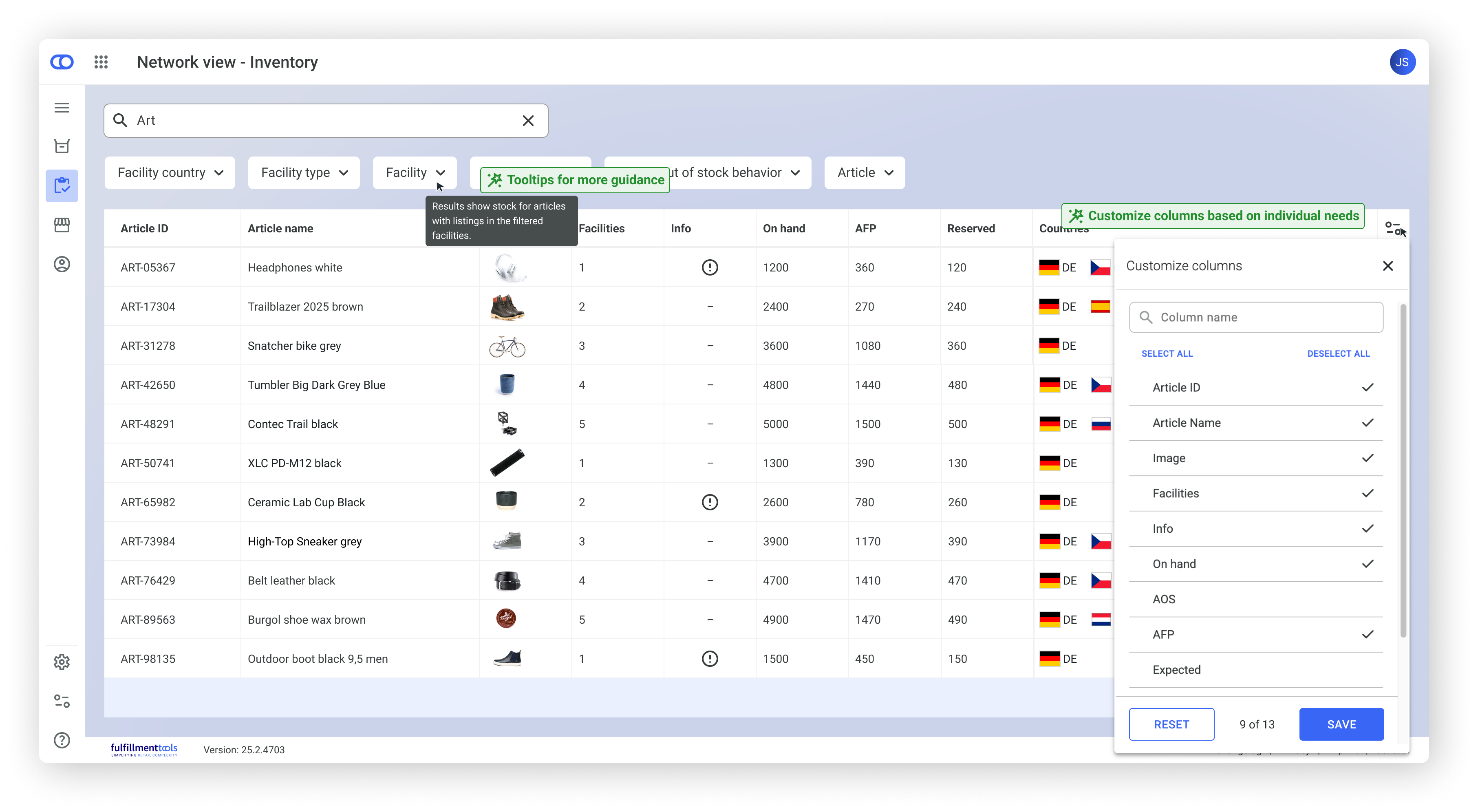
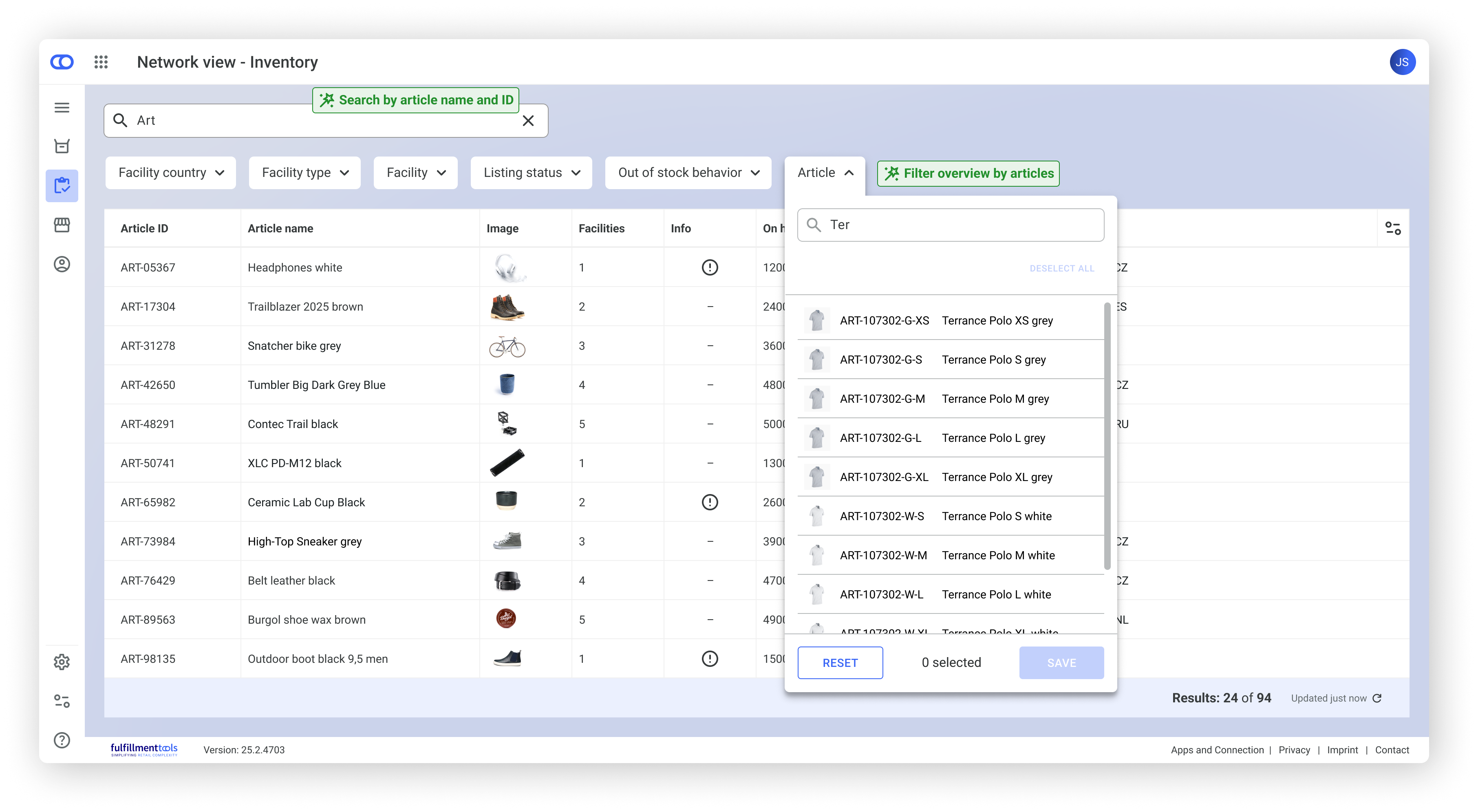
## Inventory views enhancements

The below improvements are now available on the inventory views in Backoffice:

**Network**

* Search overview by article name and ID.
* Article filter (filter for multiple articles by their name or ID).
* Tooltip on headers and filters, offering explanations on the concepts.
* Default columns (only basic columns shown by default - additional columns can be activated via customization button).

<div><figure><img src="https://4170739437-files.gitbook.io/~/files/v0/b/gitbook-x-prod.appspot.com/o/spaces%2FLrrr5jgTsDuR38gNJIrm%2Fuploads%2Ftdj9LalpatlwGetyqIaF%2FStock%20overview_0.png?alt=media&amp;token=747df087-1024-496e-a6c0-03bee71b2cd1" alt=""><figcaption><p>Stock overview in Backoffice with column customization</p></figcaption></figure> <figure><img src="https://4170739437-files.gitbook.io/~/files/v0/b/gitbook-x-prod.appspot.com/o/spaces%2FLrrr5jgTsDuR38gNJIrm%2Fuploads%2FZp9PFxToJCvzvMqfLCAH%2FStock%20overview_00.png?alt=media&amp;token=005ac731-de7e-45a0-a120-334c4cc0a69c" alt=""><figcaption><p>Stock overview in Backoffice with article filter</p></figcaption></figure></div>

{% hint style="info" %}
More information can be found under [Stock Overview](/documentation/backoffice/network-view/inventory.md).
{% endhint %}

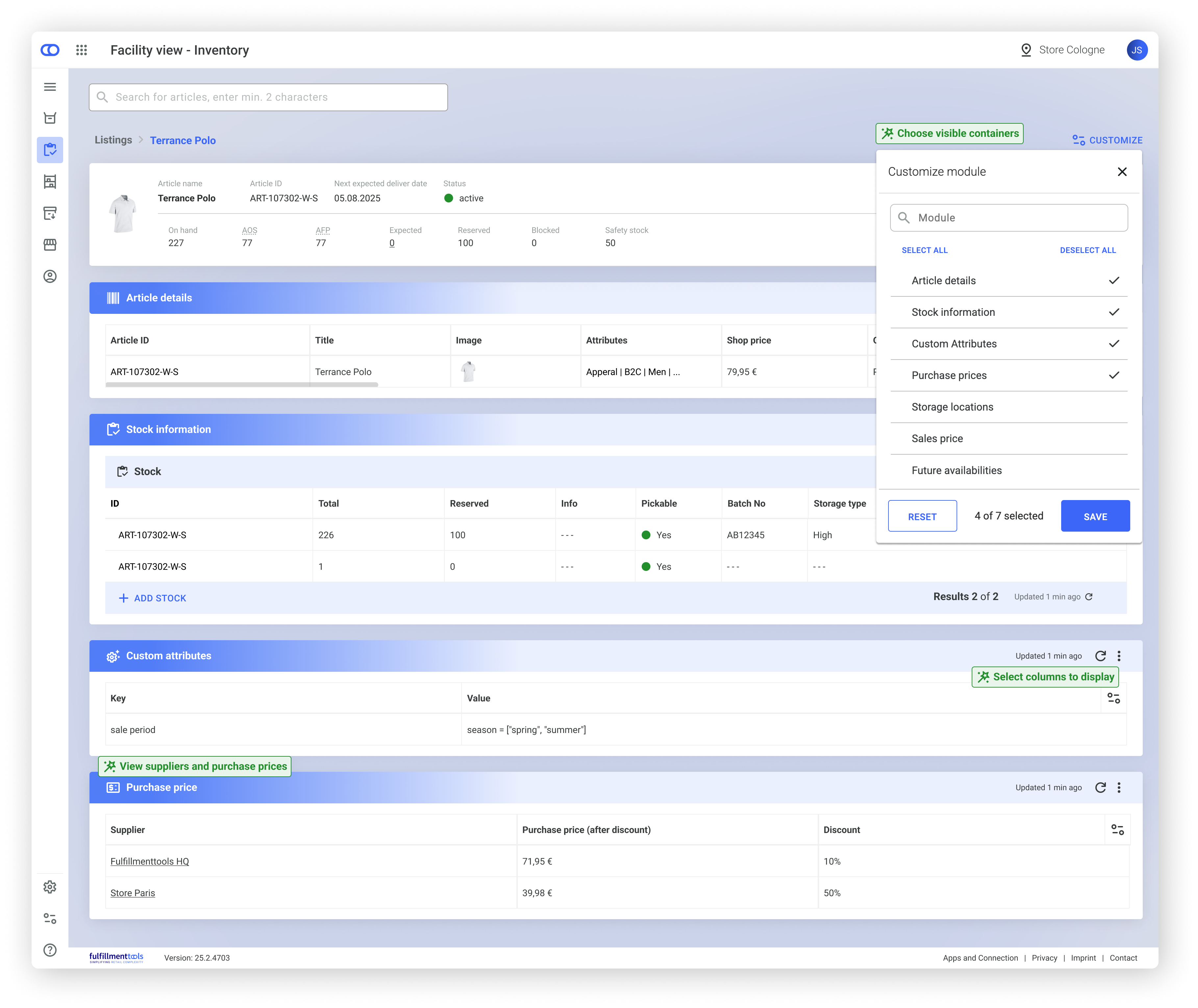
**Facility**

* Customize which modules are displayed on the page.
* Customize columns in each table.
* Delete [sales prices](/documentation/getting-started/facilities/prices.md#sales-price) via the three-dot menu in the sales price table.
* New [purchase price](/documentation/getting-started/facilities/prices.md#purchase-price) module shown in purchasing facilities if there is a facility connection between the supplier and the purchaser.

<figure><img src="https://4170739437-files.gitbook.io/~/files/v0/b/gitbook-x-prod.appspot.com/o/spaces%2FLrrr5jgTsDuR38gNJIrm%2Fuploads%2FvQre7Lou9s27OTDFEKDx%2FListings%20detail%20page_0.png?alt=media&amp;token=2a46ae72-b1c0-4ba6-9e6a-f956b699f928" alt="" width="563"><figcaption><p>Listing detail view in Backoffice</p></figcaption></figure>

{% hint style="info" %}
More information can be found under [Facility view – Inventory](/documentation/backoffice/facility-view/inventory.md).
{% endhint %}
{% endupdate %}

{% update date="2025-11-04" tags="backoffice" %}

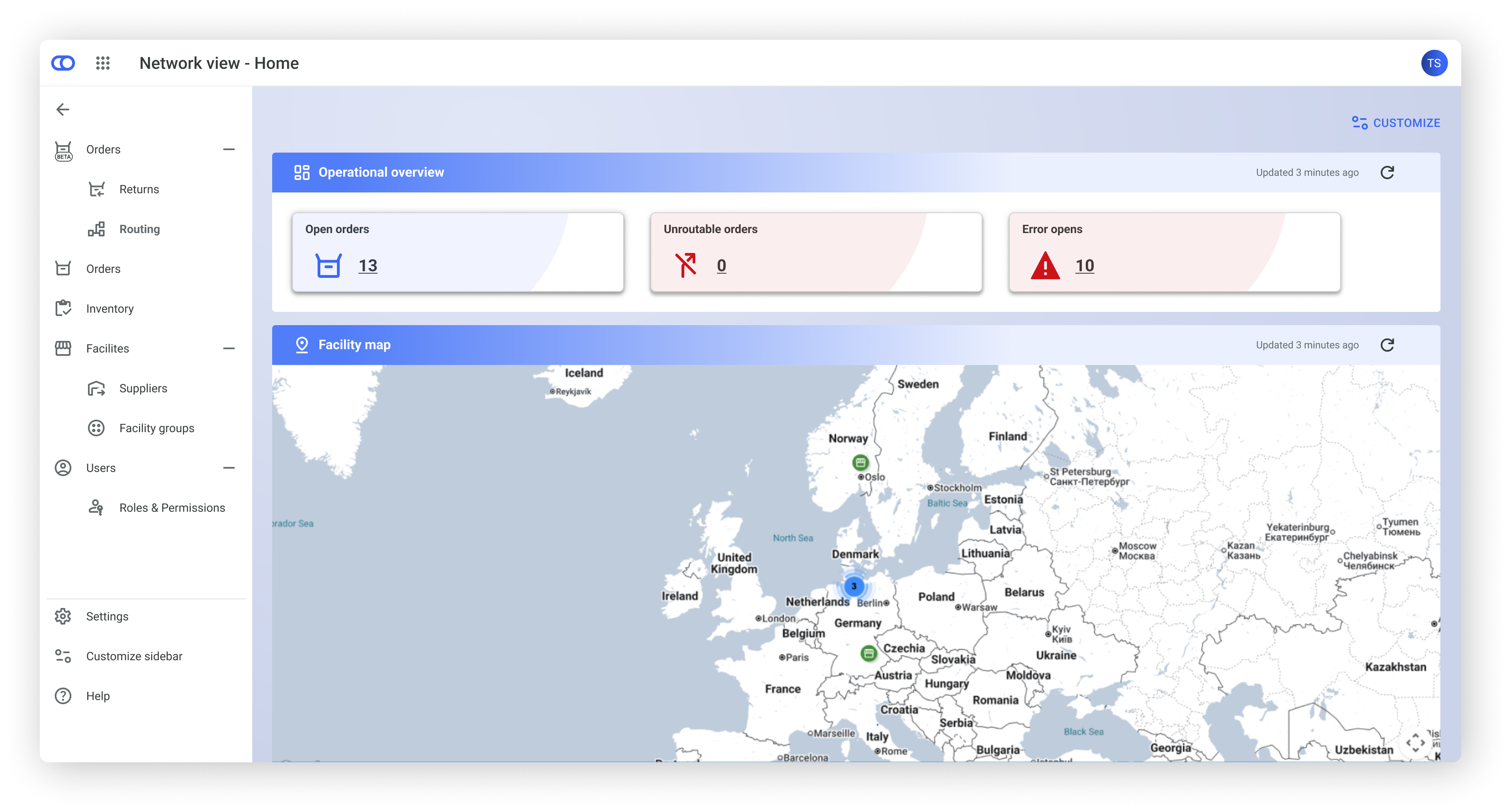
## New layout and KPI enhancements

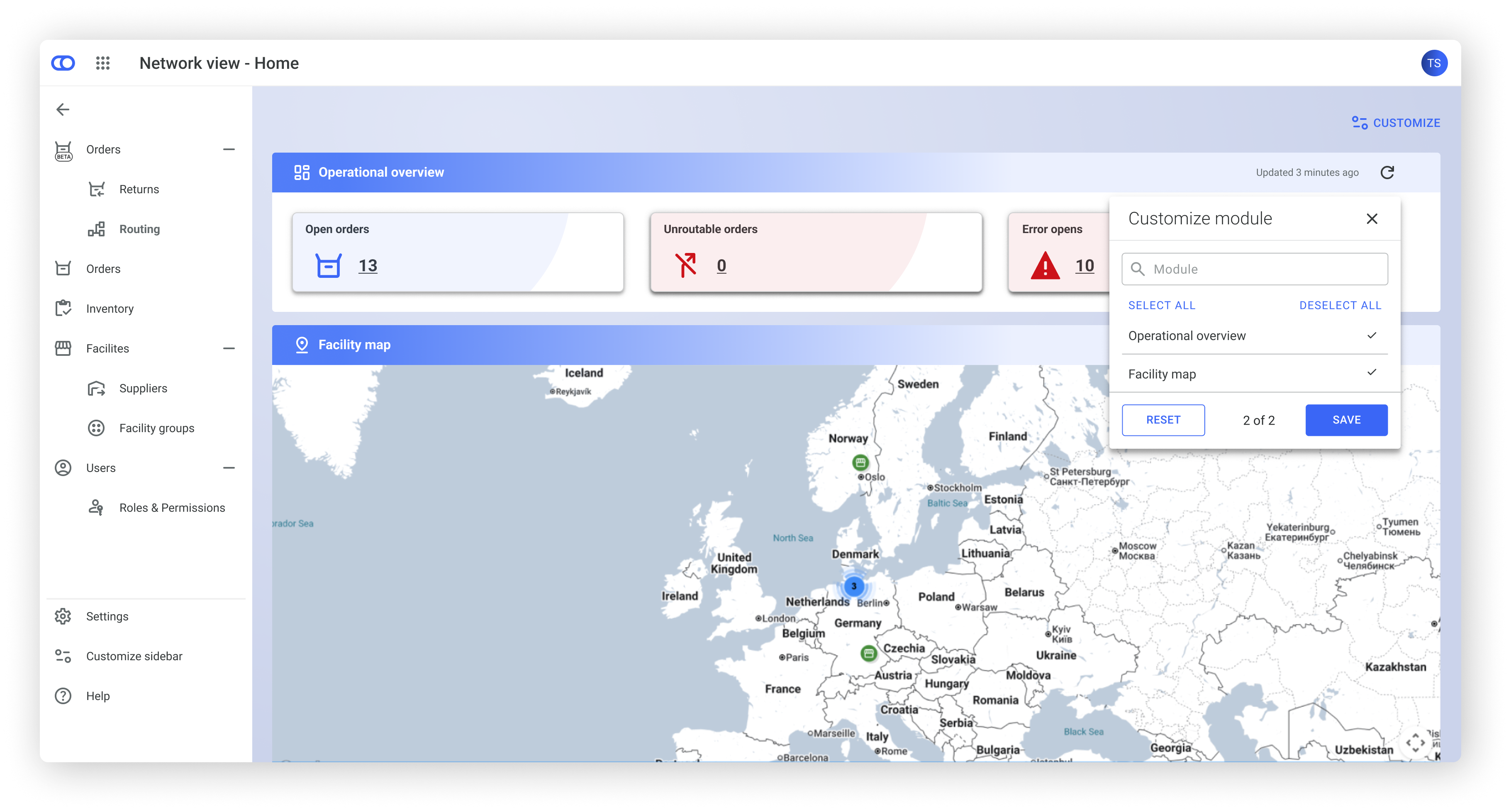
Backoffice homepage is updated with small changes. The map and KPIs are now in movable, concealable modules.

Existing KPIs are clickable and link to the new order page including KPIs for open orders, unroutable orders, and error orders. Pick, pack, and handover tasks lists have been removed for now. The Facility View Home page remains unchanged.

This update also lays the foundation for additional KPIs currently in development.

<div><figure><img src="https://4170739437-files.gitbook.io/~/files/v0/b/gitbook-x-prod.appspot.com/o/spaces%2FLrrr5jgTsDuR38gNJIrm%2Fuploads%2FihDAB3wSMiFYHqrTv4bP%2F01_Home.png?alt=media&amp;token=54b82c6a-9e12-41f5-b18c-2dbe74e8c74c" alt=""><figcaption></figcaption></figure> <figure><img src="https://4170739437-files.gitbook.io/~/files/v0/b/gitbook-x-prod.appspot.com/o/spaces%2FLrrr5jgTsDuR38gNJIrm%2Fuploads%2FtapC0sjFSFPpJpXgz3W0%2F02_Home.png?alt=media&amp;token=d731388b-2cd5-4c78-a957-2343b08080c3" alt=""><figcaption></figcaption></figure></div>
{% endupdate %}

{% update date="2025-09-18" tags="backoffice" %}

## Backoffice navigation update

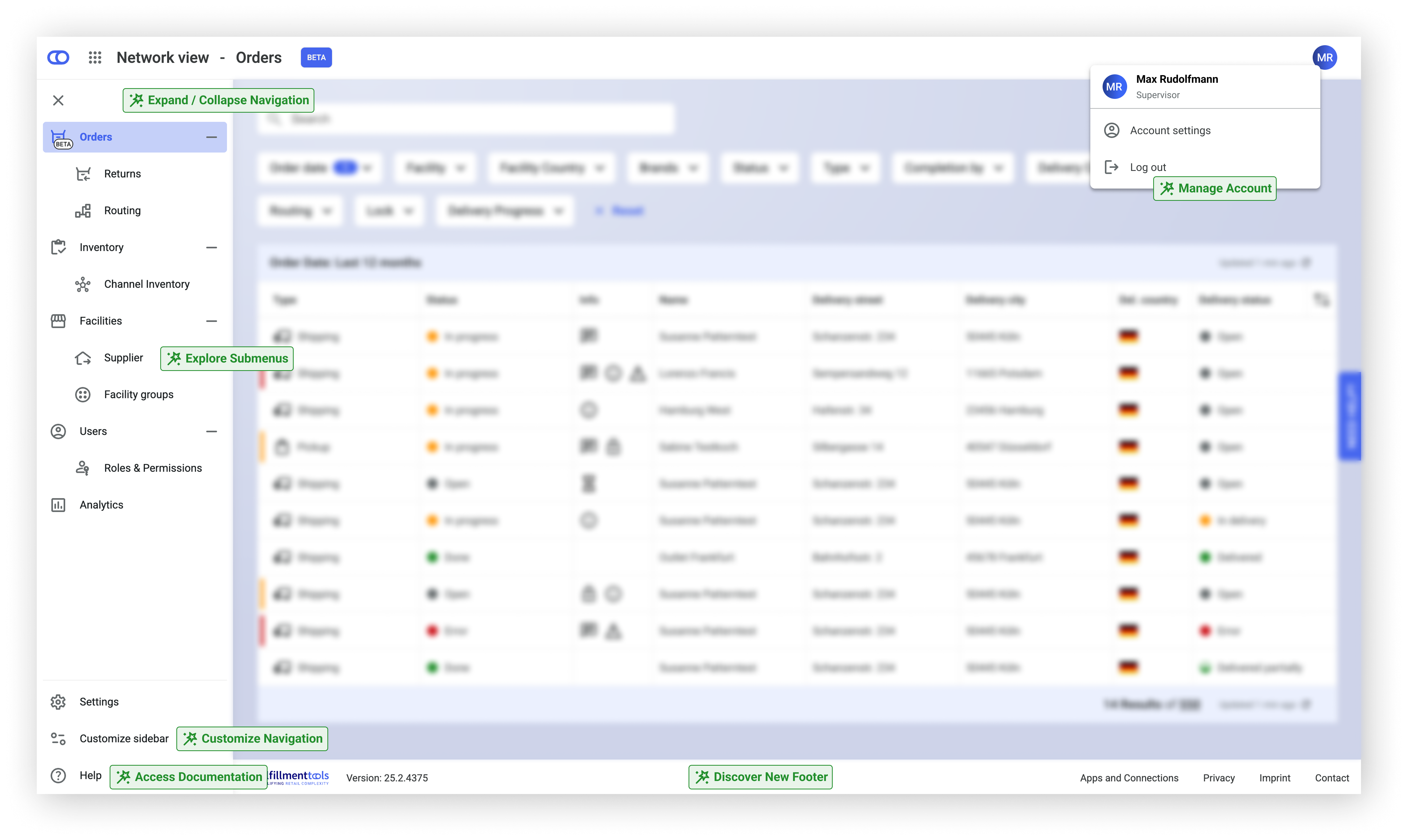
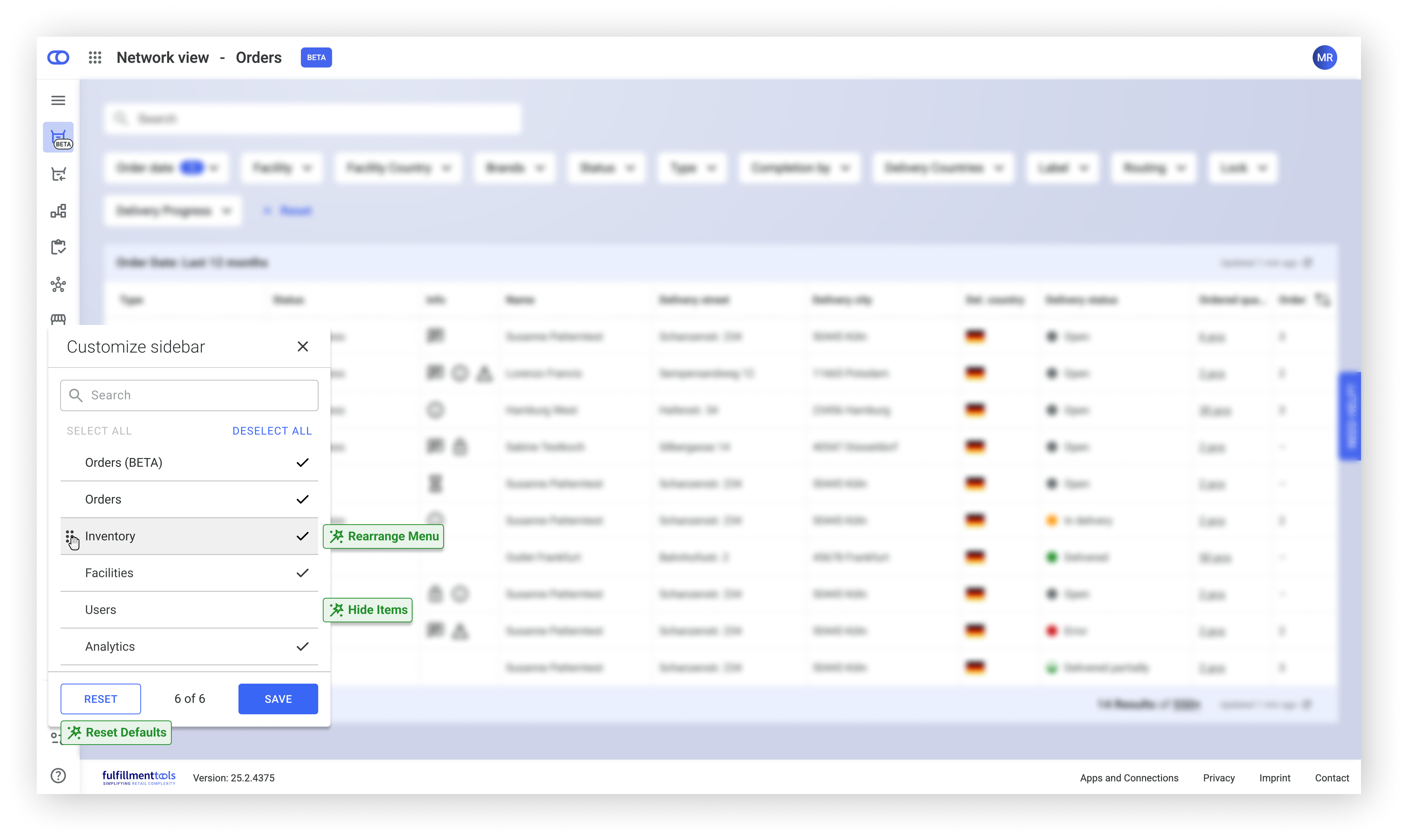
The Backoffice navigation has been enhanced with several new functions. Menu sections can now be expanded or collapsed, and submenus provide direct access to additional options.

The navigation can be customized by rearranging or hiding items, with the option to reset the layout to its default state at any time. Account settings, preferences, and personal information are available in a centralized account area. Documentation is accessible directly from the interface.

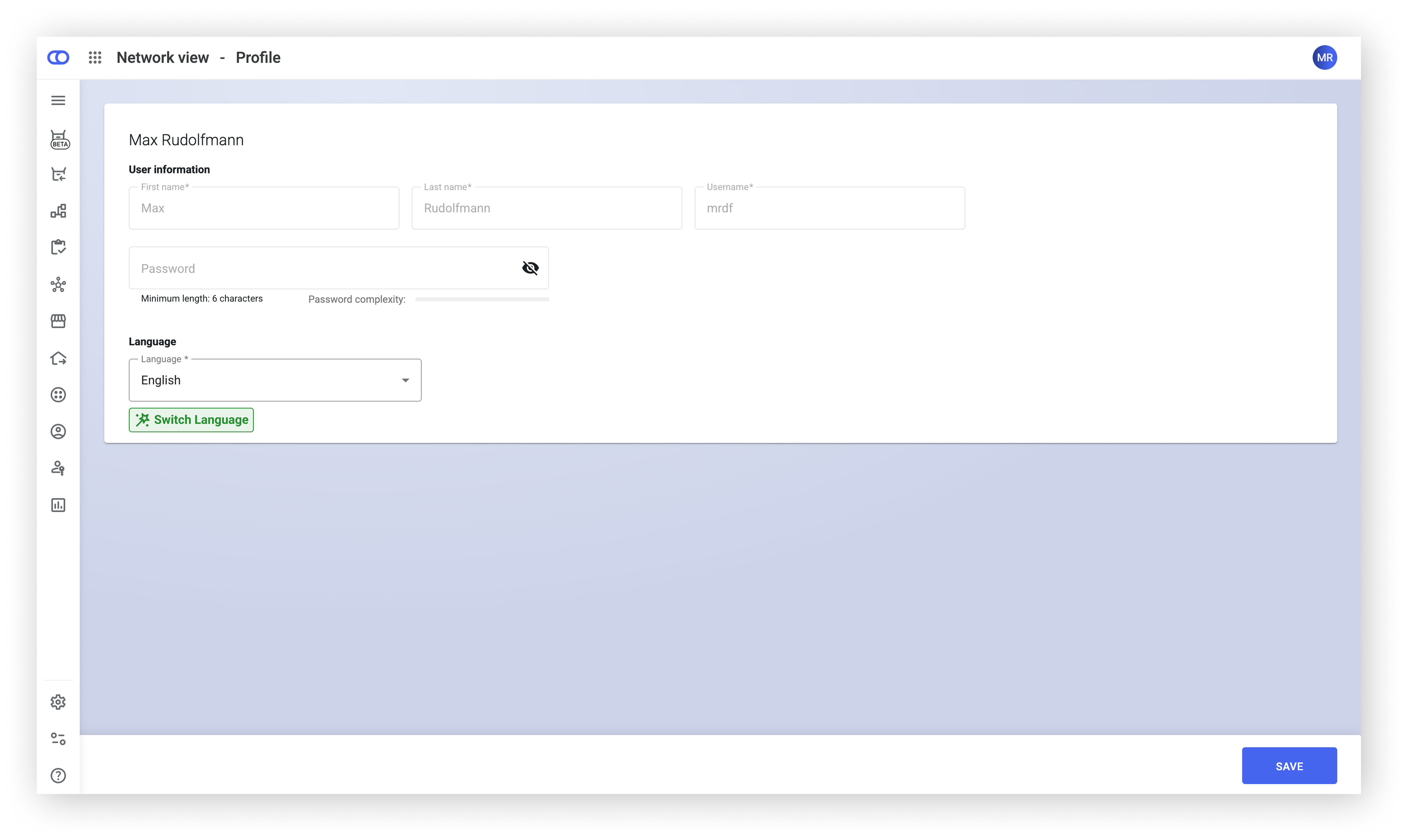
The footer has been updated to include important links and information. In addition, profile settings are now grouped in a single location, and the interface language can be switched as required.

<div><figure><img src="https://4170739437-files.gitbook.io/~/files/v0/b/gitbook-x-prod.appspot.com/o/spaces%2FLrrr5jgTsDuR38gNJIrm%2Fuploads%2FFTAF8kSFVu6SLODhmH9p%2FNew%20navigation%20expanded_with%20as_shadow.png?alt=media&amp;token=252345dc-da5f-4656-a024-a2a64f1ba026" alt=""><figcaption></figcaption></figure> <figure><img src="https://4170739437-files.gitbook.io/~/files/v0/b/gitbook-x-prod.appspot.com/o/spaces%2FLrrr5jgTsDuR38gNJIrm%2Fuploads%2F8GZMnPykEztko37rha2P%2FNavigation%20collapsed_shadow.png?alt=media&amp;token=e25b90e7-3c39-4984-a633-a7cba91528dc" alt=""><figcaption></figcaption></figure> <figure><img src="https://4170739437-files.gitbook.io/~/files/v0/b/gitbook-x-prod.appspot.com/o/spaces%2FLrrr5jgTsDuR38gNJIrm%2Fuploads%2FlhgUDaQsxWBFoqDod84G%2FAccount%20settings%20max_shadow.png?alt=media&amp;token=f760d6be-e906-42d2-937b-83aa238b7b50" alt=""><figcaption></figcaption></figure></div>
{% endupdate %}

{% update date="2025-09-18" tags="backoffice,order-management" %}

## Enhanced order status insight

The updated order overview now includes a clickable order status. This feature opens a modal that delivers detailed visibility into the operational status of order fulfillment, answering queries like whether an order is being picked, packed, or if labels have been generated.

<figure><img src="https://4170739437-files.gitbook.io/~/files/v0/b/gitbook-x-prod.appspot.com/o/spaces%2FLrrr5jgTsDuR38gNJIrm%2Fuploads%2Fro73CqUxBF59IAPEn9z8%2FBildschirmfoto%202025-09-17%20um%2013.00.42.png?alt=media&amp;token=5ab2b54d-55bf-42c9-a273-648fd2ee0d69" alt=""><figcaption></figcaption></figure>

{% hint style="info" %}
More information can be found under [Order status](/documentation/backoffice/network-view/orders/order-details-view.md).
{% endhint %}
{% endupdate %}

{% update date="2025-09-10" tags="backoffice,store-operations" %}

## Order documents access

The new module in the order details offers comprehensive access to all documents linked to an order. This includes shipping labels and external documents like invoices.

<figure><img src="https://4170739437-files.gitbook.io/~/files/v0/b/gitbook-x-prod.appspot.com/o/spaces%2FLrrr5jgTsDuR38gNJIrm%2Fuploads%2FzNaNPbbSKWSs18pu3HwJ%2FBildschirmfoto%202025-09-24%20um%2010.54.00.png?alt=media&amp;token=39343487-fd90-437d-942c-447ec90c06f3" alt=""><figcaption></figcaption></figure>

{% hint style="info" %}
More information can be found under [Documents](/documentation/backoffice/network-view/orders/order-details-view.md#documents).
{% endhint %}
{% endupdate %}

{% update date="2025-09-09" tags="backoffice,apis,global-inventory-hub" %}

## Sales and purchase price

The sales price of an article is now configurable via API and Backoffice. The sales price (and its respective purchase price) are displayed in the [Backoffice facility inventory detail view](/documentation/backoffice/facility-view/inventory.md).

The **sales price** is the amount at which articles are sold to other facilities in the network and is always stored by the facility selling the articles. It can be configured via [API](https://fulfillmenttools.github.io/fulfillmenttools-api-reference-ui/#put-/api/facilities/-facilityId-/listings) on listing level in the listing [attributes](/documentation/by-pillar/global-inventory-hub/articles/article-attributes.md#sales-price-with-currency). The **purchase price** refers to the price at which articles are acquired from other facilities within the network. It is not specifically stored in the platform but is contingent upon the facility from which an article is sourced.

<div><figure><img src="https://4170739437-files.gitbook.io/~/files/v0/b/gitbook-x-prod.appspot.com/o/spaces%2FLrrr5jgTsDuR38gNJIrm%2Fuploads%2F7lZOWE3t7KUDj4d8MSVl%2FFrame%202409%20(1).png?alt=media&amp;token=042ab528-e24f-4560-a0b1-9d83a9936c00" alt=""><figcaption></figcaption></figure> <figure><img src="https://4170739437-files.gitbook.io/~/files/v0/b/gitbook-x-prod.appspot.com/o/spaces%2FLrrr5jgTsDuR38gNJIrm%2Fuploads%2FJqOtD1APSWtXQLeld9yc%2FFrame%202409.png?alt=media&amp;token=119159c3-d261-4bd3-8db4-c6b2ac9b18f7" alt=""><figcaption></figcaption></figure></div>
{% endupdate %}

{% update date="2025-07-24" tags="apis,global-inventory-hub" %}

## Customer-defined IDs in requests

For some entities, it is possible to specify a user-defined ID. This field can be utilized for the purpose of transferring IDs from external systems to the fulfillmenttools platform. If this ID is unambiguous, it can be now used to read and write the entity in HTTP.

**At present, this functionality is exclusively available for stocks.**

{% hint style="info" %}
More information can be found under [Customer-defined IDs in requests](/documentation/apis/customer-defined-ids-in-requests.md).
{% endhint %}
{% endupdate %}

{% update date="2025-07-22" tags="apis,global-inventory-hub" %}

## Bulk update of listings in multiple facilities

When inserting listings for different facilities, the bulk insert API can now be used to minimize the number of calls. First, the listings to be updated need to be searched for obtaining the current version. Afterwards, the listings bulk API can be used to update multiple listings for multiple facilities simultaneously.

{% hint style="info" %}
More information can be found under [Bulk insert listings](/documentation/by-pillar/global-inventory-hub/listing.md#bulk-upserting-listings).
{% endhint %}
{% endupdate %}

{% update date="2025-07-22" tags="backoffice,global-inventory-hub" %}

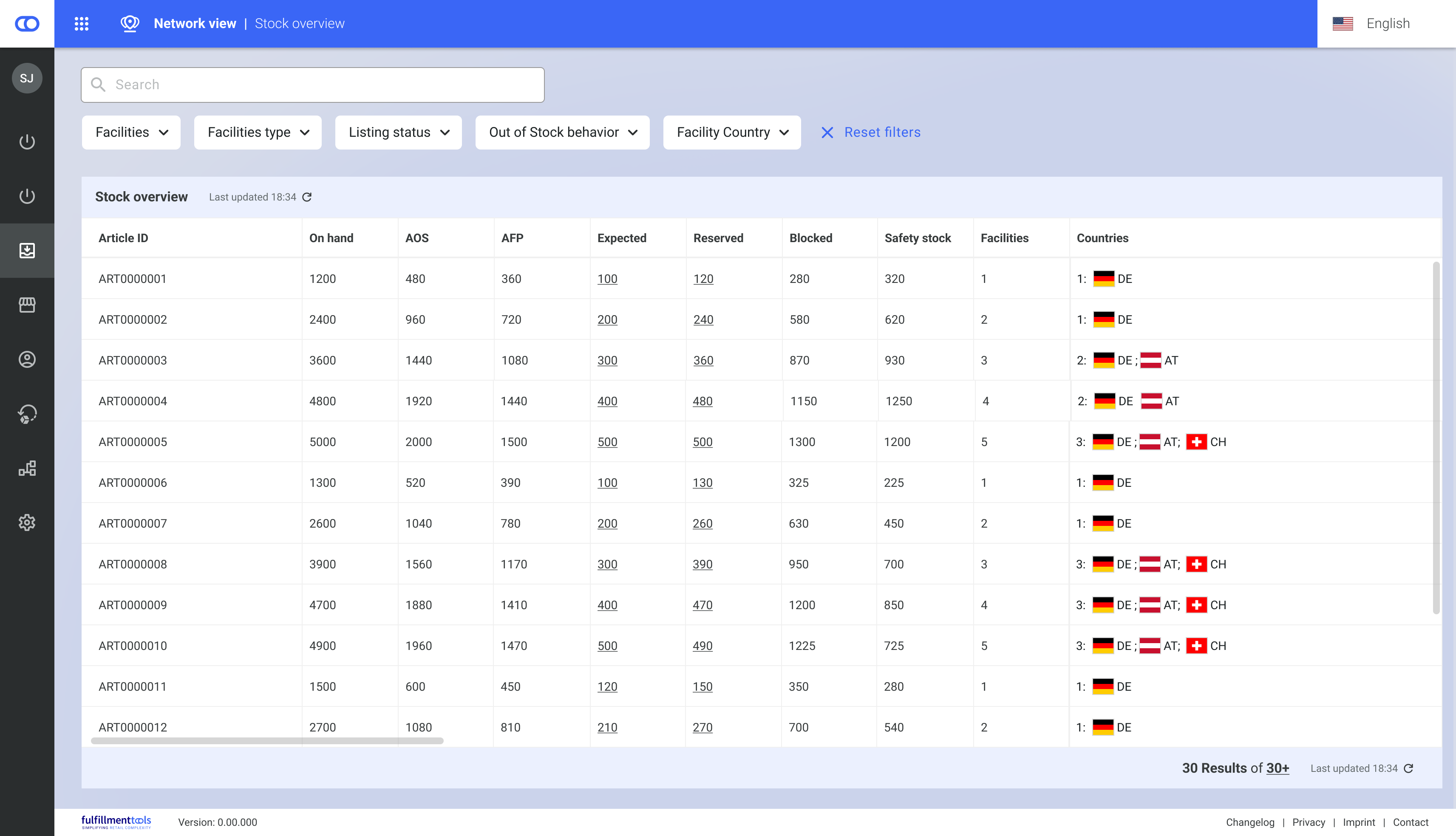
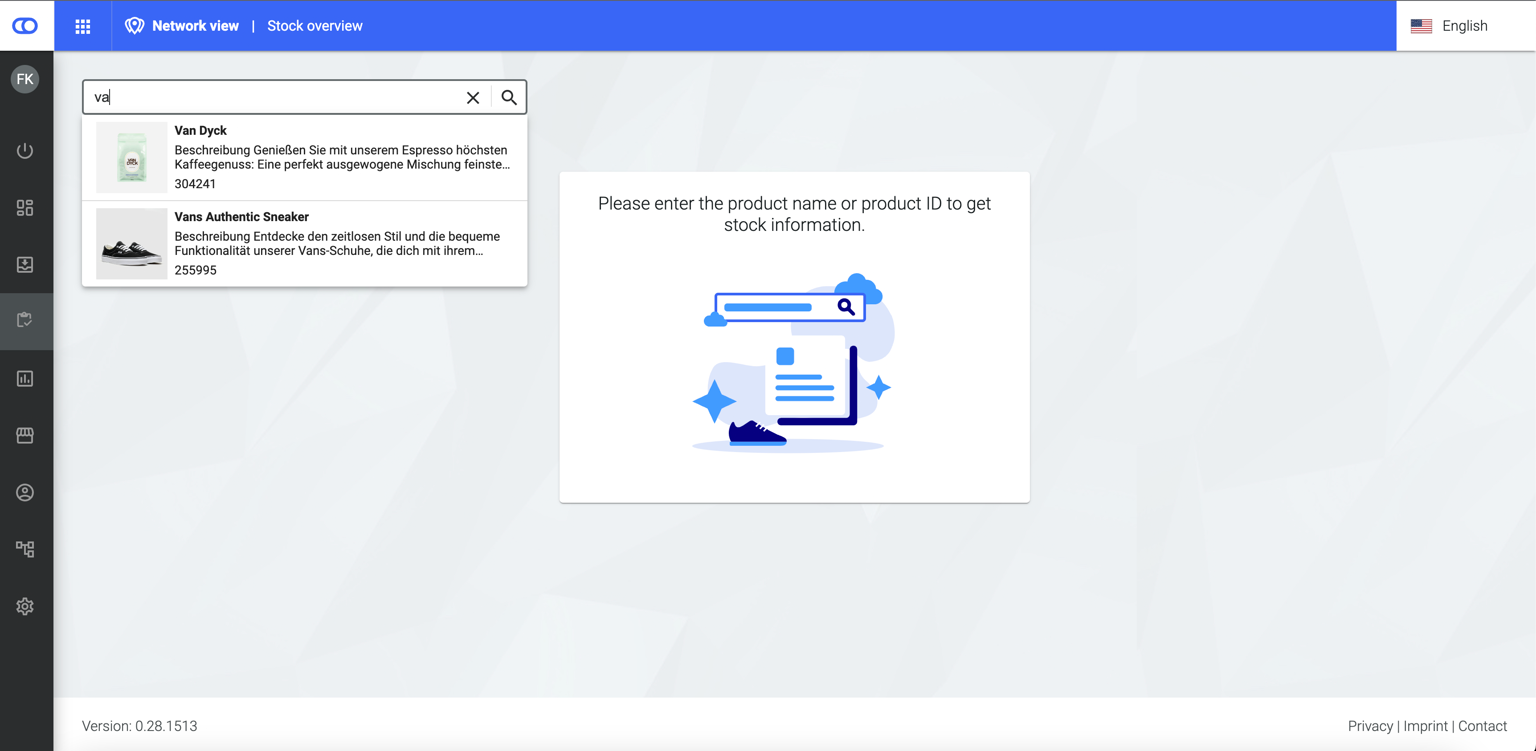
## New stock overview

The stock overview provides an overview of all articles in the network and their respective stock.

* **Inventory across the entire network**: View and filter the inventory of all articles and all facilities in the fulfillment network.
* **All availability values at a glance**: From the quantity available for sale and reservations to expected stock and safety stock.
* **Customization Options**: Users can rearrange columns and thus, tailor the view to their needs.

{% hint style="info" %}
More information can be found under [Network view – Inventory](/documentation/backoffice/network-view/inventory.md).
{% endhint %}

<figure><img src="https://4170739437-files.gitbook.io/~/files/v0/b/gitbook-x-prod.appspot.com/o/spaces%2FLrrr5jgTsDuR38gNJIrm%2Fuploads%2Fz9uYHIXYxRyI3Ak77AaQ%2FThalia%20Stock%20overview.png?alt=media&amp;token=9bf54b3f-1fc4-478c-a529-173c2b050052" alt=""><figcaption></figcaption></figure>
{% endupdate %}

{% update date="2025-07-22" tags="backoffice,global-inventory-hub" %}

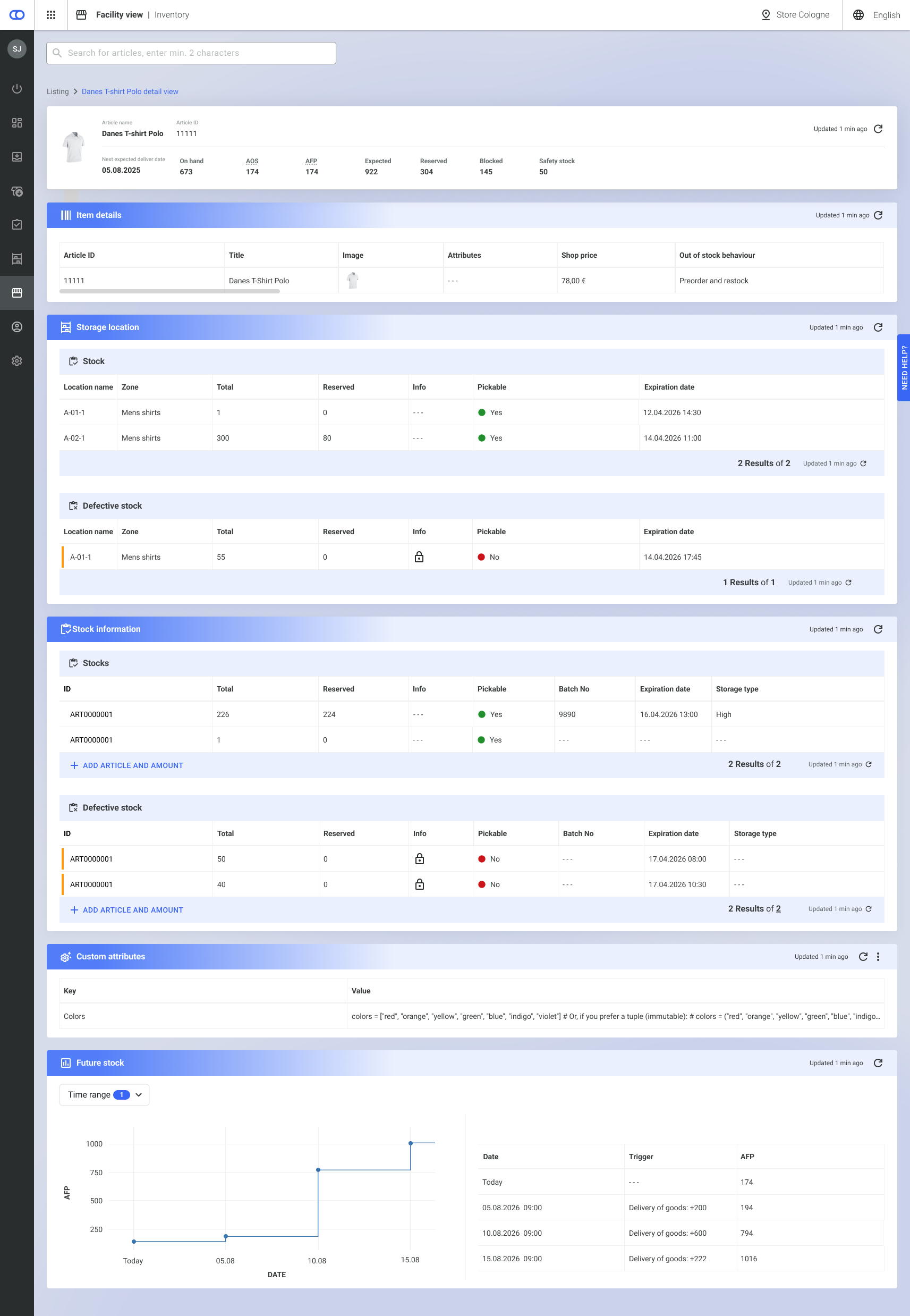
## New listing detail view

The listing detail view provides facility specific information on an article that is listed in a facility. The new view is presented in an improved layout, offering more extensive listing details and new functionalities such as viewing and editing custom attributes.

{% hint style="info" %}
More information can be found under [Facility view - Inventory](/documentation/backoffice/facility-view/inventory.md).
{% endhint %}

<figure><img src="https://4170739437-files.gitbook.io/~/files/v0/b/gitbook-x-prod.appspot.com/o/spaces%2FLrrr5jgTsDuR38gNJIrm%2Fuploads%2FHP7V0KyQfReEl6a8gCvX%2FListings%20detail%20page.png?alt=media&amp;token=e6ffd232-1e61-43aa-aac5-d1a8a28ea3d8" alt=""><figcaption></figcaption></figure>
{% endupdate %}

{% update date="2025-07-17" tags="backoffice,order-management" %}

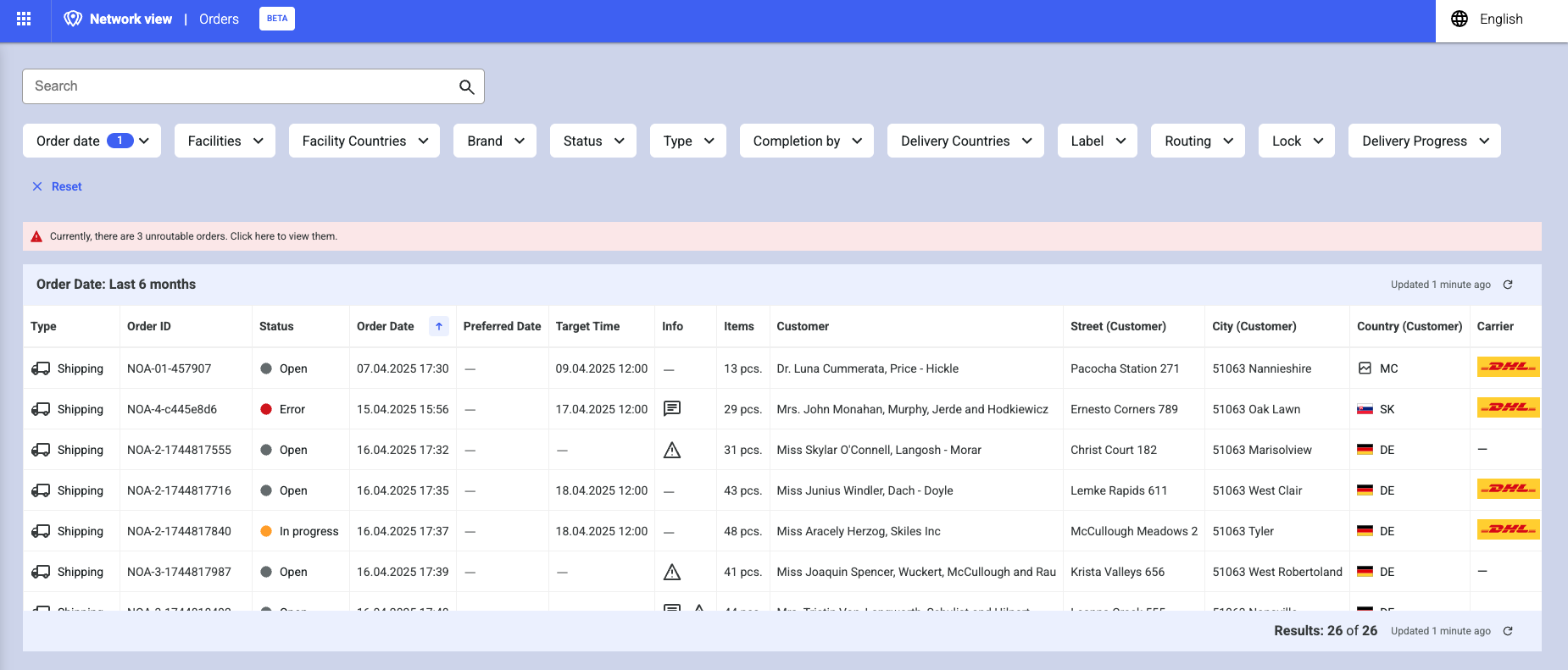
## New orders view (Beta)

The new order view, running alongside the current order page, is designed to provide a clearer and more efficient overview of orders.

* **Improved Layout**: An easier-to-read layout optimizes visibility of the order processes.
* **Enhanced Status Indicators**: Newly added status indicators provide insights into the last mile delivery within the order process.
* **Detailed Information**: More comprehensive details about fulfillment processes, parcels and services are now available on the detail page, which can be opened separately for better comparison.
* **Better Performance**: Improved system performance ensures a faster and smoother user experience.
* **Customization Options**: Users can now rearrange, sort and hide columns and containers to tailor the view to their needs.

{% hint style="info" %}
If you are interested in using and trying out the new view, please contact our customer support. Further information can be found under [Orders (Beta)](/documentation/backoffice/network-view/orders.md).
{% endhint %}

<figure><img src="https://4170739437-files.gitbook.io/~/files/v0/b/gitbook-x-prod.appspot.com/o/spaces%2FLrrr5jgTsDuR38gNJIrm%2Fuploads%2FI6cpEgam3hVroIruCT8s%2FBildschirmfoto%202025-06-24%20um%2013.58.24.png?alt=media&amp;token=4986beab-e6d6-4672-97a5-0455333573b6" alt=""><figcaption></figcaption></figure>
{% endupdate %}

{% update date="2025-07-15" tags="apis,store-operations" %}

## Optimized shipping cost calculation through intelligent packing algorithms

The packing algorithm evaluates various methods for grouping ordered items into packages during the routing process. Therefore, shipping costs can be calculated more precisely based on the actual composition of the packages. Considering the dimensions of the items and the available shipping box types, realistic packaging scenarios are simulated.

In addition to fixed package rates assigned to specific shipping routes, the system can also calculate dynamic package-based costs such as costs per unit of weight or volume shipped.\
This detailed and data-driven calculation of shipping costs provides leverage to reduce shipping expenses across the network.

{% hint style="info" %}
If you are interested in using this feature, contact our customer support. It is only available if fulfillment locations are configured as an interconnected fulfillment network.
{% endhint %}
{% endupdate %}

{% update date="2025-06-17" tags="apis" %}

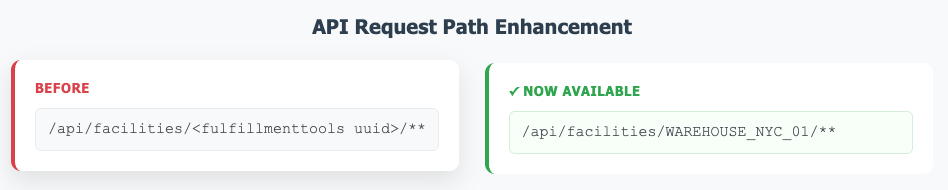
## Usage of tenantFacilityId in API request paths

Users are no able to leverage tenant-defined IDs in API requests. For the start, the `tenantFacilityId` can be used to identify a facility entity.

**Key Benefits:**

* Improved interoperability with third-party services utilizing their own identifiers.
* Enhanced user experience by supporting familiar, business-specific IDs.
* Streamlined integration and reduced complexity in ID mapping.
* Alignment of API operations with business logic for intuitive resource management.

{% hint style="info" %}
More information can be found under [Uniform-Resource-Name-Pattern (URN) in path parameters](/documentation/apis/api-reference.md#uniform-resource-name-pattern-urn-in-path-parameters).
{% endhint %}

<figure><img src="https://4170739437-files.gitbook.io/~/files/v0/b/gitbook-x-prod.appspot.com/o/spaces%2FLrrr5jgTsDuR38gNJIrm%2Fuploads%2FWLIwOna64niCOwSoxiPD%2FScreenshot%202025-06-27%20at%2009.17.25.png?alt=media&amp;token=b279ebec-a14f-4a5b-9251-091d95817bdc" alt=""><figcaption></figcaption></figure>
{% endupdate %}

{% update date="2025-06-12" tags="backoffice,global-inventory-hub" %}

## Performance improvements article search

Thanks to technical optimizations carried out in the background, the article search in the Backoffice now offers optimized performance (even with large amounts of data). The article searches on the [stock overview](/documentation/backoffice/network-view/inventory.md) and the [listing views](/documentation/backoffice/network-view/inventory/stock-detail-view.md) benefit from this.

{% hint style="info" %}
More information on the Backoffice view can be found under [Backoffice](/documentation/backoffice/network-view.md).
{% endhint %}

<figure><img src="https://4170739437-files.gitbook.io/~/files/v0/b/gitbook-x-prod.appspot.com/o/spaces%2FLrrr5jgTsDuR38gNJIrm%2Fuploads%2FdKpPtNOz8PJCuTtI7uIw%2Fimage.png?alt=media&amp;token=2f86c9ed-7b83-44bb-a017-3e07415ada17" alt=""><figcaption></figcaption></figure>
{% endupdate %}

{% update date="2025-06-11" tags="backoffice,apis,advanced-order-routing" %}

## Facility groups can be used to define routing rules <a href="#facility-groups-can-be-used-in-order-to-set-routing-rules" id="facility-groups-can-be-used-in-order-to-set-routing-rules"></a>

[Facility groups](/documentation/getting-started/facilities/facility-groups.md) allow multiple facilities to be bundled together. These groups can now be used when configuring new routing strategies, toolkit ratings, or fences.

{% hint style="info" %}
More information on routing strategies can be found under [Advanced Order Routing](/documentation/by-pillar/advanced-order-routing/routing-strategy.md).
{% endhint %}

<figure><img src="https://4170739437-files.gitbook.io/~/files/v0/b/gitbook-x-prod.appspot.com/o/spaces%2FLrrr5jgTsDuR38gNJIrm%2Fuploads%2FUdXknIQZY86ylnQJghXn%2Fimage.png?alt=media&amp;token=ca593f8c-a7aa-4aac-9a9e-dd11f52045ca" alt=""><figcaption><p>The ordering facility defines when a toolkit fence or rating is being considered</p></figcaption></figure>

<figure><img src="https://4170739437-files.gitbook.io/~/files/v0/b/gitbook-x-prod.appspot.com/o/spaces%2FLrrr5jgTsDuR38gNJIrm%2Fuploads%2FnAWdqhmW4TH2QULgKF0X%2Fimage.png?alt=media&amp;token=a4df64c0-5fb9-46ac-990c-297e5ff0bcc2" alt=""><figcaption><p>The ordering facility defines when a routing strategy "knot" becomes valid</p></figcaption></figure>
{% endupdate %}

{% update date="2025-06-10" tags="apps,store-operations" %}

## Mandatory short-pick reasons

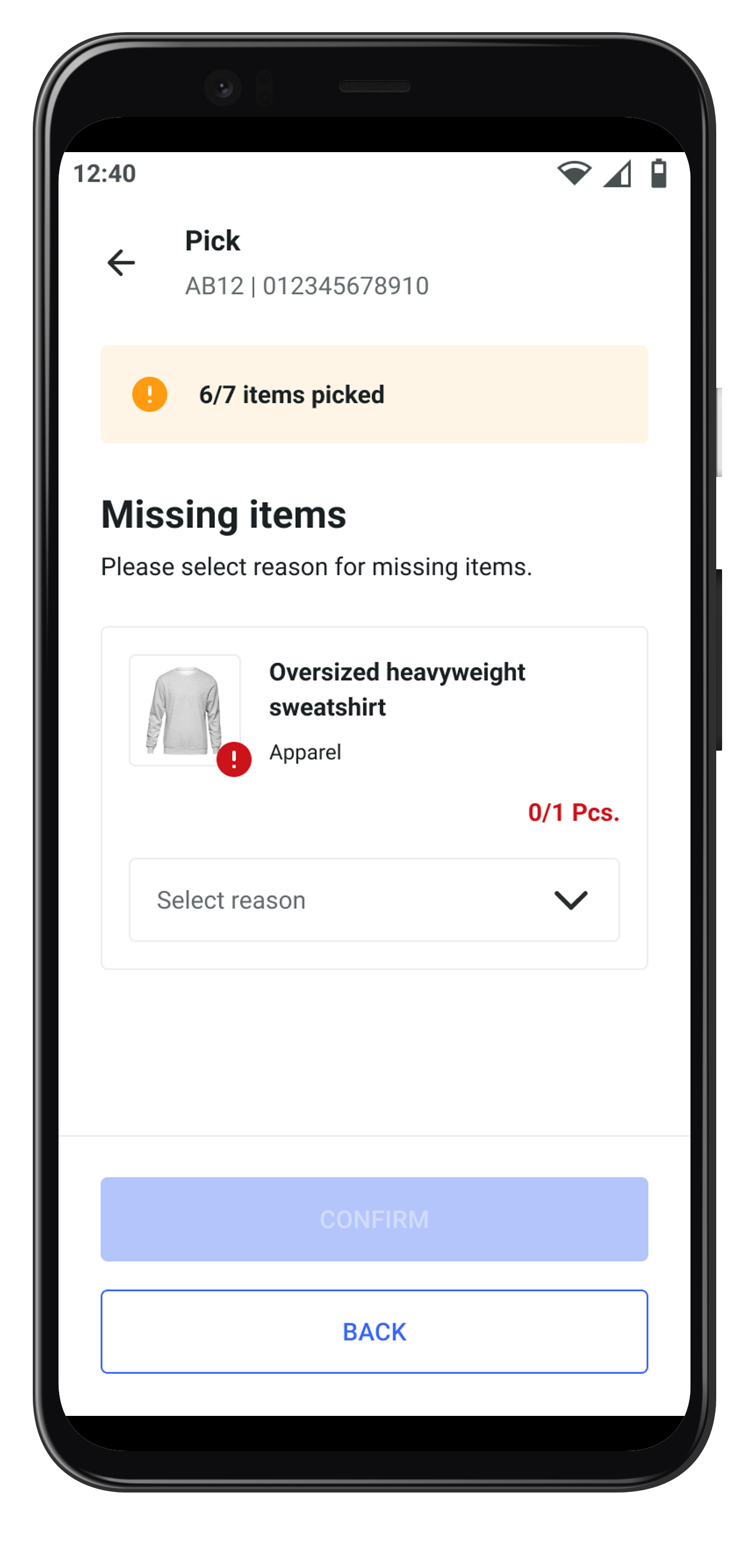
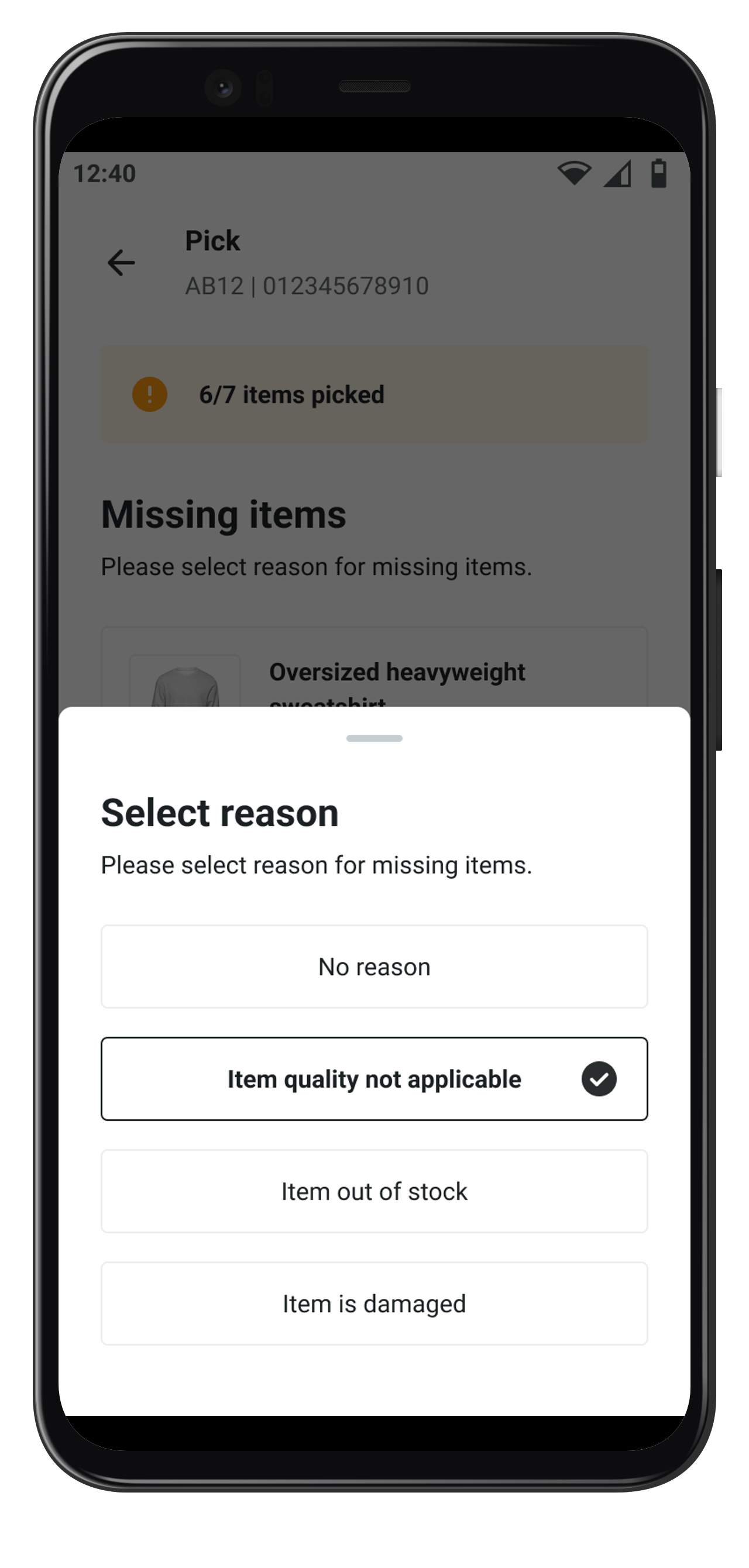
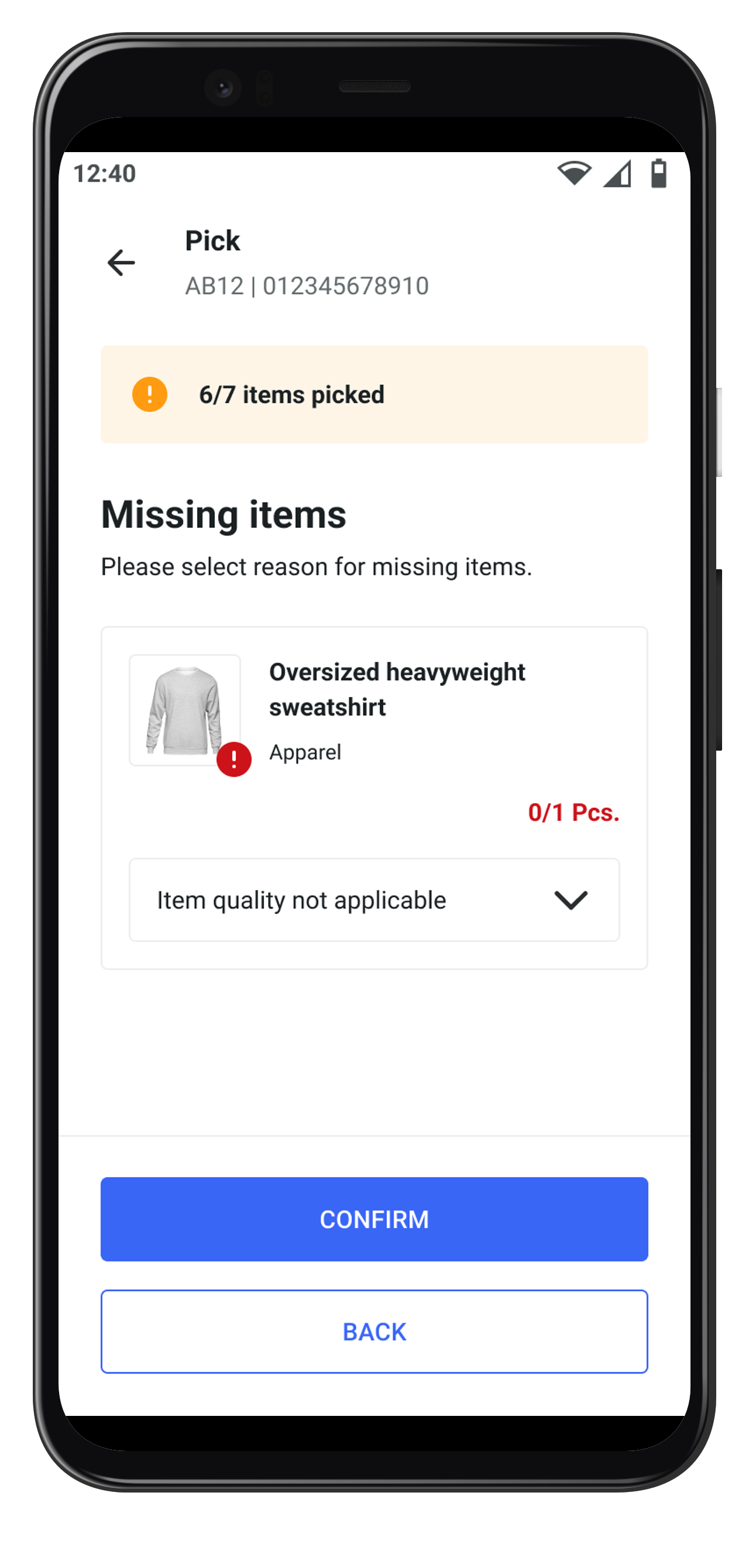
Short-pick reasons can now be made mandatory through remote configuration. If this configuration is active, users must provide reasons for every short-pick before they can finish the picking task.

{% hint style="info" %}
More information about remote configurations can be found under [Remote configurations](/documentation/by-pillar/store-operations/remote-configuration.md).
{% endhint %}

<div><figure><img src="https://4170739437-files.gitbook.io/~/files/v0/b/gitbook-x-prod.appspot.com/o/spaces%2FLrrr5jgTsDuR38gNJIrm%2Fuploads%2Fa6iFzyYz44dFFiuKoSED%2FRelease-Notes-Shortpick-01-portrait.png?alt=media&amp;token=0b349711-a84f-4b7c-9a6e-2fc1bcf078e5" alt=""><figcaption><p>Confirm button inactive</p></figcaption></figure> <figure><img src="https://4170739437-files.gitbook.io/~/files/v0/b/gitbook-x-prod.appspot.com/o/spaces%2FLrrr5jgTsDuR38gNJIrm%2Fuploads%2FsviI9sZlwlkdgKfb6DPW%2FRelease-Notes-Shortpick-02-portrait.png?alt=media&amp;token=c7df1f3b-6f42-481a-9026-afecb3ac2846" alt=""><figcaption><p>Reason selected</p></figcaption></figure> <figure><img src="https://4170739437-files.gitbook.io/~/files/v0/b/gitbook-x-prod.appspot.com/o/spaces%2FLrrr5jgTsDuR38gNJIrm%2Fuploads%2FqwHNzmhe94ggUV2g2qdw%2FRelease-Notes-Shortpick-03-portrait.png?alt=media&amp;token=bd91ac80-c54a-4d82-b639-38e280407f2e" alt=""><figcaption><p>Confirm button active</p></figcaption></figure></div>
{% endupdate %}

{% update date="2025-06-10" tags="apis,availability-and-promising" %}

## Custom attributes filter for checkout options earliest endpoint

The [earliest possible delivery date shop endpoint](/documentation/by-pillar/availability-and-promising/earliest-possible-delivery-date.md) now offers a new filter option by custom attributes.

The endpoint provides the earliest possible delivery date for an item or a list of items. This information can be used on a search result or product overview page to inform the shop user about the earliest delivery date that can be expected for a specific item.

By applying a filter to the request, only facilities that share the specified attribute(s) are considered when evaluating fulfillment options.

A typical use case can be found among retailers operating across multiple countries. In such scenarios, it is essential to ensure that consumers in the online shop are only presented with fulfillment options and delivery promises that are based on resources actually available and accessible within their country.

{% hint style="info" %}
More information can be found under [custom attributes](/documentation/getting-started/custom-attributes.md). More API information can be found here: [REST API documentation – checkoutoptions/delivery/earliest](https://fulfillmenttools.github.io/fulfillmenttools-api-reference-ui/#post-/api/promises/checkoutoptions/delivery/earliest).
{% endhint %}
{% endupdate %}

{% update date="2025-04-24" tags="apis,global-inventory-hub" %}

## Sales price in listing attributes

Listings can have a sales price. The sales price is particularly relevant for [facilities with type supplier](/documentation/getting-started/facilities.md#supplier-facilities). These facilities sell/deliver articles to other facilities. Therefore, it might be necessary to define the price for which these supplier facilities sell their listings to other facilities / facility groups.

{% hint style="info" %}
More information can be found under [Article attributes](/documentation/by-pillar/global-inventory-hub/articles/article-attributes.md).
{% endhint %}
{% endupdate %}

{% update date="2025-04-22" tags="apis" %}

## Facility groups

Facility groups can be used to mark individual facilities as belonging to a specific group. A facility can be part of several facility groups. Facility groups can be created, edited and deleted via [REST API](https://fulfillmenttools.github.io/fulfillmenttools-api-reference-ui/#tag--Core---FacilityGroups). Facility groups can be used, for example, to define [sales prices](/documentation/by-pillar/global-inventory-hub/articles/article-attributes.md) for certain facility groups.

{% hint style="info" %}
More information can be found under [Facility groups](/documentation/getting-started/facilities/facility-groups.md).
{% endhint %}
{% endupdate %}

{% update date="2025-04-17" tags="apis,global-inventory-hub" %}

## Categories

Categories can be used to mark [listings](/documentation/by-pillar/global-inventory-hub/listing.md) as belonging to a specific category. A listing can belong to one to many categories. Categories can be created, edited and deleted via [REST API](https://fulfillmenttools.github.io/fulfillmenttools-api-reference-ui/#tag--Inventory-Management---Categories).

{% hint style="info" %}
More information can be found under [Categories](/documentation/by-pillar/global-inventory-hub/categories.md).
{% endhint %}
{% endupdate %}

{% update date="2025-03-25" tags="backoffice,apis" %}

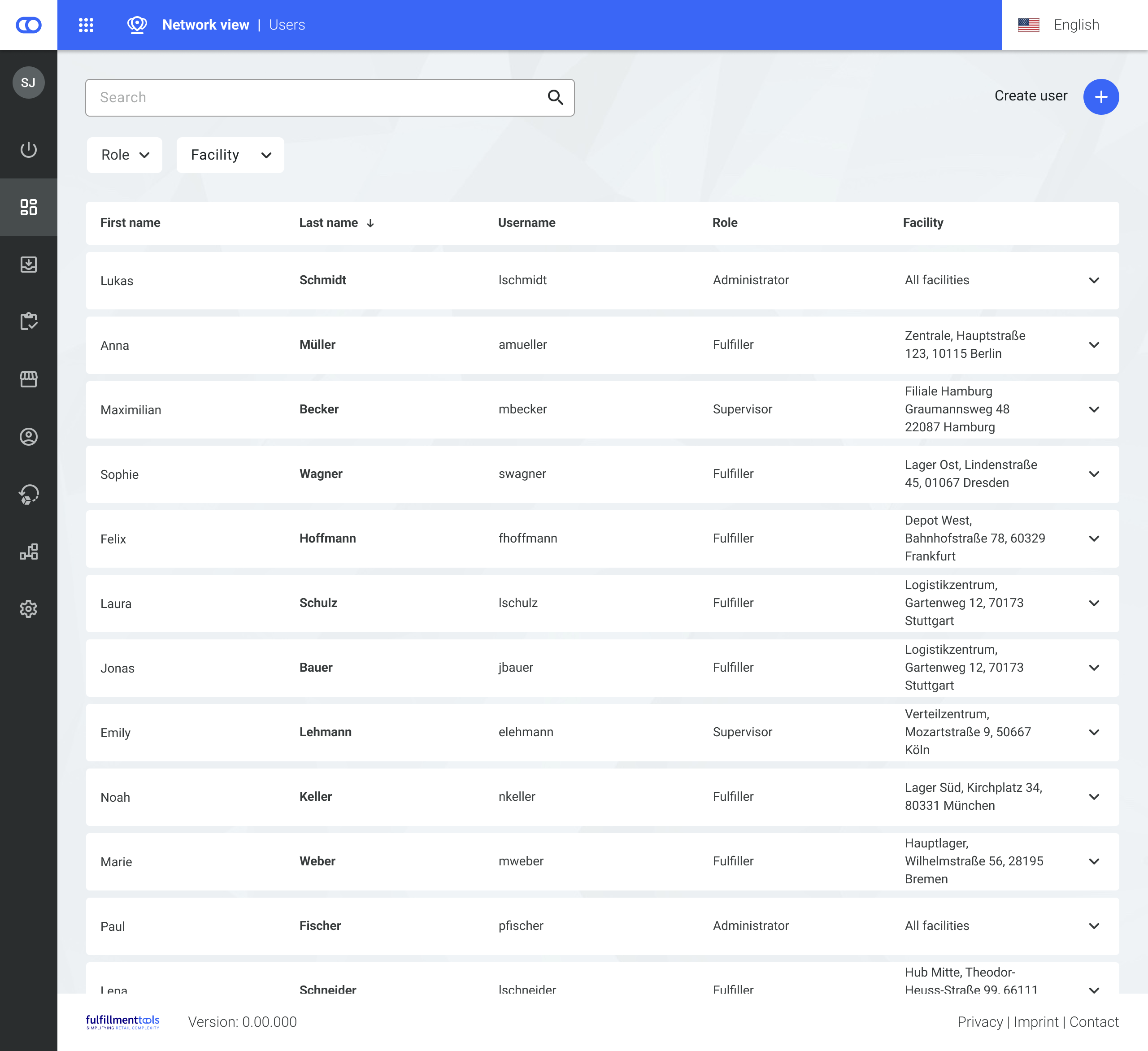
## Search and filter in user management

A new search on the user view enables searching and filtering by facility, role, or name.

{% hint style="info" %}
More information on user management can be found under [User Management](/documentation/getting-started/authentication-and-authorization/user-management.md).
{% endhint %}

<figure><img src="https://4170739437-files.gitbook.io/~/files/v0/b/gitbook-x-prod.appspot.com/o/spaces%2FLrrr5jgTsDuR38gNJIrm%2Fuploads%2FQpUxAwK6rcaUghjHxILu%2Fimage.png?alt=media&amp;token=477d4dc5-4998-414b-bd2e-79151b80917e" alt=""><figcaption></figcaption></figure>
{% endupdate %}

{% update date="2025-03-25" tags="apis,global-inventory-hub" %}

## New webhook events in inventory

New events were introduced for `storageLocation` and `listing`, improving the usage of both for event-based system architectures.

{% hint style="info" %}
All available events in the fulfillmenttools platform can be found under [Available events](/documentation/getting-started/eventing/available-events.md).
{% endhint %}
{% endupdate %}

{% update date="2025-03-18" tags="apis,global-inventory-hub" %}

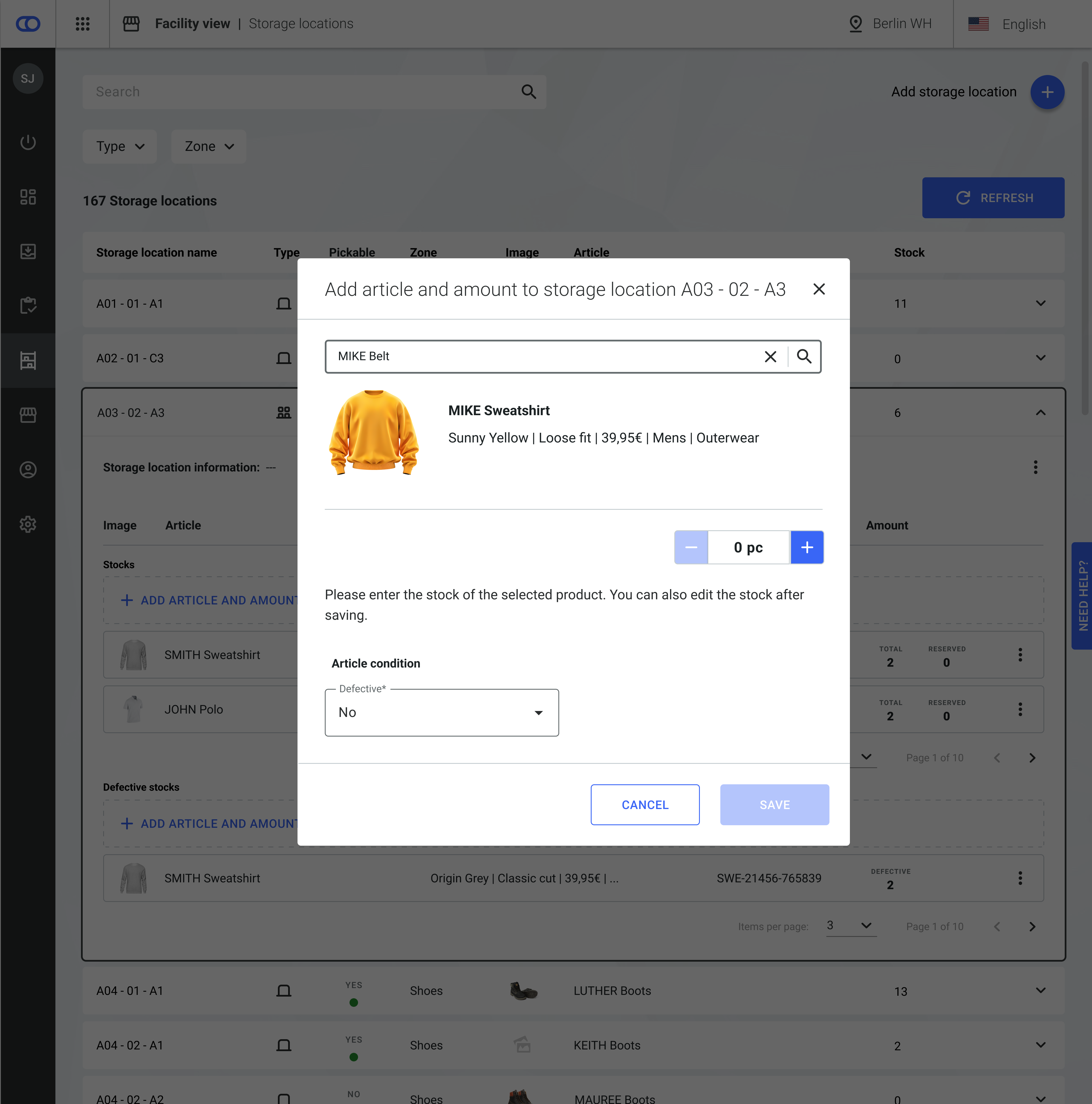
## Defective stock

It is possible that stock is delivered to a facility in a defective state or that it gets damaged during storage. In such instances, it is advisable to label the stock accordingly and make it unavailable for sale. This option is provided by the [stock condition](/documentation/by-pillar/global-inventory-hub/stock.md#stock-condition).

Stocks with the condition defective are displayed in a separate section in the [listing detail view](/documentation/backoffice/network-view/inventory/stock-detail-view.md) and the [storage location view](/documentation/backoffice/facility-view/inventory/storage-locations.md). Users can set the condition to defective when adding new stock.

{% hint style="info" %}
More information can be found under [Stock condition](/documentation/by-pillar/global-inventory-hub/stock.md#stock-condition).
{% endhint %}

<table data-header-hidden data-full-width="false"><thead><tr><th width="376.12890625" align="center"></th><th align="center"></th></tr></thead><tbody><tr><td align="center"><img src="https://4170739437-files.gitbook.io/~/files/v0/b/gitbook-x-prod.appspot.com/o/spaces%2FLrrr5jgTsDuR38gNJIrm%2Fuploads%2FxsKkW0odVlCSErN0GOJZ%2FStorage%20Location%20-%20Defective%20%26%20Reserved%20Stock%20(4).png?alt=media&amp;token=13dc24af-b68c-40bf-b01f-46b72969d10e" alt="" data-size="original"></td><td align="center"><img src="https://4170739437-files.gitbook.io/~/files/v0/b/gitbook-x-prod.appspot.com/o/spaces%2FLrrr5jgTsDuR38gNJIrm%2Fuploads%2FyGxoyKtjrfbiR8ZJudn2%2FStorage%20Location%20-%20Add%20article.png?alt=media&amp;token=3f0b063f-48f2-4007-8218-f63945564e4f" alt="" data-size="original"></td></tr></tbody></table>
{% endupdate %}

{% update date="2025-02-19" tags="apis" %}

## Additions to search functionality

New search endpoints were introduced, allowing searching entities by various search parameters using sorting and several search operators. This covers the following entities: facilities, handover jobs, inbound processes, listings, orders, pack jobs, pick jobs, processes, routing plans, stocks, storage locations, stow jobs, users, and zones.

{% hint style="info" %}
More information can be found under [Search](/documentation/getting-started/search.md).
{% endhint %}
{% endupdate %}

{% update date="2025-02-12" tags="apis,order-management" %}

## Auditing functionality

The auditing functionality enables users to retrieve information on which actor changed an entity or process. This covers human actors as well as business functions responsible for any changes. Audits can be retrieved via [API](https://fulfillmenttools.github.io/fulfillmenttools-api-reference-ui/#tag--Core---Audit).

{% hint style="info" %}
More information on can be found under [Audits](/documentation/by-pillar/order-management/audits.md).
{% endhint %}
{% endupdate %}

{% update date="2025-02-11" tags="apis,global-inventory-hub" %}

## New webhook events in inventory

New events were introduced for `stock`, `stow job`, `inbound process`, and `receipt`, improving the usage of the inbound feature, stow jobs, and stock updates for event-based system architectures.

{% hint style="info" %}
All available events in the fulfillmenttools platform can be found under [Available events](/documentation/getting-started/eventing/available-events.md).
{% endhint %}
{% endupdate %}

{% update date="2025-02-05" tags="backoffice,global-inventory-hub" %}

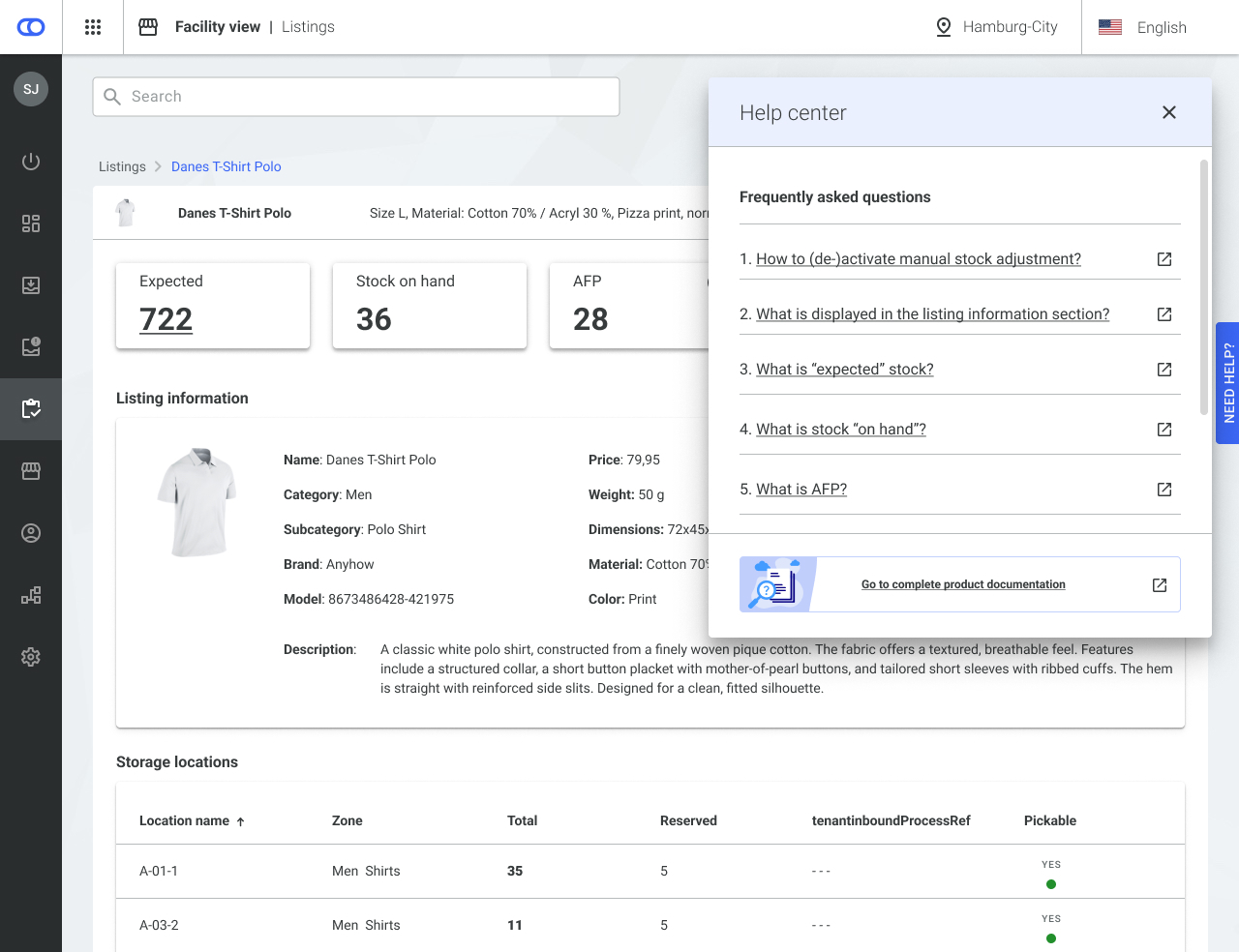
## Help center in inventory views

The help center is available on the stock overview, listing view, inbound view, and storage location view in the Backoffice. Upon clicking on the help button, the user receives helpful links to the fulfillmenttools documentation, supporting the usage and understanding of the respective view.

<figure><img src="https://4170739437-files.gitbook.io/~/files/v0/b/gitbook-x-prod.appspot.com/o/spaces%2FLrrr5jgTsDuR38gNJIrm%2Fuploads%2FerUdvYhvKnIyzOOT6VRy%2FListings%20-%20release%20notes%402x.jpg?alt=media&amp;token=341c0cd2-2035-4b78-a1c7-0ac0ad2a272f" alt=""><figcaption></figcaption></figure>
{% endupdate %}

{% update date="2025-02-05" tags="backoffice,advanced-order-routing" %}

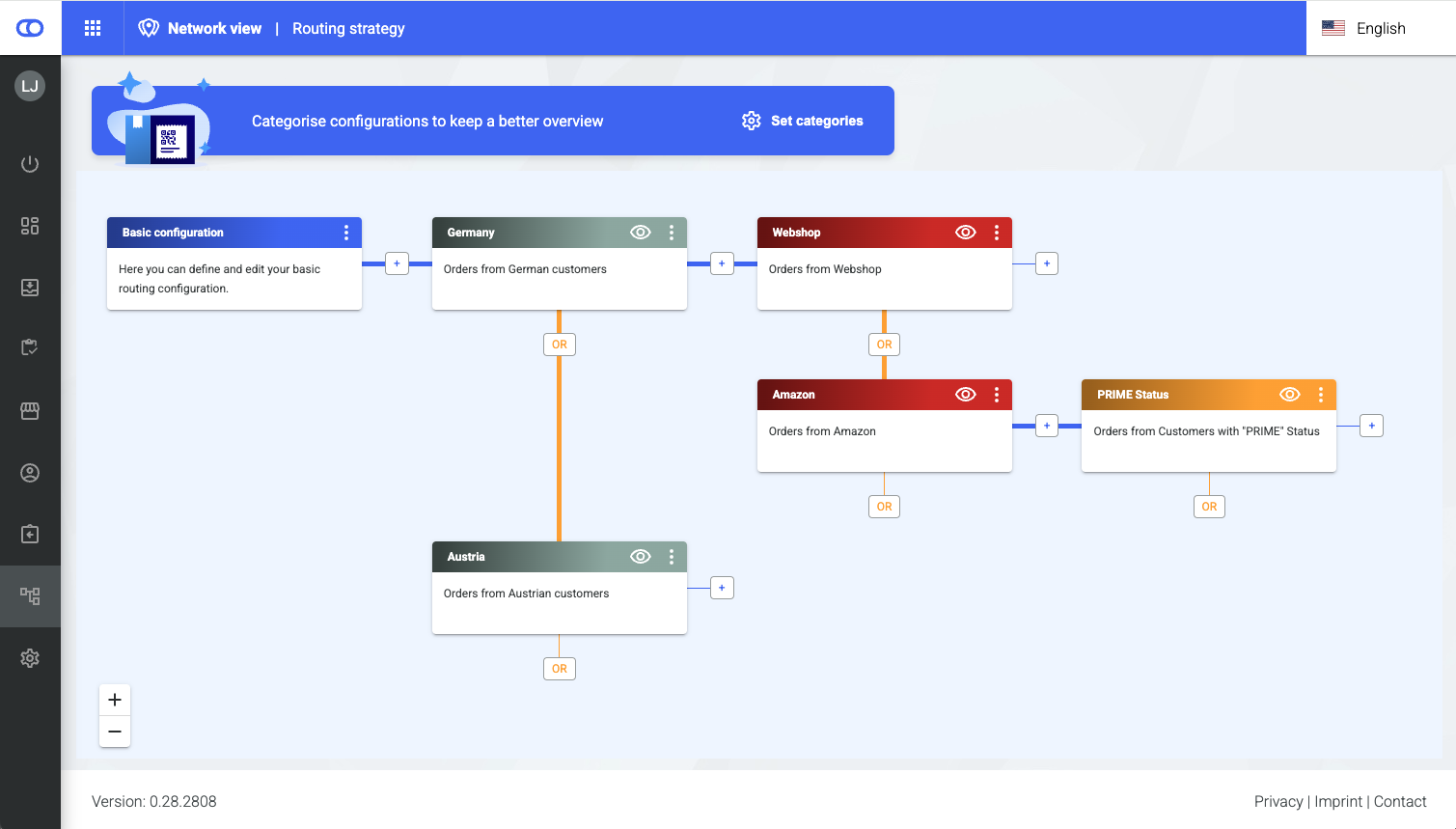
## Routing strategy

With the new routing strategy feature, multiple context-specific routing setups can be configured on a tenant. This enables fully customized routing decisions tailored to different use cases, allowing for greater flexibility and precise control over routing behavior.

{% hint style="info" %}
More information can be found under [Routing strategy](/documentation/by-pillar/advanced-order-routing/routing-strategy.md).
{% endhint %}

<figure><img src="https://4170739437-files.gitbook.io/~/files/v0/b/gitbook-x-prod.appspot.com/o/spaces%2FLrrr5jgTsDuR38gNJIrm%2Fuploads%2FvhcPvK6jO7GLlTCQeDYU%2Fimage.png?alt=media&amp;token=7f07551a-d545-49f5-a277-1b3977f3225e" alt=""><figcaption></figcaption></figure>
{% endupdate %}

{% update date="2025-02-05" tags="apis" %}

## New search functionality

The new search functionality introduces a search endpoint for individual entities in fulfillmenttools. The search offers a counting and sorting mechanism as well as search operators such as `eq`, `notEq`, `in`, `notIn`, `gt` (>)**,** `gte` (>=)**,** `lt` (<)**,** and `lte` (<=).

{% hint style="info" %}
More information on the search can be found under [Search](/documentation/getting-started/search.md).
{% endhint %}
{% endupdate %}

{% update date="2025-02-05" tags="apis,global-inventory-hub" %}

## External stock change reasons

External stock change reasons represent user-defined reasons for stock movements within a facility. These reasons can optionally be included in stow line items of [stow jobs](/documentation/by-pillar/global-inventory-hub/stow-jobs.md) to explain why the stock was adapted.

{% hint style="info" %}
More information can be found under [External stock change reasons](/documentation/by-pillar/global-inventory-hub/stock/external-stock-change-reasons.md).
{% endhint %}
{% endupdate %}

{% update date="2025-02-05" tags="apis,global-inventory-hub" %}

## New webhook events for purchase order and stocks

New events were introduced for `stock` and `purchaseOrder`, improving the usage of the inbound feature and stock updates for event-based system architectures.

{% hint style="info" %}
All available events in the fulfillmenttools platform can be found under [Available events](/documentation/getting-started/eventing/available-events.md).
{% endhint %}
{% endupdate %}

{% update date="2025-02-04" tags="apis,global-inventory-hub" %}

## Status on purchase order and receipt

* An open status was added to the receipt, simplifying the mapping of the process of accepting incoming goods.
* A canceled status was added to the purchaseOrder, replacing the deprecated canceled flag.

{% hint style="info" %}
More information about the status of the the inbound process and its sub-entities can be found under [Inbound process](/documentation/by-pillar/global-inventory-hub/inbound-process.md).
{% endhint %}
{% endupdate %}

{% update date="2025-02-04" tags="backoffice,global-inventory-hub" %}

## Requested date and time visible in inbound view

The date and time for which a delivery of goods was requested is displayed in the [inbound view](/documentation/backoffice/facility-view/inventory/inbound.md) in the Backoffice.

<figure><img src="https://4170739437-files.gitbook.io/~/files/v0/b/gitbook-x-prod.appspot.com/o/spaces%2FLrrr5jgTsDuR38gNJIrm%2Fuploads%2Ft2DiINbuQSaDiCevRy1A%2FInbound%20(1).png?alt=media&amp;token=4f626d07-395a-4d8e-89dc-abec0c29e2e7" alt=""><figcaption></figcaption></figure>
{% endupdate %}

{% update date="2025-02-04" tags="backoffice,global-inventory-hub" %}

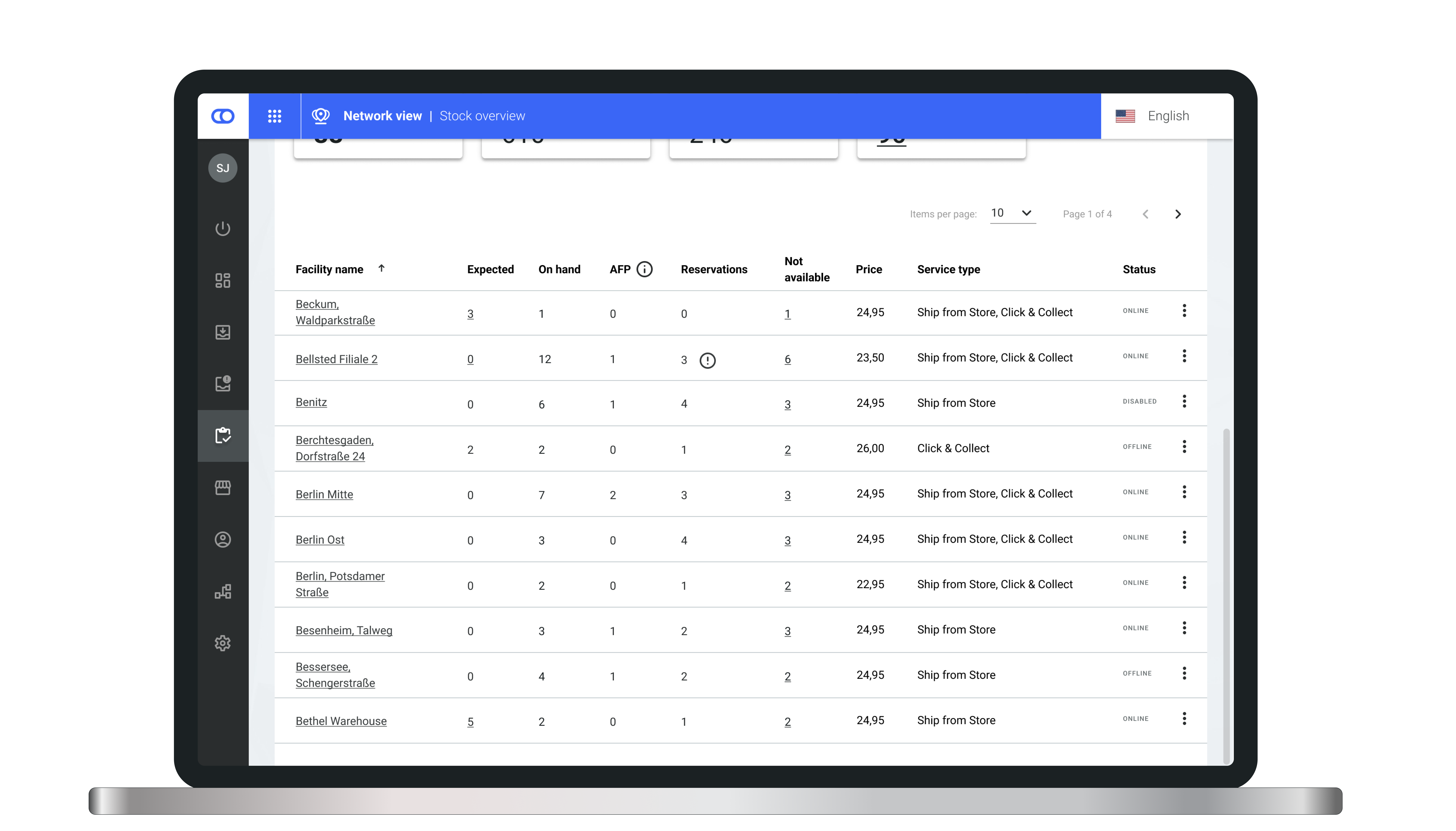
## Reservations column in stock overview

A reservation column is added the [stock overview](/documentation/backoffice/network-view/inventory.md) in Backoffice, displaying the sum of all reservations for the respective facility including [reservations](/documentation/by-pillar/global-inventory-hub/reservations.md) without stock and reservations on [expected stock](/documentation/by-pillar/global-inventory-hub/stock/expected-stock-in-availability.md).

<figure><img src="https://4170739437-files.gitbook.io/~/files/v0/b/gitbook-x-prod.appspot.com/o/spaces%2FLrrr5jgTsDuR38gNJIrm%2Fuploads%2FCr7x91Qz71eJBidSwIRq%2FStock%20Overview_.png?alt=media&amp;token=66fa2185-3728-4542-8a3b-0de1f68bae38" alt=""><figcaption></figcaption></figure>
{% endupdate %}

{% update date="2025-02-04" tags="backoffice,store-operations" %}

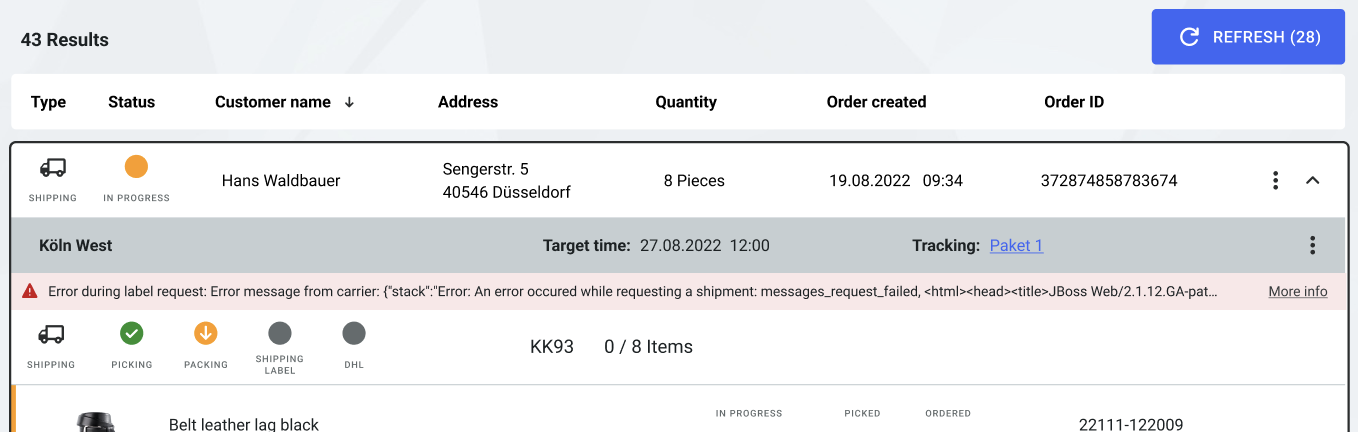
## Label error messages are shown

In case there has been an error during the label request, the error message from the carrier is shown in the [order view](/documentation/backoffice/network-view/orders.md).

<figure><img src="https://4170739437-files.gitbook.io/~/files/v0/b/gitbook-x-prod.appspot.com/o/spaces%2FLrrr5jgTsDuR38gNJIrm%2Fuploads%2F9RFDKNmYQs6lR4fHmPwi%2FBildschirmfoto%202025-01-31%20um%2011.22.08.png?alt=media&amp;token=eae013f3-b5a5-4f95-bdc6-03b13b162417" alt=""><figcaption></figcaption></figure>
{% endupdate %}
{% endupdates %}


---

# Agent Instructions
This documentation is published with GitBook. GitBook is the documentation platform designed so that both humans and AI agents can read, navigate, and reason over technical content effectively. Learn more at gitbook.com.

## Querying This Documentation
If you need additional information that is not directly available in this page, you can query the documentation dynamically by asking a question.

Perform an HTTP GET request on the current page URL with the `ask` query parameter, and the optional `goal` query parameter:

```
GET https://docs.fulfillmenttools.com/documentation/about-fulfillmenttools/release-notes/release-notes-2025.md?ask=<question>&goal=<endgoal>
```

`ask` is the immediate question: it should be specific, self-contained, and written in natural language.
`goal` is optional and describes the broader end goal you are ultimately trying to accomplish on behalf of the user. GitBook uses it to tailor the answer towards what is most useful for that goal.

The response will contain a direct answer to the question and relevant excerpts and sources from the documentation.

Use this mechanism when the answer is not explicitly present in the current page, you need clarification or additional context, or you want to retrieve related documentation sections.