> For the complete documentation index, see [llms.txt](https://docs.fulfillmenttools.com/documentation/llms.txt). Markdown versions of documentation pages are available by appending `.md` to page URLs; this page is available as [Markdown](https://docs.fulfillmenttools.com/documentation/about-fulfillmenttools/release-notes/release-notes-2024.md).

# Release notes 2024

This page highlights recent updates, new features, and product improvements delivered across our API and Apps.

{% hint style="info" %}
Subscribe to updates using the **RSS feed** button or sign up for our monthly newsletter using the [form on our website](https://fulfillmenttools.com/newsletter-abo-release-summary/).
{% endhint %}

The below release notes focus on the 2024. For other years, see the [2026](/documentation/about-fulfillmenttools/release-notes.md) or [2025](/documentation/about-fulfillmenttools/release-notes/release-notes-2025.md) release notes.

{% updates format="full" %}
{% update date="2024-12-17" tags="apis,global-inventory-hub" %}

## Stow jobs

Stow jobs represent the intention or instruction to change the storage location and/or the amount of stock in a facility. They support employees in a store or warehouse to execute one or several of the below tasks:

* Relocate items within a facility.
* Stow items from a goods receipt.
* Discard expired or broken items.
* Create stock for items that are not registered yet.

{% hint style="info" %}
More information can be found under [Stow jobs](/documentation/by-pillar/global-inventory-hub/stow-jobs.md) or in the [REST API documentation](https://fulfillmenttools.github.io/fulfillmenttools-api-reference-ui/#tag--Inventory-Management---Stowing).
{% endhint %}
{% endupdate %}

{% update date="2024-12-17" tags="backoffice" %}

## CSV export via Backoffice

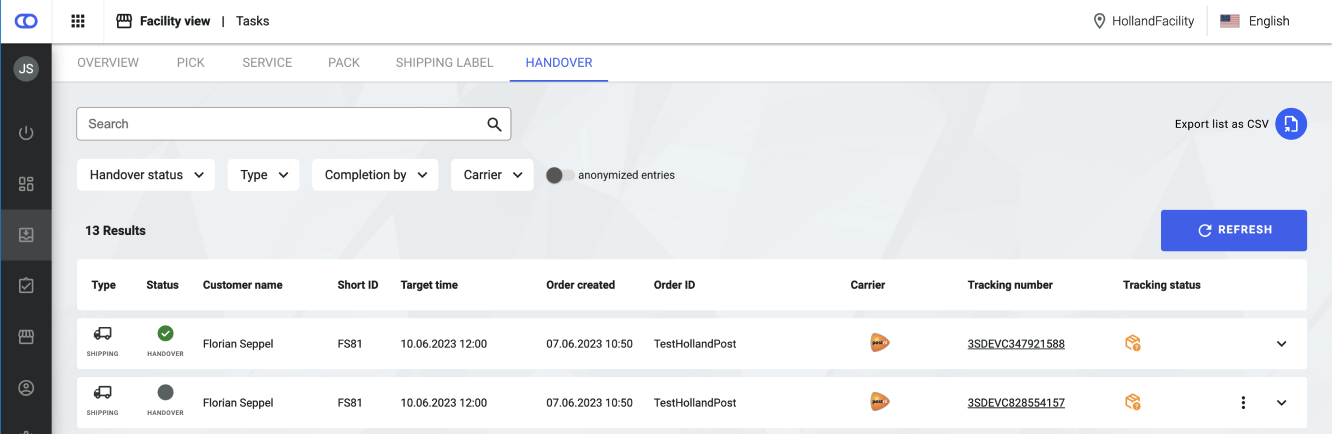
In the handover tab of the facility view there is now the option to compile a CSV export with the data displayed on the page.

<figure><img src="https://4170739437-files.gitbook.io/~/files/v0/b/gitbook-x-prod.appspot.com/o/spaces%2FLrrr5jgTsDuR38gNJIrm%2Fuploads%2F1j2J5AlXlLhRMr795UNt%2FBildschirmfoto%202024-12-20%20um%2014.57.09.png?alt=media&amp;token=1d0a7dd0-8753-421d-9e79-ec825918079b" alt=""><figcaption></figcaption></figure>
{% endupdate %}

{% update date="2024-11-19" tags="backoffice,global-inventory-hub" %}

## New listing view

The new listing overview offers the option to visit a detail page for each listing by clicking on the arrow on the right. The new detail views give insights into important stock availability values, product information, and storage locations or stocks for the listing. In addition, users can edit stock on this page if the respective setting is active.

{% hint style="info" %}
More information can be found under [Listing view](/documentation/backoffice/network-view/inventory.md).
{% endhint %}

<figure><img src="https://4170739437-files.gitbook.io/~/files/v0/b/gitbook-x-prod.appspot.com/o/spaces%2FLrrr5jgTsDuR38gNJIrm%2Fuploads%2FFf4Mf1L5yO0gzwifBkLT%2Fimage%20(2).webp?alt=media&amp;token=af2b07bb-0094-4d7b-87de-0c35299ac28a" alt=""><figcaption></figcaption></figure>
{% endupdate %}

{% update date="2024-11-19" tags="apis,global-inventory-hub" %}

## Defective stock

It is possible that stock is delivered to a facility in a defective state or that it gets damaged during storage. In such instances, it is advisable to label the stock accordingly and make it unavailable for sale. This option is provided by the new 'condition' field on the stock.

If rejected items are accepted during goods [receipt](/documentation/by-pillar/global-inventory-hub/inbound-process.md#receipt), this stock is automatically marked as defective and labelled as not pickable and not accessible.

{% hint style="info" %}
More information can be found under [Stock](/documentation/by-pillar/global-inventory-hub/stock.md#stock-condition).
{% endhint %}
{% endupdate %}

{% update date="2024-11-19" tags="apis,global-inventory-hub" %}

## Trait configuration on stock

Traits provide information on how [storage locations](/documentation/by-pillar/global-inventory-hub/storage-locations-and-zones.md) and [stocks](/documentation/by-pillar/global-inventory-hub/stock.md) are to be handled in operational and order processes. Previously, traits could only be set on storage locations and were inherited to stocks. As part of the latest releases, traits can also be set explicitly on stock. This allows users who do not use storage locations, to mark stock as not accessible or not pickable and therefore, exclude it from order routing. Traits on stocks overwrite the default traits and the traits set on the storage location.

{% hint style="info" %}
More information can be found under [Inventory traits](/documentation/by-pillar/global-inventory-hub/inventory-traits.md).
{% endhint %}
{% endupdate %}

{% update date="2024-11-19" tags="backoffice,global-inventory-hub" %}

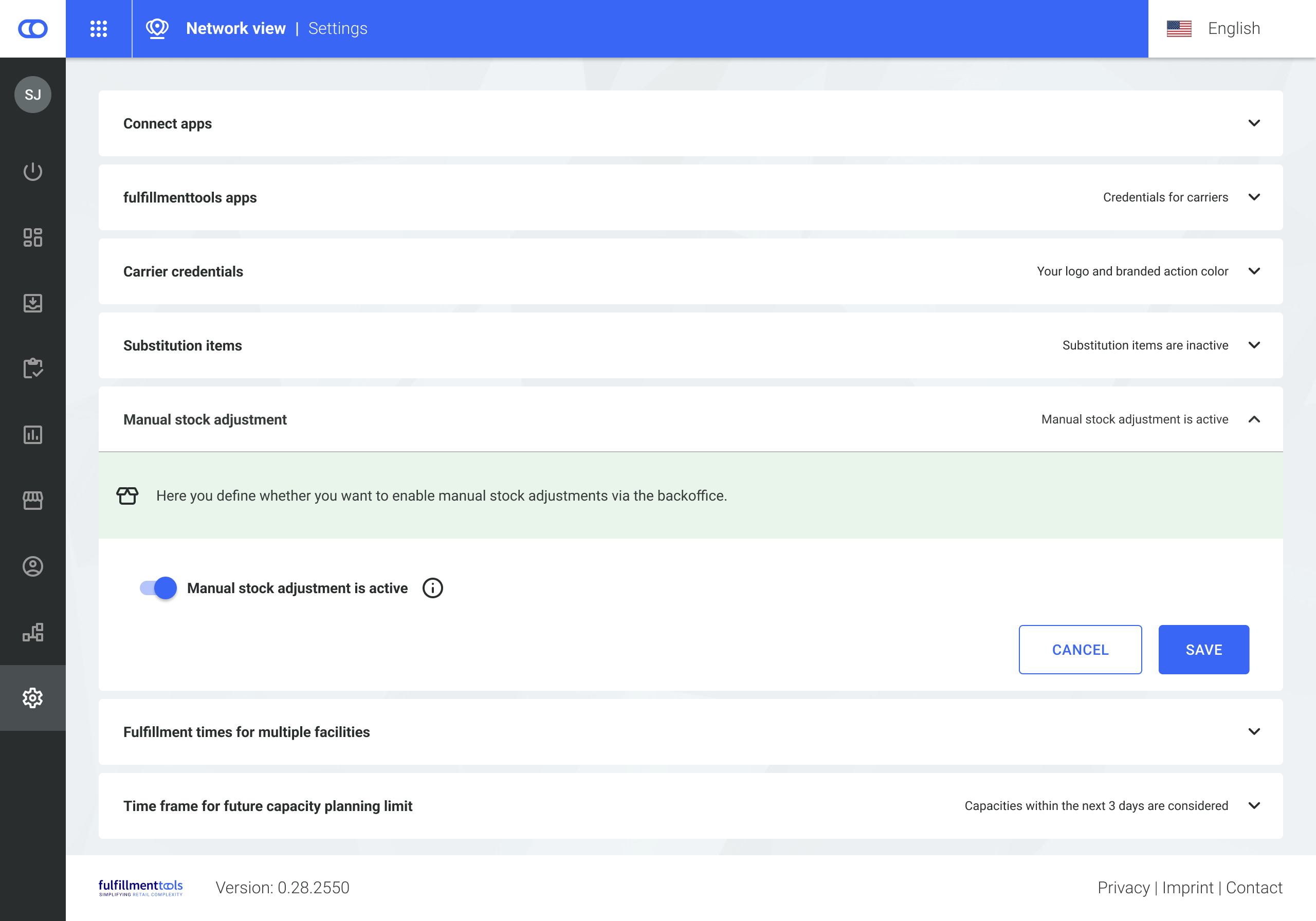
## Configuration for stock modification

Users can decide whether it should be allowed to modify stock levels in the Backoffice. While this configuration was previously only applied to the listing view, storage locations are affected now as well. If modifying stock is disallowed, it is not possible to add stock to storage locations or change the existing stock on locations.

<figure><img src="https://4170739437-files.gitbook.io/~/files/v0/b/gitbook-x-prod.appspot.com/o/spaces%2FLrrr5jgTsDuR38gNJIrm%2Fuploads%2FXVCAPYn2FCzdW21HCF8n%2Frelease-notes-03.png?alt=media&amp;token=2fa2c932-cc8c-4b88-ac1f-9ebe5e0c7c4c" alt=""><figcaption></figcaption></figure>

{% hint style="info" %}
More information can be found under [Network settings](/documentation/backoffice/network-view/settings.md#manual-stock-adjustment).
{% endhint %}
{% endupdate %}

{% update date="2024-11-12" tags="apps,store-operations" %}

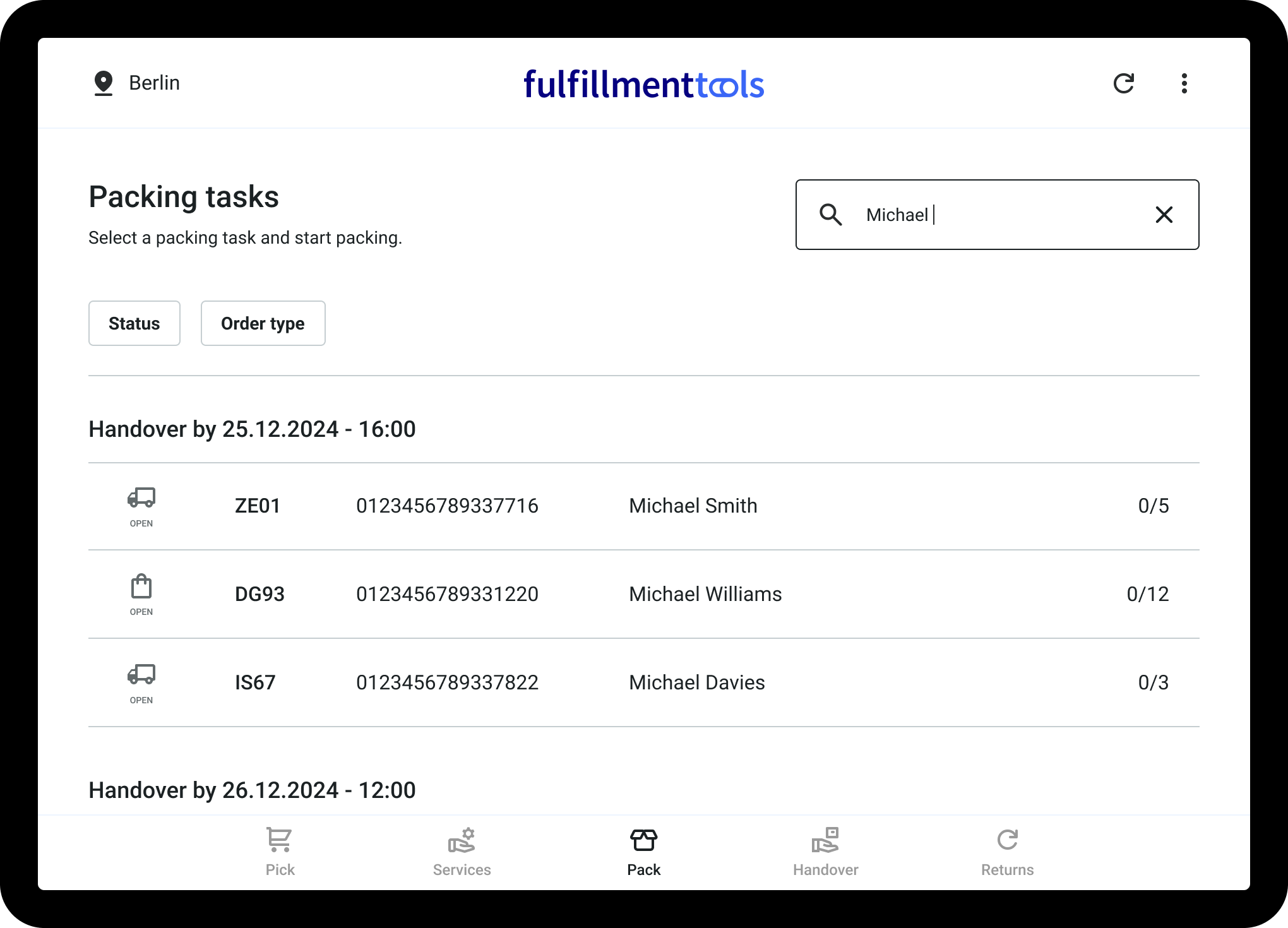
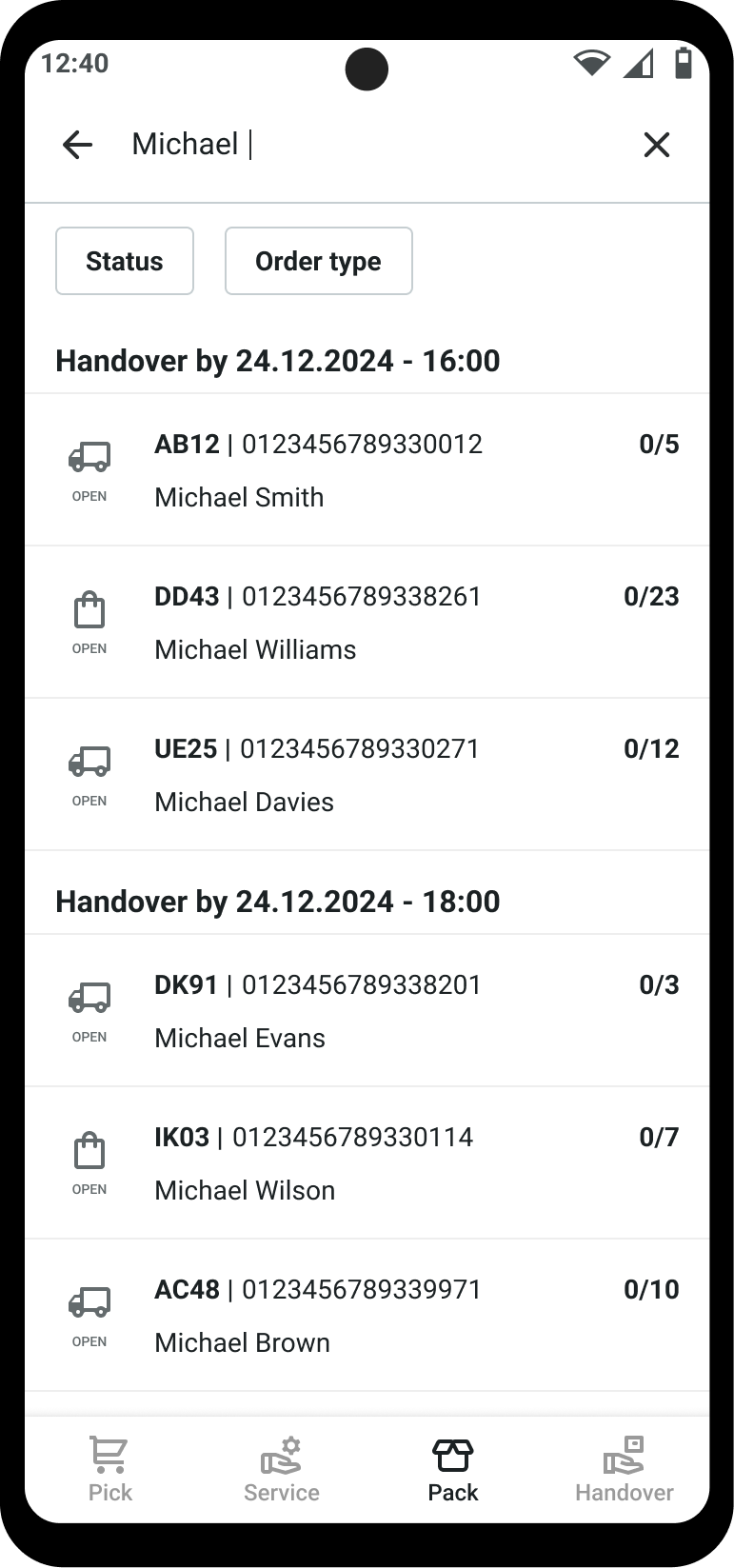
## **Search and filter operations web app**

A new search and filter function for packing and handover tasks allows users to find specific tasks, such as the last task processed or a task from a particular consumer.

<div><figure><img src="https://4170739437-files.gitbook.io/~/files/v0/b/gitbook-x-prod.appspot.com/o/spaces%2FLrrr5jgTsDuR38gNJIrm%2Fuploads%2FfOuGZmNVLY2bIRFh281U%2FMockup-Search-Packing-Desktop-02.png?alt=media&amp;token=c9d929f7-2d27-4a4d-a1f6-6d6c6fc34ec1" alt=""><figcaption></figcaption></figure> <figure><img src="https://4170739437-files.gitbook.io/~/files/v0/b/gitbook-x-prod.appspot.com/o/spaces%2FLrrr5jgTsDuR38gNJIrm%2Fuploads%2F50UIRmRQUjwxrtffSZOP%2FMockup-Search-Packing-Mobile-02.png?alt=media&amp;token=5f4749ca-17bb-4d82-8d3d-f5235948d2f8" alt=""><figcaption></figcaption></figure></div>
{% endupdate %}

{% update date="2024-11-12" tags="backoffice,store-operations" %}

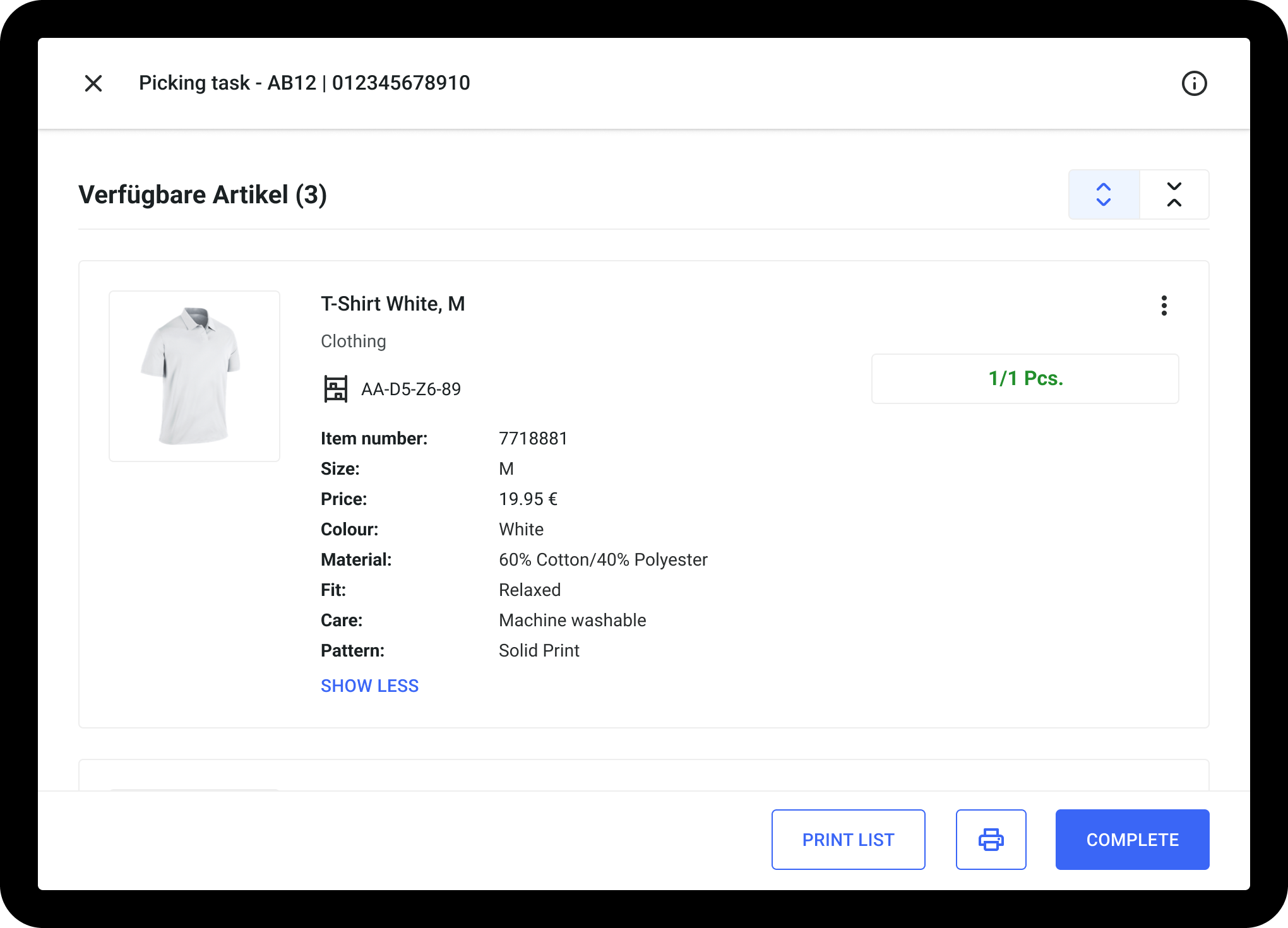
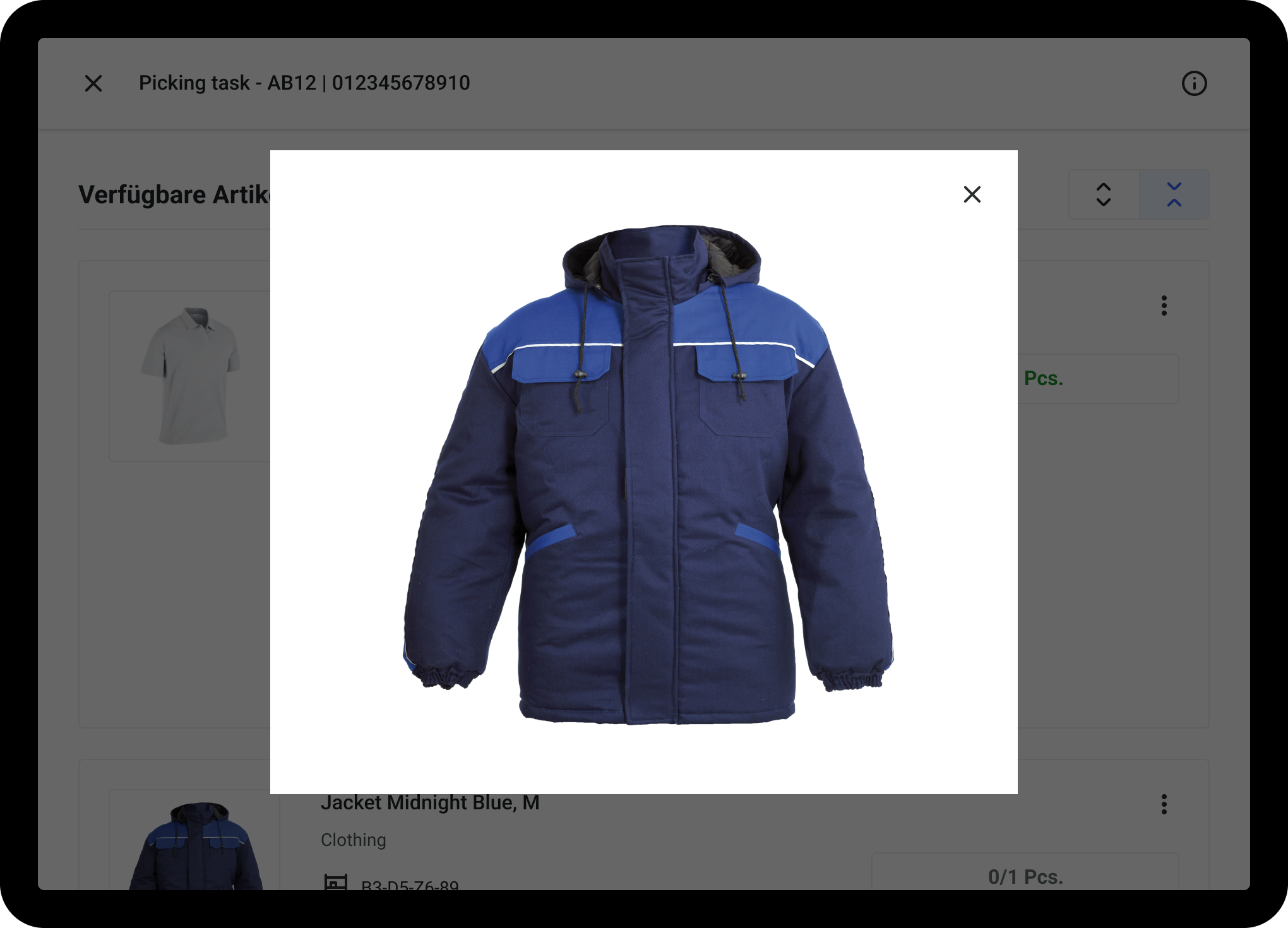
## **Optimized design in the picking view**

In the new picking view, items can now be edited directly in the list view. The item card now contains more attributes and can be expand or collapse to see more or less attributes, as desired. Users can also enlarge the image by clicking on it.

<div><figure><img src="https://4170739437-files.gitbook.io/~/files/v0/b/gitbook-x-prod.appspot.com/o/spaces%2FLrrr5jgTsDuR38gNJIrm%2Fuploads%2FC1I8AI8az1sVL8csh3rU%2FMockup-Desktop-Picking-View-02.png?alt=media&amp;token=1967dcaf-b591-48a9-8f4d-39352cde06e9" alt=""><figcaption></figcaption></figure> <figure><img src="https://4170739437-files.gitbook.io/~/files/v0/b/gitbook-x-prod.appspot.com/o/spaces%2FLrrr5jgTsDuR38gNJIrm%2Fuploads%2FY2NB4G9NlXwT1E2c7x65%2FMockup-Desktop-Picking-View-03.png?alt=media&amp;token=e14d66c2-f3d8-489b-8227-0d5d471652cd" alt=""><figcaption></figcaption></figure></div>

{% hint style="info" %}
If you want to use the new picking view, please get in contact with us.
{% endhint %}
{% endupdate %}

{% update date="2024-11-12" tags="apps,store-operations" %}

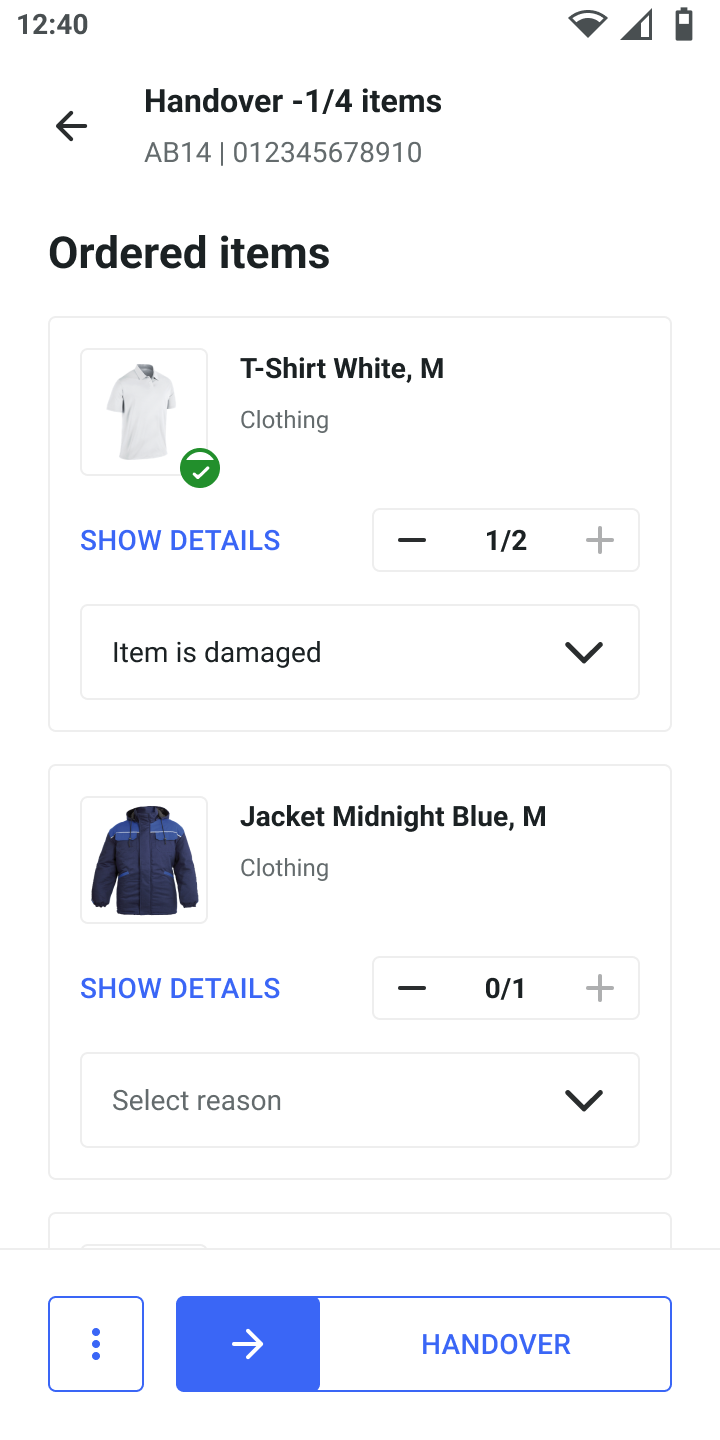
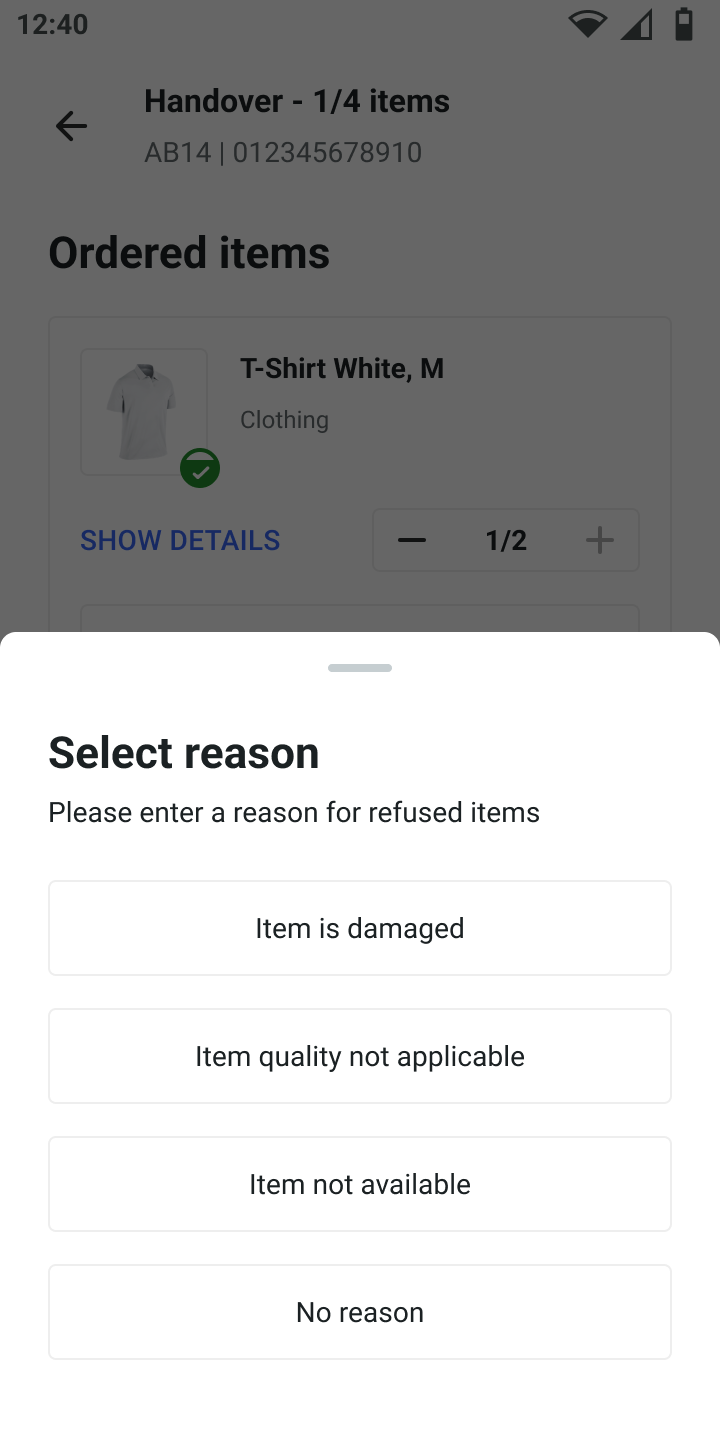
## Android Operations app update 1.24

The new update enables partial hand over of items to a consumer as part of click-and-collect. Customers who also use the fulfillmenttools Returns App now have a direct link to the Returns App.

<div><figure><img src="https://4170739437-files.gitbook.io/~/files/v0/b/gitbook-x-prod.appspot.com/o/spaces%2FLrrr5jgTsDuR38gNJIrm%2Fuploads%2FNXQSMbl1eIEfYzQ2dHYV%2FRefuse-reasons-01.png?alt=media&amp;token=faf1880a-5b6a-4dd2-b49e-6d39fc160f81" alt=""><figcaption></figcaption></figure> <figure><img src="https://4170739437-files.gitbook.io/~/files/v0/b/gitbook-x-prod.appspot.com/o/spaces%2FLrrr5jgTsDuR38gNJIrm%2Fuploads%2Fu5Mk6VEft19rVCLuIr6J%2FRefuse-reasons-03.png?alt=media&amp;token=d2c89427-24ea-46d9-88dc-37b792369df3" alt=""><figcaption></figcaption></figure></div>

{% hint style="info" %}
Download the new update from the [Google Play Store](https://play.google.com/store/apps/details?id=com.ocfulfillment.fulfillmentapp).
{% endhint %}
{% endupdate %}

{% update date="2024-11-12" tags="backoffice,store-operations" %}

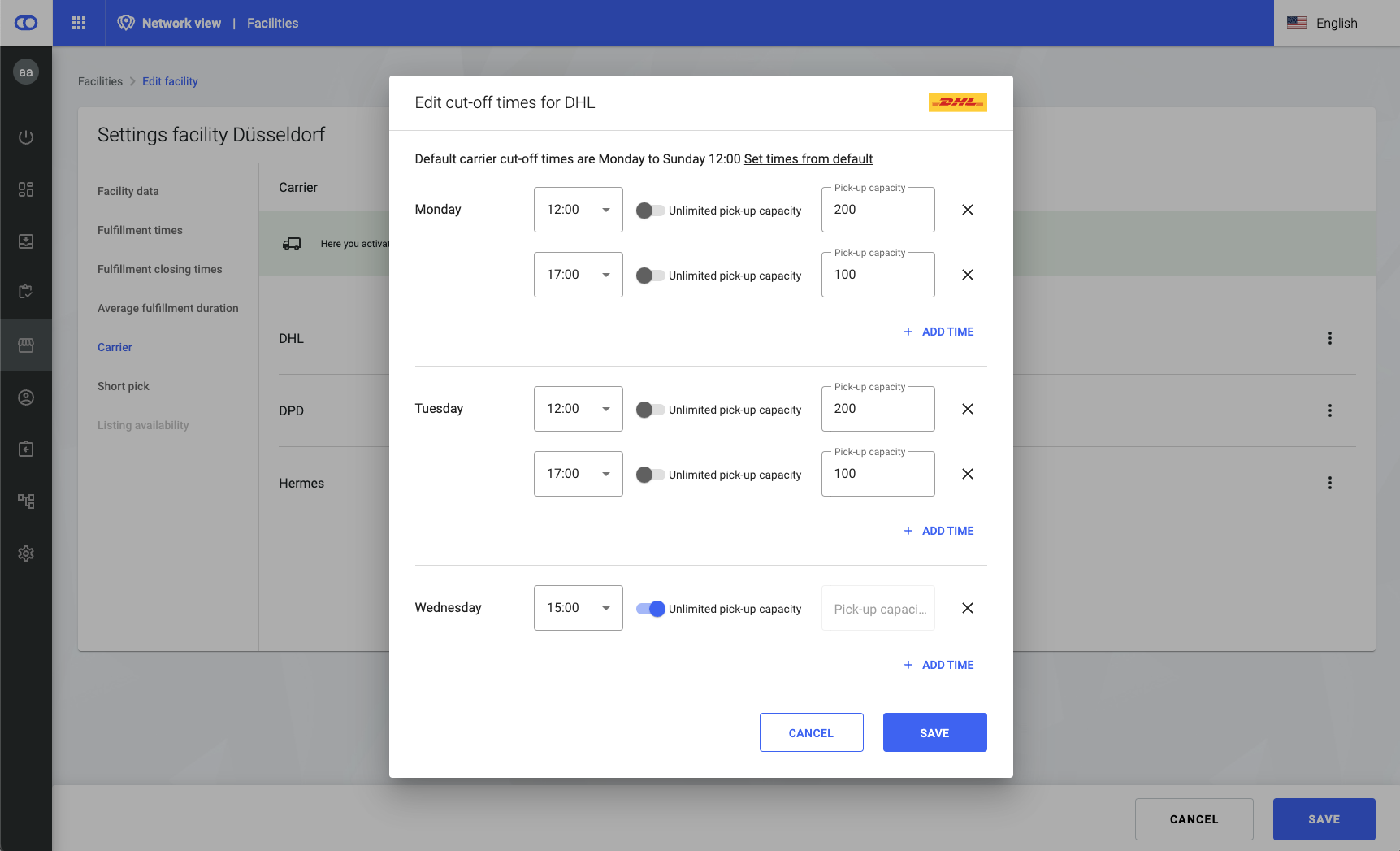
## Facility carrier capacity

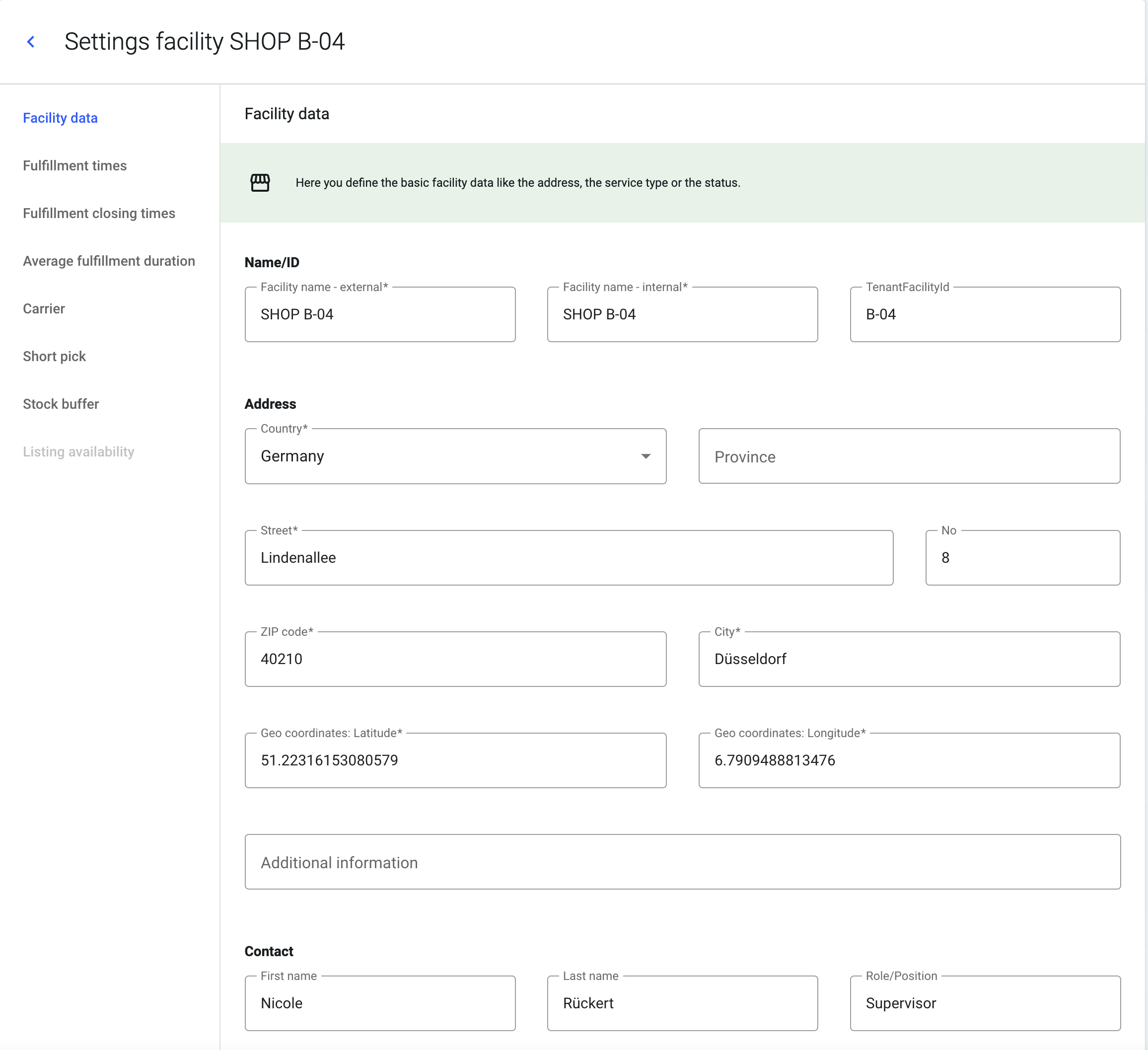
We introduce the ability to manage and allocate carrier capacity at a granular level for a facility and its carrier pickup time. This ensures that carriers’ truck loading constraints are respected while routing orders effectively.

<figure><img src="https://4170739437-files.gitbook.io/~/files/v0/b/gitbook-x-prod.appspot.com/o/spaces%2FLrrr5jgTsDuR38gNJIrm%2Fuploads%2Fehf7cppZ5HlSUq0CB9Qi%2FScreenshot%202024-12-03%20at%2011.52.43.png?alt=media&amp;token=6dc70d89-d288-4644-91c7-b844691f9ad0" alt=""><figcaption></figcaption></figure>

{% hint style="info" %}
More information can be found under [facilities settings](/documentation/backoffice/network-view/settings.md).
{% endhint %}
{% endupdate %}

{% update date="2024-10-23" tags="apis" %}

## Search orders and processes by consumer ID

It's now possible to filter orders and processes by consumerId.
{% endupdate %}

{% update date="2024-10-23" tags="apis" %}

## New custom attributes

The below [custom attributes](/documentation/getting-started/custom-attributes.md) were introduced:

* Custom attributes in [zone](/documentation/by-pillar/global-inventory-hub/storage-locations-and-zones.md).
* Custom attributes in inboundLineItem of [receipt](/documentation/by-pillar/global-inventory-hub/inbound-process.md#receipt).
* Custom attributes in inboundLineItem of [purchase order](/documentation/by-pillar/global-inventory-hub/inbound-process/purchase-order.md).

Custom attributes can be used to maintain information that is not storable via our predefined fields. They have no direct influence on our processes, but can be helpful to map information from and for external systems.
{% endupdate %}

{% update date="2024-10-23" tags="backoffice,global-inventory-hub" %}

## Future stock movements

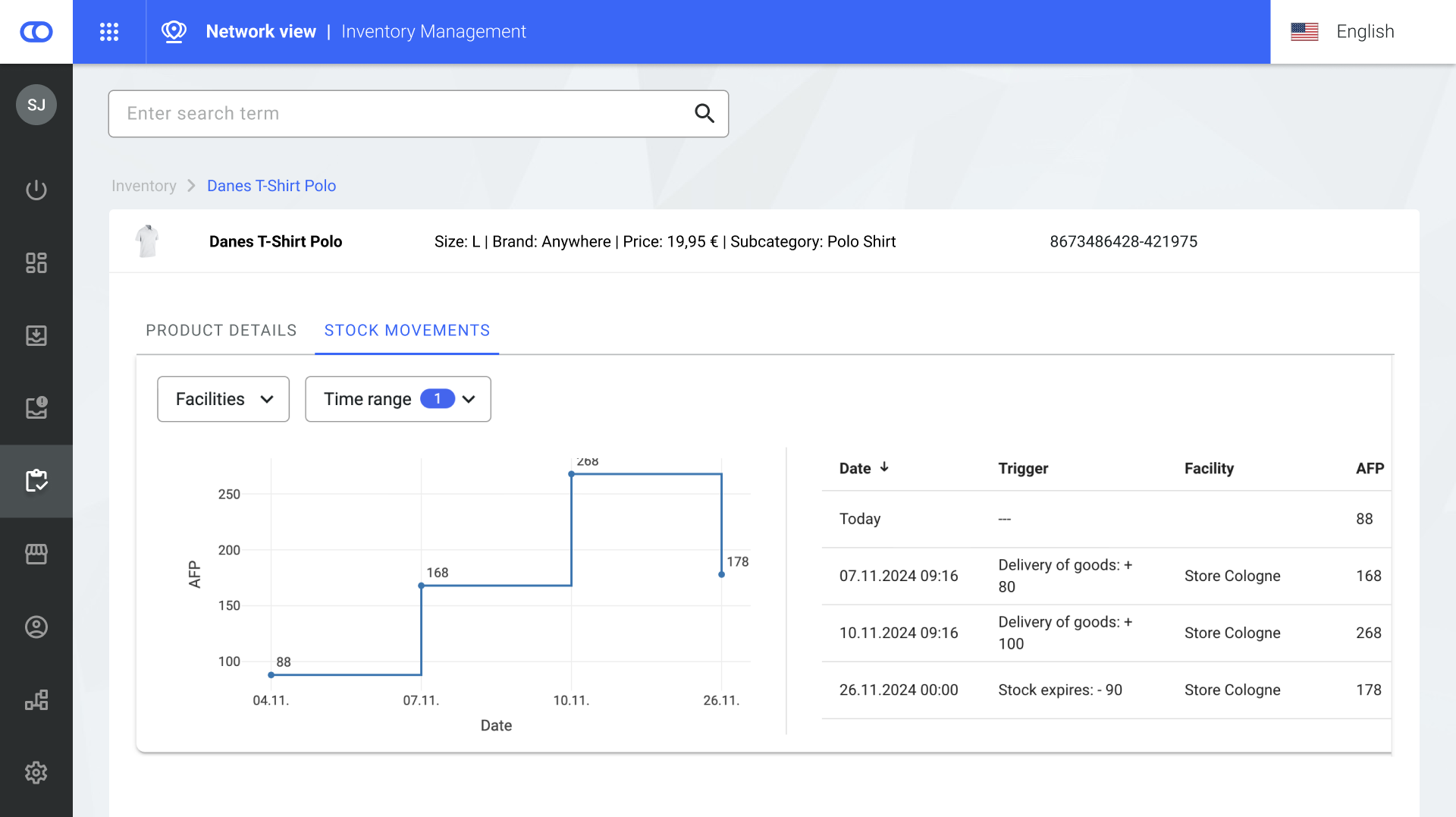
The [future stock movements](/documentation/backoffice/network-view/inventory/stock-detail-view.md#future-stock-movements) graph and table are accessible on the [stock overview](/documentation/backoffice/network-view/inventory.md). The graph shows the development of stock that will be [available for picking](/documentation/by-pillar/global-inventory-hub/stock/stock-availability.md) in the future. The table on the right provides more details into the events that triggered the changes in stock levels. Stock levels can change due to delivery of goods (increase) or due to the expiry of stock (decrease).

<figure><img src="https://4170739437-files.gitbook.io/~/files/v0/b/gitbook-x-prod.appspot.com/o/spaces%2FLrrr5jgTsDuR38gNJIrm%2Fuploads%2FVVoBfMuJEU0tnCG2kpUN%2Fstock%20movements%20new.png?alt=media&amp;token=f1663850-4e73-4093-8d24-707d2cf45b5c" alt=""><figcaption></figcaption></figure>
{% endupdate %}

{% update date="2024-10-23" tags="backoffice,global-inventory-hub" %}

## Over-reservations

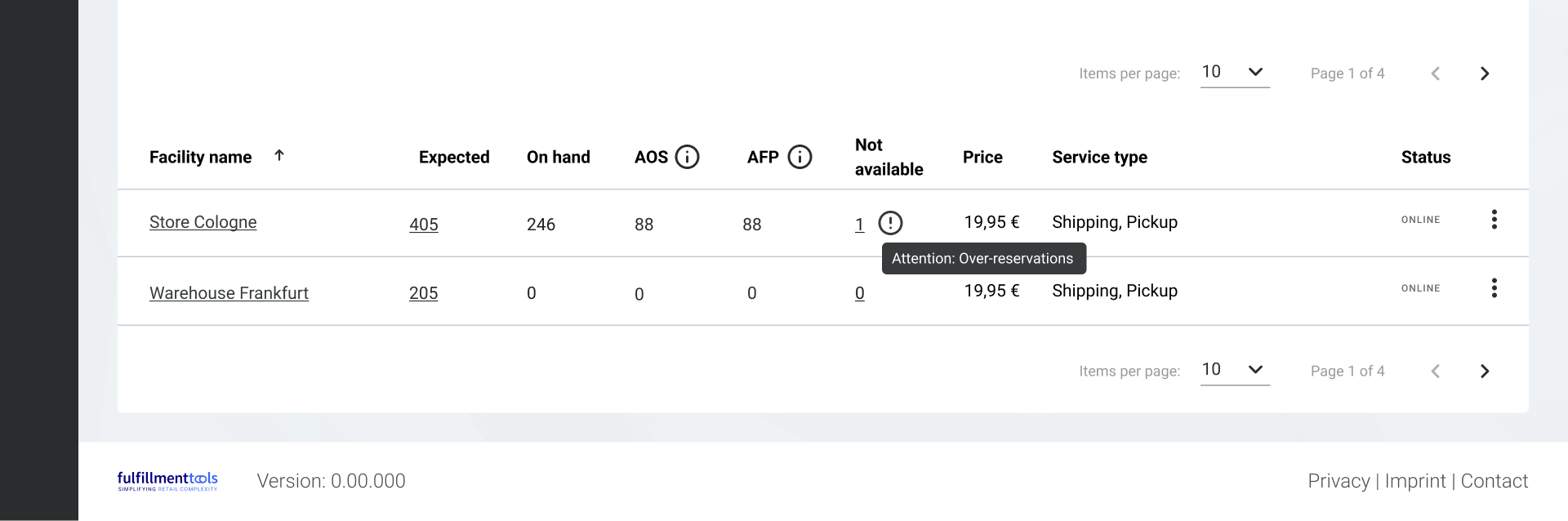
After a reservation has been assigned to a stock, our systems constantly ensure that the reservations can still be fulfilled. If reservations cannot be fulfilled anymore (due to, for example, stock becoming broken) our systems will try to re-distribute the reservation. In case there is no other stock available, an [over-reservation](/documentation/by-pillar/global-inventory-hub/reservations.md#over-reservation) is created. Users are informed in the[ stock overview](/documentation/backoffice/network-view/inventory.md) in Backoffice if there are over-reservations for a product.

<figure><img src="https://4170739437-files.gitbook.io/~/files/v0/b/gitbook-x-prod.appspot.com/o/spaces%2FLrrr5jgTsDuR38gNJIrm%2Fuploads%2FLR4NirKL1Kj15AhPH8kT%2Fover%20resrvations%20new.png?alt=media&amp;token=5a19daaf-980f-4393-9865-44d9d127ae0e" alt=""><figcaption></figcaption></figure>
{% endupdate %}

{% update date="2024-09-24" tags="backoffice" %}

## New languages available in the Backoffice

The following languages are now available:

* Bulgarian
* Croatian
* Czech
* Hungarian
* Portuguese (Portugal)
* Romanian
* Slovakian
* Slovenian

Languages can be changed via the menu on the top right of all Backoffice pages.
{% endupdate %}

{% update date="2024-09-10" tags="backoffice,store-operations" %}

## Links to our apps in the Backoffice

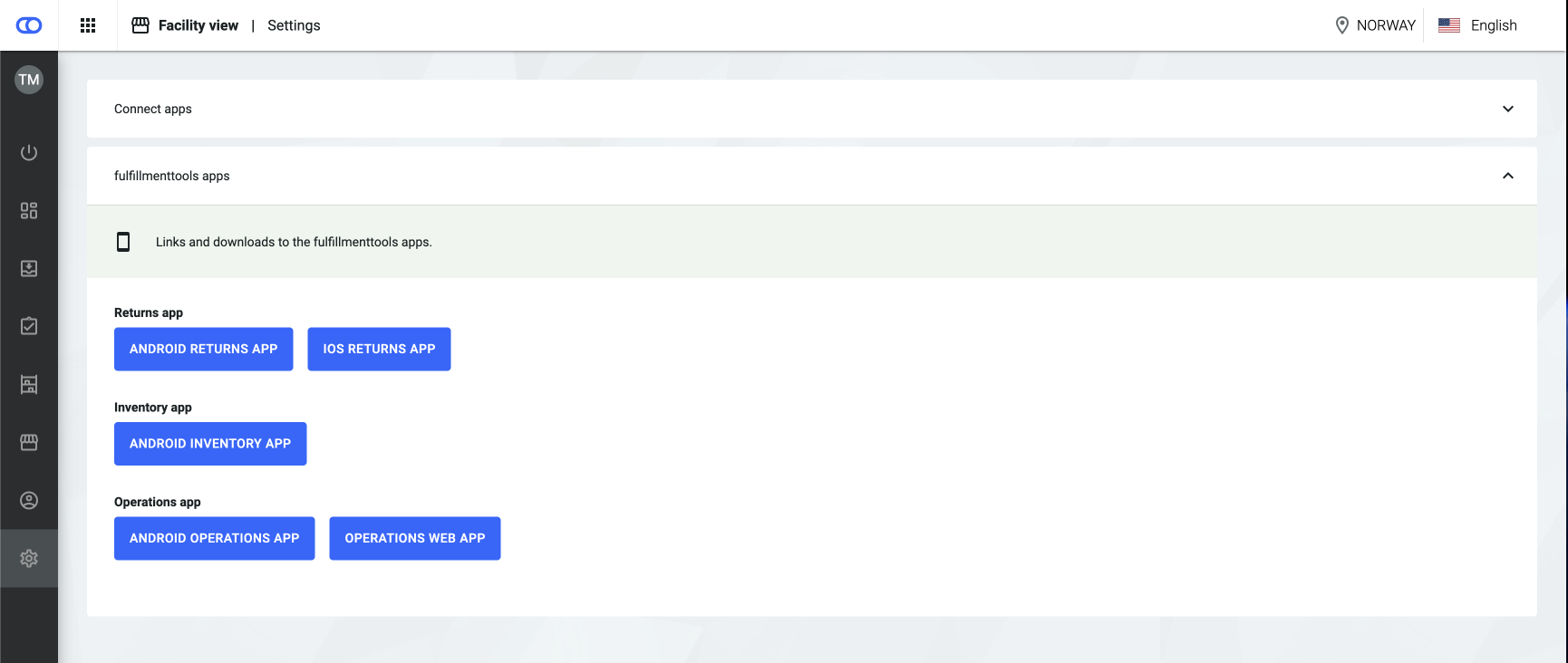
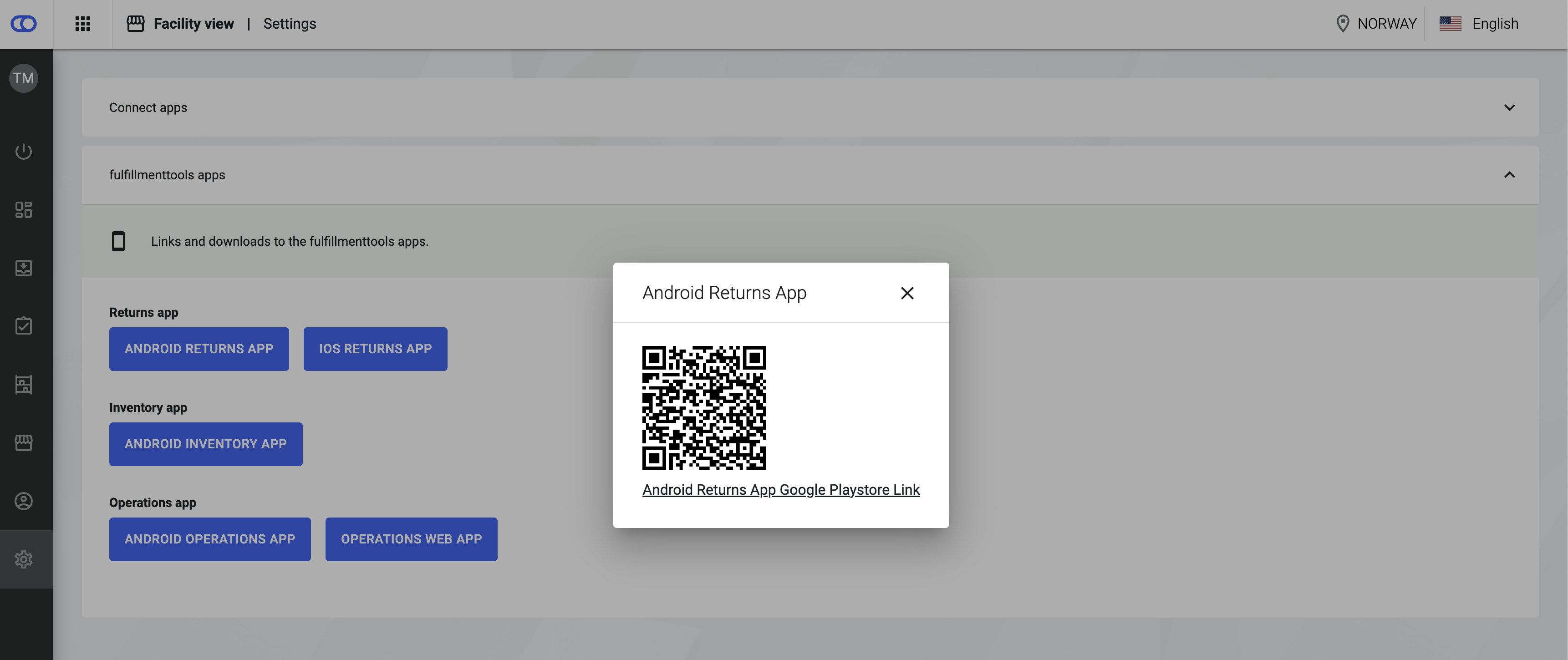
All our apps are now listed on both the [facility view settings](/documentation/backoffice/network-view/settings.md) and the [network view settings](/documentation/backoffice/network-view/settings.md) page under "fulfillmenttools apps" including a link to the respective app store.

<div><figure><img src="https://content.gitbook.com/content/Lrrr5jgTsDuR38gNJIrm/blobs/iS3fgWMjo2GVKgKALJzC/Settings_1.png" alt=""><figcaption><p>Get instant access by following the links to our clients</p></figcaption></figure> <figure><img src="https://content.gitbook.com/content/Lrrr5jgTsDuR38gNJIrm/blobs/a5x3XvUNHjjFsUhBRZcT/Settings_apps.png" alt=""><figcaption><p>Scan the QR code for quick and easy download</p></figcaption></figure></div>
{% endupdate %}

{% update date="2024-09-03" tags="apis,global-inventory-hub" %}

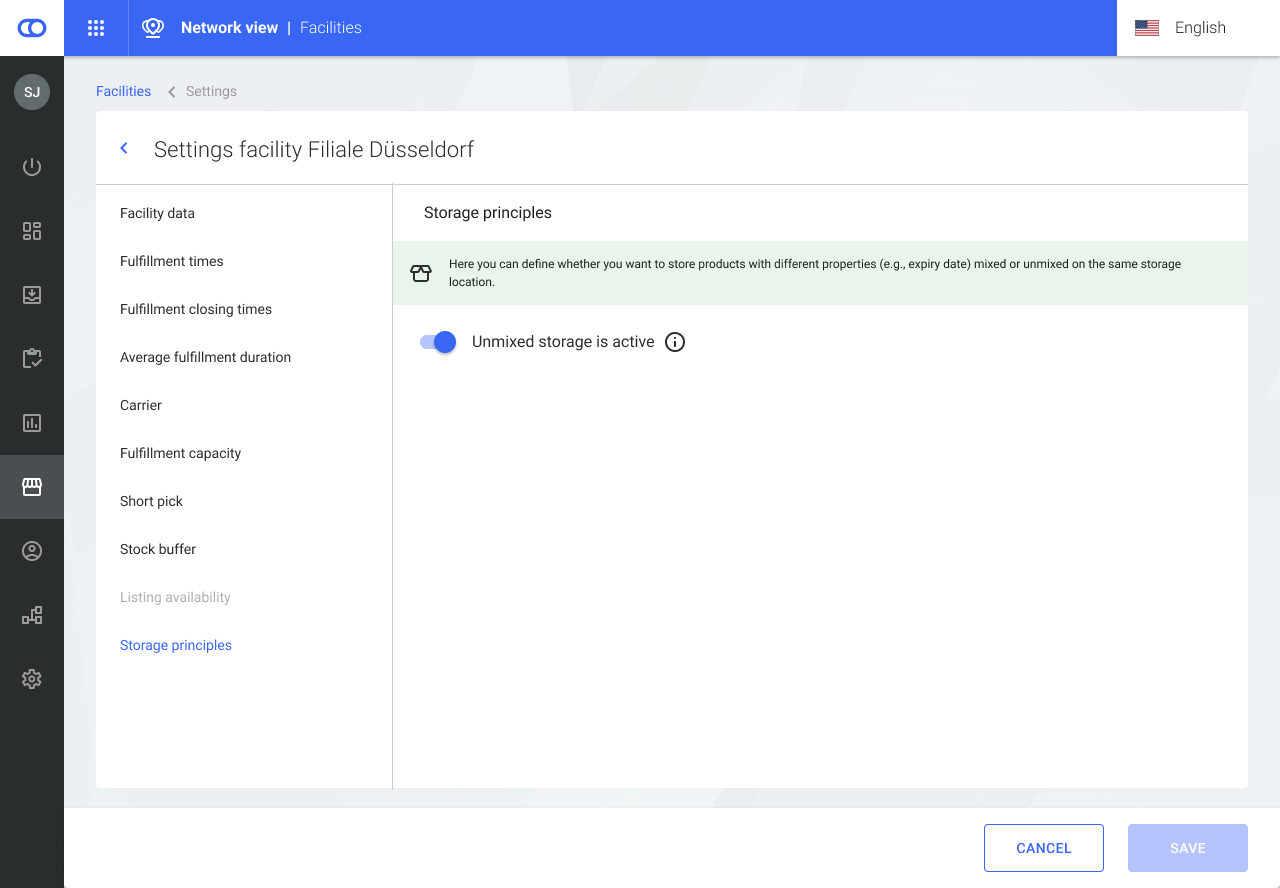
## Unmixed storage principle

Storage principles can be defined on facility level. The principle “unmixed storage” means that the same item with different properties (e.g., expiry date) must not be stored on the same storage location. Enabling unmixed storage has the following effects:

* If a user tries to stow the same items with different properties on the same storage location, a user prompt is shown in the inventory app.
* For storage location recommendations only locations are shown where the unmixed storage principle is met.

See the [unmixed storage configuration section](/documentation/by-pillar/global-inventory-hub/configurations.md#unmixed-storage-configuration) to get more information.

<figure><img src="https://content.gitbook.com/content/Lrrr5jgTsDuR38gNJIrm/blobs/Edu4o6dll5V1OEx6yzFC/NET%20Facilities%20Settings%20-%20Unmixed%20storage%20active_02.png" alt=""><figcaption></figcaption></figure>
{% endupdate %}

{% update date="2024-09-03" tags="apps,store-operations" %}

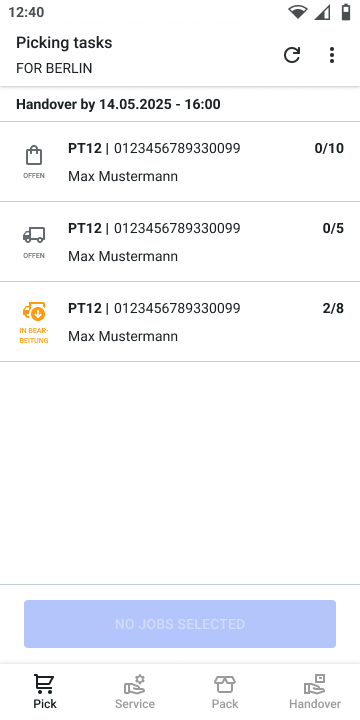
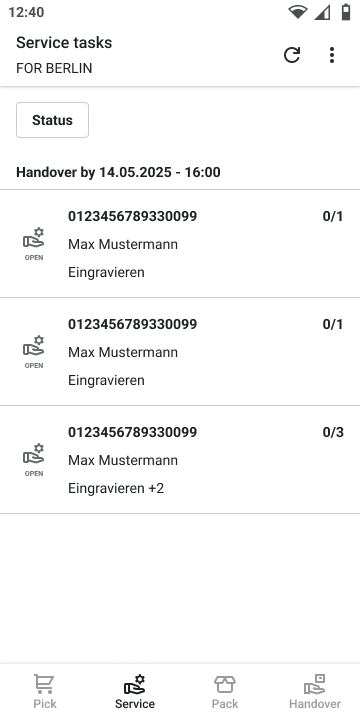
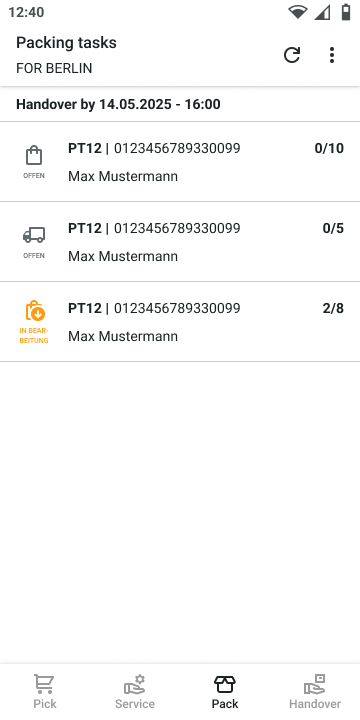
## Operations web app improvements

**Consumer names** are displayed in the task overview:

<div><figure><img src="https://content.gitbook.com/content/Lrrr5jgTsDuR38gNJIrm/blobs/J8vDbhY17TYlwB8eL1LH/Picking-tasks-overview.png" alt="" width="180"><figcaption></figcaption></figure> <figure><img src="https://content.gitbook.com/content/Lrrr5jgTsDuR38gNJIrm/blobs/bexq4rvTCDqTFMueboVK/Service-tasks-overview.png" alt="" width="180"><figcaption></figcaption></figure> <figure><img src="https://content.gitbook.com/content/Lrrr5jgTsDuR38gNJIrm/blobs/bjk7qGpqZSFbiZtPTJyS/Packing-tasks-overview.png" alt="" width="180"><figcaption></figcaption></figure> <figure><img src="https://content.gitbook.com/content/Lrrr5jgTsDuR38gNJIrm/blobs/hPmo0BY3wf6aJCF3wZja/Shipping-taks-overview.png" alt="" width="180"><figcaption></figcaption></figure></div>

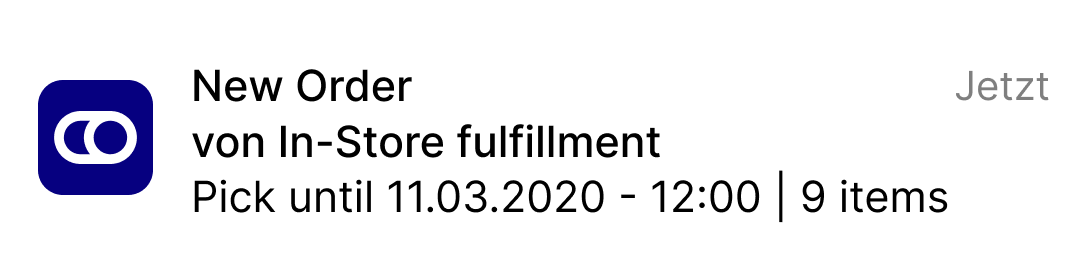
**Notifications** can be enabled for specific browser versions. If you are interested in this feature, please reach out to your fulfillmenttools contact person for assistance.

<figure><img src="https://content.gitbook.com/content/Lrrr5jgTsDuR38gNJIrm/blobs/malcZ5oJvgM2f0fV5wFd/Notification.png" alt="" width="375"><figcaption></figcaption></figure>
{% endupdate %}

{% update date="2024-08-20" tags="apis,global-inventory-hub" %}

## Reservations on expected stock

Expected stock can be tracked and communicated to shop systems via our platform. As a result, expected stock can be made available for sale before it has even arrived at the site or has been produced. If necessary, reservations can also be made on expected stock. Expected stock can be communicated to our systems via [purchase orders](/documentation/by-pillar/global-inventory-hub/inbound-process/purchase-order.md).

See the [Expected stock in availability article](/documentation/by-pillar/global-inventory-hub/stock/expected-stock-in-availability.md) to get more information on making expected stock available for sale.

<figure><img src="https://content.gitbook.com/content/Lrrr5jgTsDuR38gNJIrm/blobs/OxmV9nff6o49TjhYg2id/image" alt=""><figcaption></figcaption></figure>
{% endupdate %}

{% update date="2024-08-20" tags="apis,global-inventory-hub" %}

## Redistribution of reservations

After a reservation has been assigned to an (expected) stock, our systems constantly ensure that the reservations can still be fulfilled. If reservations cannot be fulfilled anymore (due to, for example, stock becoming broken) our systems will try to re-distribute the reservations on stocks meeting the [reservation criteria](/documentation/by-pillar/global-inventory-hub/reservations.md). In case there is no other stock available, the reservations are still tracked and assigned to a fitting stock as soon as any becomes available.

See the [reservations article](/documentation/by-pillar/global-inventory-hub/reservations.md) for more information.
{% endupdate %}

{% update date="2024-08-20" tags="apis,global-inventory-hub" %}

## Outbound trait for storage locations and stocks

Outbound inventory describes stock that has already been picked for an order and has been physically separated from other stock. It is placed on an outbound location until being handed over to another party and finally, leaving the warehouse. Previously, users could already define whether stock should be booked out or transferred to a (virtual) outbound location after picking. In addition, it is now possible to specifically mark storage locations and their stock with the `OUTBOUND` trait.

See the [Inventory traits article](/documentation/by-pillar/global-inventory-hub/inventory-traits.md) to get more information on the outbound trait.

See the [outbound stock configuration section of the configurations article](/documentation/by-pillar/global-inventory-hub/configurations.md#outbound-stock-configuration) to get information on the outbound configuration.
{% endupdate %}

{% update date="2024-08-20" tags="apis,availability-and-promising" %}

## New checkout endpoints

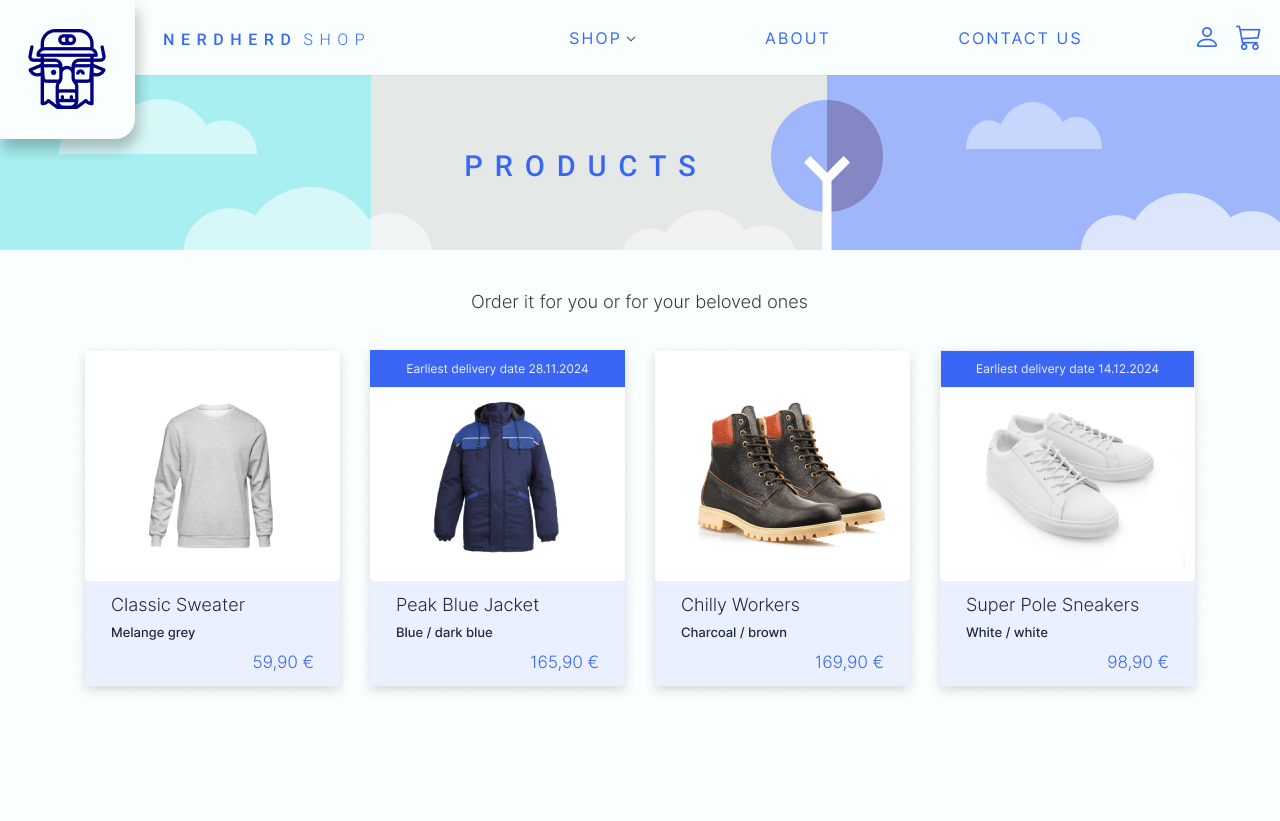
**Earliest possible delivery date**

Provides the earliest possible delivery date for an item or a list of items. This information can be used on a search result or product overview page to inform the shop user about when to expect the delivery of an item at the earliest. Go [here for more REST API](https://fulfillmenttools.github.io/fulfillmenttools-api-reference-ui/#post-/api/promises/checkoutoptions/delivery/timeperiod) information.

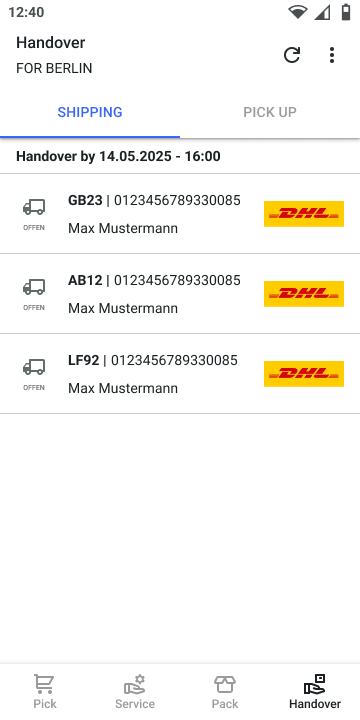
<figure><img src="https://content.gitbook.com/content/Lrrr5jgTsDuR38gNJIrm/blobs/wiB8R3g4DQrNs2P4rRoM/Earliest%20product%20delivery%20date.png" alt=""><figcaption></figcaption></figure>

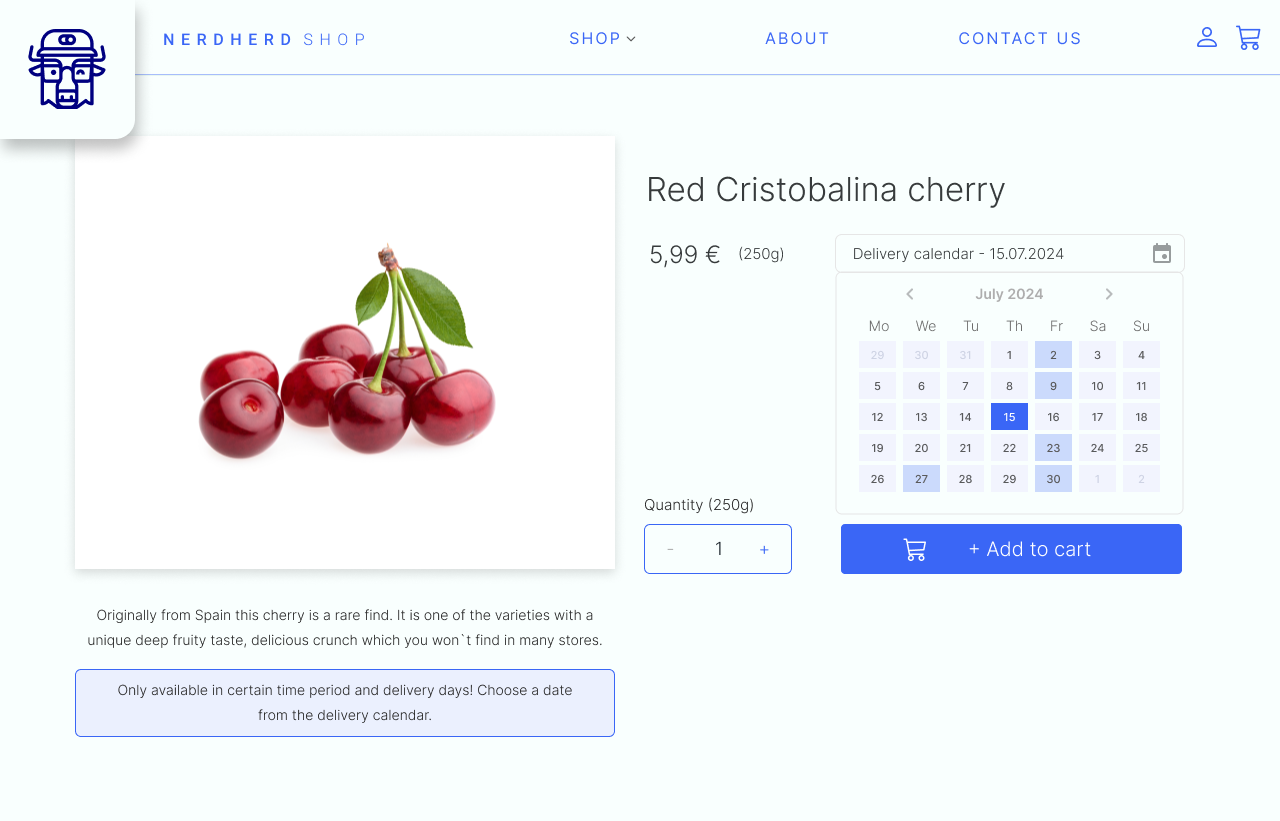
**Possible delivery dates within time period**

Provides all available delivery dates based on a basket of items within a specific timeframe. This information can be used to provide the user with a calendar view on the product detail page or during checkout. In the calendar view, users can select the most suitable delivery date from all possible dates within the defined time frame. Go [here for more REST API](https://fulfillmenttools.github.io/fulfillmenttools-api-reference-ui/#post-/api/promises/checkoutoptions/delivery/timeperiod) information.

<figure><img src="https://content.gitbook.com/content/Lrrr5jgTsDuR38gNJIrm/blobs/LkI1aZ9hp66lvd1Ud71R/Specific%20product%20delivery%20date.png" alt=""><figcaption></figcaption></figure>

**Stock availability for delivery date**

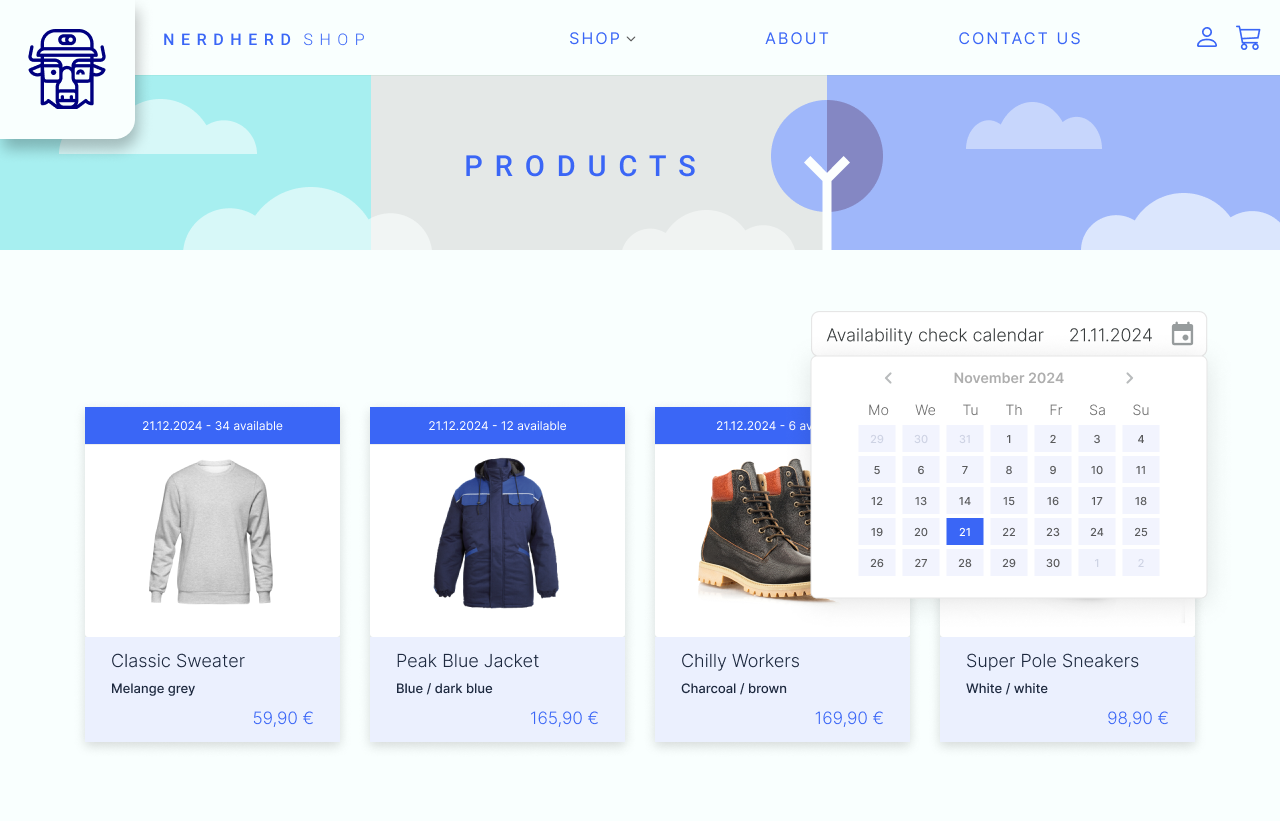
Provides available stock quantities over facilities for items on a specific delivery date. This information can be used on a product overview page or product detail page to determine the availability of certain items for a delivery day selected by the consumer. Go [here for more REST API](https://fulfillmenttools.github.io/fulfillmenttools-api-reference-ui/#post-/api/promises/checkoutoptions/delivery/timepoint) information.

<figure><img src="https://content.gitbook.com/content/Lrrr5jgTsDuR38gNJIrm/blobs/zE3eZRaWYIvdAYkmvBb0/Product%20availability%20check%20calendar.png" alt=""><figcaption></figcaption></figure>
{% endupdate %}

{% update date="2024-08-06" tags="backoffice,store-operations" %}

## Partial handover

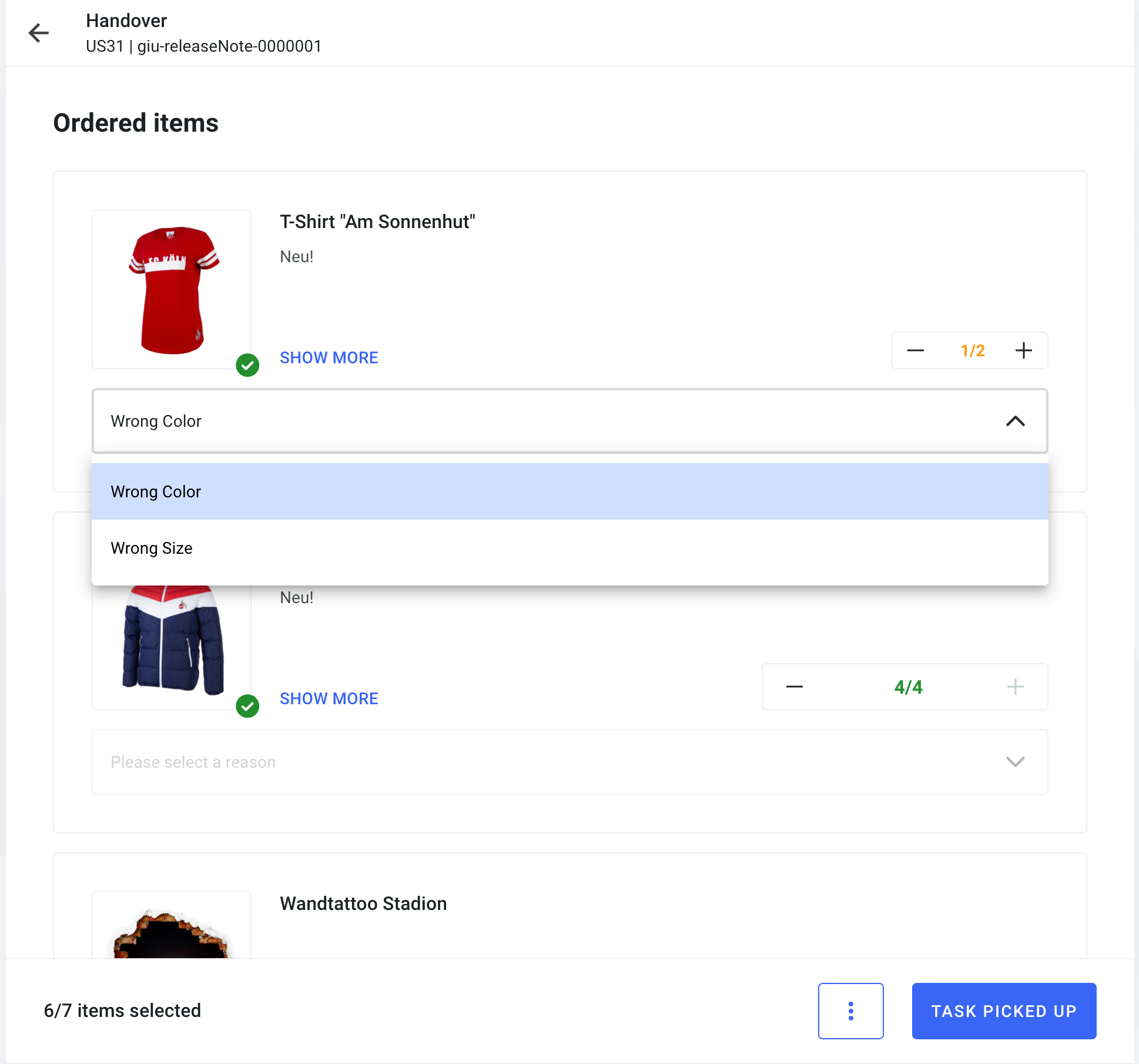
Rework of the handover page for click & meet in the web app. The rework includes:

* A list view providing information on picked versus ordered items.
* Showing respective reasons if the picked amount is lower than the ordered amount (also known as "short-pick").
* An amount handler allowing the user to specify how many items were handed over.
* The possibility to add refuse reasons, describing why the handover to the consumer has not been successful.
* Display of line item information on picked items along with refuse reasons in Backoffice.
<figure><img src="https://content.gitbook.com/content/Lrrr5jgTsDuR38gNJIrm/blobs/DjyFPvG7WSbLxhgtISkj/handover_003.png" alt=""><figcaption><p>Line item information on picked items along with refuse reasons</p></figcaption></figure>
{% endupdate %}

{% update date="2024-08-06" tags="apps,store-operations" %}

## New printing overview

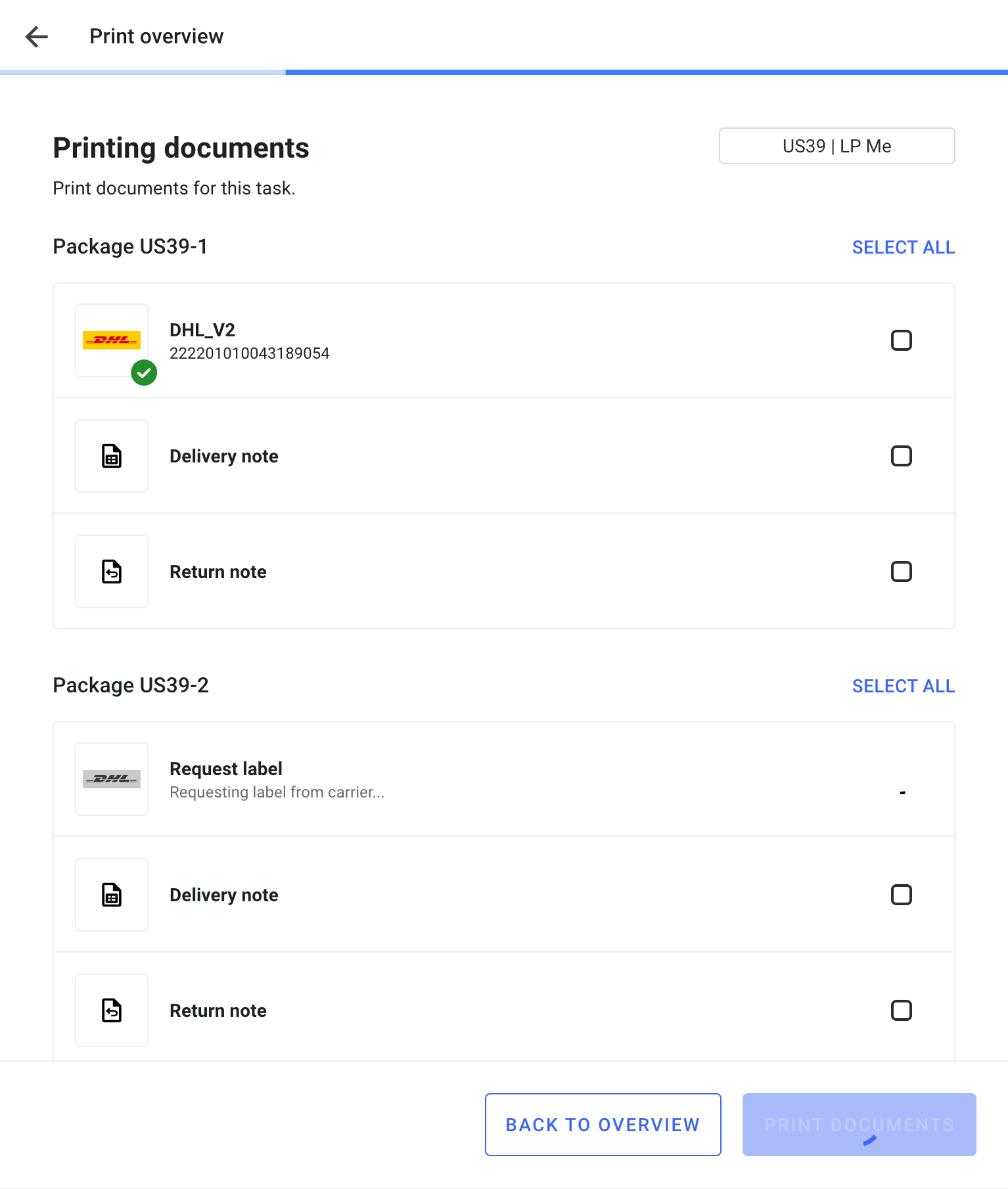
* Re-design of the print overview.
* Showing packed items separately by parcel.
* Automated pre-fill of custom data, if needed.
* Possibility to request a label per parcel.

<figure><img src="https://content.gitbook.com/content/Lrrr5jgTsDuR38gNJIrm/blobs/MevXdMGF8gWpK0hJ8mA0/new_printing_004.png" alt=""><figcaption></figcaption></figure>
{% endupdate %}

{% update date="2024-07-23" tags="backoffice" %}

## Design adjustments for text fields

The updated look of form fields in the whole Backoffice application provides an improved usability.

<figure><img src="https://4170739437-files.gitbook.io/~/files/v0/b/gitbook-x-prod.appspot.com/o/spaces%2FLrrr5jgTsDuR38gNJIrm%2Fuploads%2FHkHGHERFetfH4mItBk10%2Fimage.png?alt=media&amp;token=9467ad8a-2bc4-4593-93a7-f18737a87a3d" alt=""><figcaption></figcaption></figure>
{% endupdate %}

{% update date="2024-07-16" tags="apis,store-operations" %}

## New public events available

**Returns**

* `REFUND_TRIGGERED`
* This event is triggered when every lineItem of a returnJob is set to `closed`
* More information about [returns](/documentation/by-pillar/store-operations/returns.md)

**Services**

* `SERVICE_JOB_CREATED`
* `SERVICE_JOB_FINISHED`
* More information about [services](/documentation/by-pillar/store-operations/services/service-jobs.md)

All public events can be found in the [Available events article](/documentation/getting-started/eventing/available-events.md).
{% endupdate %}

{% update date="2024-07-16" tags="backoffice,apis" %}

## New type of external action

* New type of external action: `COMMENT`
* The external action enables adding any kind of additional information to a process.
* The comment can refer to a previously submitted external action (for example, the payment service provider confirms the adjustment of the payment amount) or a general information (for example, the consumer called and changed the pick-up appointment for their click-and-collect order).

Please find further information in the [External actions article](/documentation/integrations/external-actions.md).
{% endupdate %}

{% update date="2024-07-09" tags="backoffice" %}

## New links in Backoffice

* Introduction of links allowing users to quickly move between views.
* Administrator users can directly jump from the stock overview on network level to the listings page on facility level.
* By clicking on the link in the stock overview, administrator users can get an overview of all orders containing with reservations for a certain product.
  {% endupdate %}

{% update date="2024-07-09" tags="apis,apps,store-operations" %}

## Packing process with packages

* Pack items into one or several packages during a pack job in the Operations Web App.
* A new view incorporating these changes will follow in the upcoming releases. Please contact us if you are interested in using it beforehand.

More information on the [packing process](/documentation/by-pillar/store-operations/packing.md).
{% endupdate %}

{% update date="2024-07-02" tags="apps,store-operations" %}

## Improved task overview

Two design adjustments were made to the task overview in the [Operations Web App:](/documentation/apps/operations-app.md)

* The consumer's name is included in the entry (if available).
* The status icons of a task include information about the type of task: shipping or pickup. The "Shipping" and "Pickup" tags have been replaced by these combined status and type icons.
  {% endupdate %}

{% update date="2024-07-02" tags="apis,store-operations" %}

## Non-delivery days

* Define carrier and region specific weekdays / dates on which no deliveries can be made
* This information will be considered within specific routing and promising cases

Please find further information in the [non-delivery day section of the facility carrier connections article](/documentation/by-pillar/store-operations/carrier-management.md#carrier-connections-to-facilities).
{% endupdate %}

{% update date="2024-06-18" tags="backoffice,apis" %}

## External actions

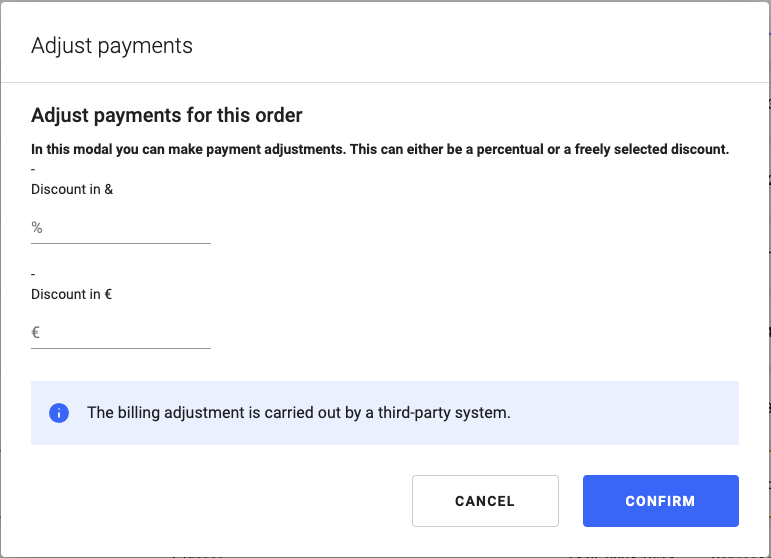
* Define an external action which allows triggering actions and processes in external systems (outside fulfillmenttools). This covers, for example, sending an email to a consumer, adjusting the payment for an order, or other order-related processes.
* The feature enables generic communication with third-party systems. The definition of the external action (done via our API) and the integration of our platform into other systems determines the functional capabilities of the action.
* There are two types of external actions:
  * LINK: A link or deeplink can be attached to an order. A user can then execute processes via the linked external system.
  * FORM: Configure a modal with individual texts and input fields fields. When completing this action, an external event is sent which then can be used to trigger further processes.
* Executing an external action is logged and displayed in our order history.

Please find further information in the [external actions article](/documentation/integrations/external-actions.md).

<img src="https://content.gitbook.com/content/Lrrr5jgTsDuR38gNJIrm/blobs/d7d5bpoC5Kki8rNzBMbS/image.png" alt="Example for an external action triggering a payment adjustment" data-size="original">
{% endupdate %}

{% update date="2024-06-18" tags="backoffice,apps" %}

## New language: Spanish

Spanish is supported as a new language in Backoffice, Operations Web App, Operations App, and Returns App.
{% endupdate %}

{% update date="2024-06-18" tags="backoffice,apis,global-inventory-hub" %}

## Extend expected stocks by properties

* Stock that is expected to arrive in inbound processes can have stock properties and an `availableUntil` value reflecting the residual life of the stock.
* This improves the calculation of future (inventory) availability since systems know when stock cannot be sold anymore before it even arrived in a facility.
* Stock properties can be configured via `requestedItems` in the `purchaseOrder`. For more information please refer to [Inbound process](/documentation/by-pillar/global-inventory-hub/inbound-process.md).
* The `availableUntil` value is automatically calculated for `expectedStocks` if configured in the respective listing (same as for stocks). For more information please refer to [Stock available until](/documentation/by-pillar/global-inventory-hub/listing.md#stock-available-until).
* If there are stock properties specified in the purchase order, they are visible in the [inbound view](/documentation/backoffice/facility-view/inventory/inbound.md) in the Backoffice.
  {% endupdate %}

{% update date="2024-06-18" tags="apis,apps,store-operations" %}

## Carrier news

* For DHL users the service "Bulky Goods" is supported which can be configured in the label classifications via the [carrier configuration](/documentation/by-pillar/store-operations/carrier-management.md#carrier-configurations) on tenants.
* INTEX and UPS Capital are supported.
  {% endupdate %}

{% update date="2024-06-11" tags="apis,store-operations" %}

## Support of different address types on delivery and return note

* The currently available types of consumer addresses can be used on documents for delivery and return note: `POSTAL_ADDRESS`, `PARCEL_LOCKER`, `INVOICE_ADDRESS`
* Pleas also consider the prioritization rules when providing more than one address type.
* More information about the usage of address types and their impact on documents can be found in the [Printing and document configuration article](/documentation/by-pillar/store-operations/configurations.md#printing-and-document-configuration).
  {% endupdate %}

{% update date="2024-06-11" tags="apis,apps,store-operations" %}

## Provide short pick reasons when performing a short-pick while picking

* Reasons why certain items were short picked by the picker can be provided as optional information by the picker during the picking process.
* When available and active, the reasons will automatically be shown to the user when trying to complete a picking task with short picked items.
* More information on how to configure reasons for short-picks can be found in the [short pick reasons section of the picking article](/documentation/by-pillar/store-operations/picking.md#short-pick-reasons).
  {% endupdate %}

{% update date="2024-06-11" tags="apis,backoffice,store-operations" %}

## Trigger refund screen

* On the [returns](/documentation/by-pillar/store-operations/returns.md) page, a refund for items with status ACCEPTED can be triggered.
* Items with status REJECTED or WAITING\_FOR\_INPUT are displayed but cannot be edited.
* Items eligible for a refund can be updated, including entering the refund amount / percentage and currency.

Please note: Only price and currency provided within the order can be displayed. If this information is not available, no refund amount or currency will be shown.
{% endupdate %}

{% update date="2024-05-22" tags="apis,global-inventory-hub" %}

## Expired or outdated goods are omitted in stock availability

* Stocks that have expired or have exceeded their availableUntil value are not considered anymore in the stock availability, namely in `availableForPicking` and `availableOnStock`. For more information please refer to [Stock availability](/documentation/by-pillar/global-inventory-hub/stock/stock-availability.md).
* In addition to the expiry date, users can configure an "available until" value on stocks. For example, this allows products to be withdrawn from a sales channel a certain time before they expire. For information on configuration of availableUntil refer to [Listings](/documentation/by-pillar/global-inventory-hub/listing.md).
  {% endupdate %}

{% update date="2024-05-14" tags="apis" %}

## Localizations for listing titles and attributes

* Improved concept for localizations in our platform. For more information please refer to [Localizations](/documentation/getting-started/authentication-and-authorization/localization.md).
* Allowing multi-language translations for titles and attributes of listings. For more information please refer to [Listings](/documentation/by-pillar/global-inventory-hub/listing.md).
  {% endupdate %}

{% update date="2024-05-14" tags="apis" %}

## New event added to notification center

Trigger emails to configurable mail addresses each time a routing plan is waiting. For more information please refer to [Notification center](/documentation/getting-started/eventing/notification-center.md).
{% endupdate %}

{% update date="2024-05-14" tags="apis,global-inventory-hub" %}

## New stock availability

* New availability concepts that streamline our availability endpoints and improve comprehensibility.
* The following fields in our endpoints `api/stocks/summaries` and `api/stockdistribution` will be marked as "deprecated" (but will still be available for usage):
  * `available`
  * `availableToPromise`
  * `readyToPick`
* The following fields in our endpoints `api/stocks/summaries` and `api/stockdistribution` are added:
  * `stockOnHand`: Stock that is physically present in a facility
  * `availableOnStock`: Stock that is available to be sold (replaces availableToPromise)

For more information, refer to the [Stock availability article](/documentation/by-pillar/global-inventory-hub/stock/stock-availability.md).
{% endupdate %}

{% update date="2024-05-08" tags="apis,store-operations" %}

## Services in the task view

We have added a new tab for service tasks (if activated) which show service tasks with their status and content.

* More about services can be found in [the custom services and service jobs article](/documentation/by-pillar/store-operations/services/service-jobs.md).
* Search function and filters are still in progress and will follow soon.
  {% endupdate %}

{% update date="2024-05-07" tags="apis,advanced-order-routing" %}

## Bundling items

* Order lines or each of order lines can now be bundled within an order.
* We make sure that [bundled items](/documentation/by-pillar/store-operations/services/bundled-line-items.md) will be fulfilled in the same location and a split of these items is prevented in the routing decision.
  {% endupdate %}

{% update date="2024-05-02" tags="apis,store-operations" %}

## Handling appointment times

* [Collect orders](/documentation/by-pillar/order-management.md#click-and-collect-order) can now include a consumer pick-up date.
* This pick-up date can be adjusted flexibly in case consumer's plans change.
* In case the consumer does not show up, the pickup task will be [canceled automatically](/documentation/by-pillar/order-management.md#order-statuses) after a defined timeframe and the corresponding operational restow tasks are triggered.
  {% endupdate %}

{% update date="2024-05-01" tags="backoffice,store-operations" %}

## Returns overview

We now have a new page in the Network Overview which displays available returns including their status and content (if module is used).

* More about return management can be found [in the Returns management article](/documentation/by-pillar/store-operations/returns.md).
* Search function and filters are still in progress and will follow soon
  {% endupdate %}
  {% endupdates %}


---

# Agent Instructions
This documentation is published with GitBook. GitBook is the documentation platform designed so that both humans and AI agents can read, navigate, and reason over technical content effectively. Learn more at gitbook.com.

## Querying This Documentation
If you need additional information that is not directly available in this page, you can query the documentation dynamically by asking a question.

Perform an HTTP GET request on the current page URL with the `ask` query parameter, and the optional `goal` query parameter:

```
GET https://docs.fulfillmenttools.com/documentation/about-fulfillmenttools/release-notes/release-notes-2024.md?ask=<question>&goal=<endgoal>
```

`ask` is the immediate question: it should be specific, self-contained, and written in natural language.
`goal` is optional and describes the broader end goal you are ultimately trying to accomplish on behalf of the user. GitBook uses it to tailor the answer towards what is most useful for that goal.

The response will contain a direct answer to the question and relevant excerpts and sources from the documentation.

Use this mechanism when the answer is not explicitly present in the current page, you need clarification or additional context, or you want to retrieve related documentation sections.