# Stock
Stock represents items in a facility and carries information on how much of a product is present, as well as metadata and operational data.
Stock is linked to a listing, which contains information about the item's attributes within the facility. Only stock-specific information, which differs by item, such as expiry dates or storage locations, is tracked under stock.
Stock can technically exist without listings. However, we strongly recommend always creating listings for two reasons:
* Listings are required for order routing as they contain data relevant to routing processes
* Listings provide the corresponding product information to be displayed in the fulfillmenttools clients
## Description of stock
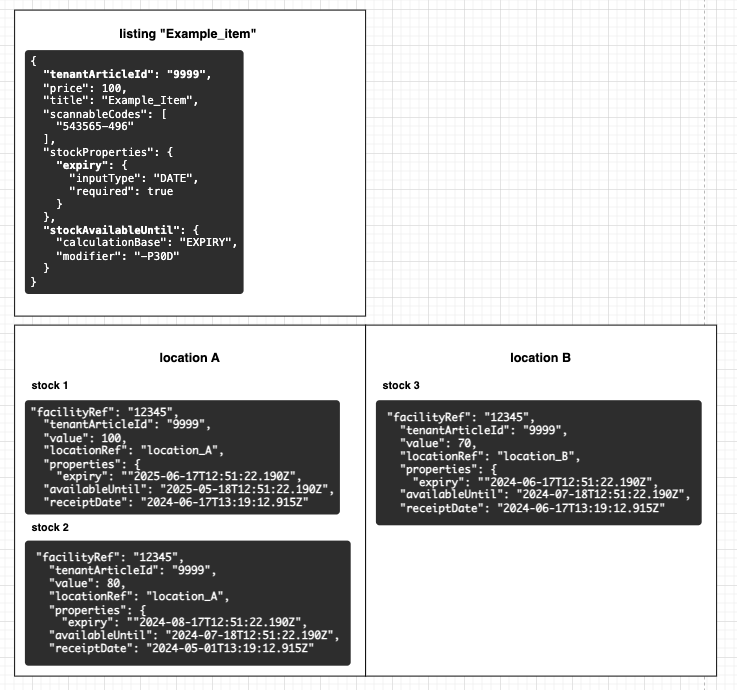
Stock represents one or more items with the exact same attributes, for example, items with the same expiry date, lying in the same storage location. Two stocks can be merged if all information on the respective stocks is identical, adding up their amounts. However, our systems still allow having two separate stocks with identical attributes.
The example below shows a listing with tenantArticleId "9999". As stocks for that item are firstly, distributed over two locations and secondly, have different attributes, three stocks were created.
### Stock properties
Attributes which are relevant for operational processes are handled via [stock properties](https://docs.fulfillmenttools.com/documentation/by-pillar/global-inventory-hub/stock/stock-properties). A common example for properties are values such as expiry date or batch number.
### Stock receipt date
The receipt date represents the time and date when a stock enters a facility. The information can be used for various purposes, for example, to ensure that picking follows a first-in-first-out strategy. This ensures that the timestamp is set to the value when the stock is accepted in the inbound process and not changed afterwards.
When the stock is created via [stocks REST API](https://fulfillmenttools.github.io/fulfillmenttools-api-reference-ui/#post-/api/stocks), it's the responsibility of the integration layer to provide the correct time point. If no `receiptDate` is provided, the platform defaults to the moment when the stock is created.
### Stock deletion
The system automatically deletes a stock entity when the following conditions are met:
* The stock value reaches `0`.
* The `KEEP_ON_ZERO` [trait](https://docs.fulfillmenttools.com/documentation/by-pillar/global-inventory-hub/inventory-traits) is inactive on the stock (default behavior).
If reservations exist on a stock and the stock value reaches `0` without `KEEP_ON_ZERO` being active, the stock is no longer returned via the fulfillmenttools APIs. The reservation remains tracked in the system and is assigned to a suitable stock as soon as one becomes available.
### Stocks with amount 0
The fact that there is no stock left for an item in a facility can be represented in two ways:
1. Having no stock entities
2. Having stock entities with amount `0`
A stock with amount `0` that is assigned to a storage location can be used to indicate that the product should always be stored there. This is, for example, helpful when using the [Operations app](https://docs.fulfillmenttools.com/documentation/apps/operations-app) for picking or the [Inventory app](https://docs.fulfillmenttools.com/documentation/apps/inventory-app) including [storage location recommendations](https://docs.fulfillmenttools.com/documentation/by-pillar/storage-locations-and-zones#storage-location-recommendations). If stock is set to `0`, our systems will remove the stock entity by default. This can be prevented by adding the [trait](https://docs.fulfillmenttools.com/documentation/by-pillar/global-inventory-hub/inventory-traits) `KEEP_ON_ZERO` to a storage location.
### Stock condition
It is possible that stock is delivered to a facility in a defective state or that it gets damaged during storage. In that cases, the stock condition can be set to "defective". Prior to setting a stock's condition to defective, it must first be marked as not [pickable](https://docs.fulfillmenttools.com/documentation/by-pillar/inventory-traits#available-traits) and not [accessible](https://docs.fulfillmenttools.com/documentation/by-pillar/inventory-traits#available-traits). This ensures that the defective stock is no longer considered for sales processes. If rejected items are accepted during goods [receipt](https://docs.fulfillmenttools.com/documentation/by-pillar/global-inventory-hub/inbound-process/receipts), this stock is automatically marked as defective and labelled as not pickable and not accessible.
## Using stock endpoints
### Create stock
{% hint style="warning" %}
To create stock, [create a facility](https://docs.fulfillmenttools.com/documentation/getting-started/facilities) first, stock are always related to a specific facility.
{% endhint %}
To create stock, use the stocks endpoint and POST the amount of stock for each article for each facility:
{% tabs %}
{% tab title="Create stock endpoint" %}
```http
POST https://{YOUT_TENANT_NAME}.api.fulfillmenttools.com/api/stocks
```
{% endtab %}
{% tab title="Request body" %}
```json
{
"facilityRef": "d286e108-698b-4f6c-97b7-21f090f17e46",
"tenantArticleId": "BLAZER-G-6354",
"value": 100,
"properties": {
"batch": "0-1-2-3",
"expiry": "2023-08-17T09:39:28.966Z"
}
}
```
{% endtab %}
{% tab title="Response body" %}
After creating the stock, we receive a `201 CREATED` response:
```json
{
"created": "2024-02-02T10:27:55.154Z",
"facilityRef": "d286e108-698b-4f6c-97b7-21f090f17e46",
"id": "33fb7ef6-47b5-4fd7-ac07-584293d84af3",
"lastModified": "2024-02-02T10:27:55.154Z",
"tenantArticleId": "BLAZER-G-6354",
"value": 100,
"scannableCodes": [],
"scores": [
{
"type": "RATING",
"name": "RECEIPT_DATE",
"value": 3255
}
],
"reserved": 0,
"facilityWideReserved": 0,
"available": 100,
"traits": [
"PICKABLE",
"ACCESSIBLE"
],
"properties": {
"batch": "0-1-2-3",
"expiry": "2023-08-17T09:39:28.966Z"
},
"serializedProperties": "{}",
"receiptDate": "2024-02-02T10:27:55.136Z",
"version": 1
}
```
{% endtab %}
{% endtabs %}
Besides some other properties, you might have noticed `reserved` and `facilityWideReserved`. When there is a pick job inside the facility which needs this stock or this article in the facility, the stock will be reserved until it is picked. When the item is picked, the reservation will be removed and the amount of stock will be decreased.
### Bulk stock create or update
When updating stock, it;s recommended to use the bulk `PUT /api/stocks` [endpoint](https://fulfillmenttools.github.io/fulfillmenttools-api-reference-ui/#put-/api/stocks) to regularly push stock level updates by SKU (`tenantArticleId`) and facility while minimizing the number of calls.
In the following example, all stocks of `tenantArticleId` 4711 are updated.
{% hint style="info" %}
The stock version and ID must be sent for an update. Otherwise, a new stock is created.
{% endhint %}
### Search stock for obtaining the ID and version
First, stocks needs to be searched to obtain the IDs and versions of all stocks that exist for the respective `tenantArticleId`.
```http
POST https://{YOUR-TENANT-NAME}.api.fulfillmenttools.com/api/stocks/search
```
```json
{
"query": {
"tenantArticleId": {
"eq": "4711"
}
}
}
```
When stock should be updated per facility, the `facilityRef` must be included in the search query.
{% hint style="info" %}
It might be necessary to iterate over multiple pages to get all stocks with the corresponding `tenantArticleId`. More information can be found under [Pagination](https://docs.fulfillmenttools.com/documentation/getting-started/general-concepts#pagination).
{% endhint %}
### Update stock
Use the PUT `/api/stocks` [endpoint](https://fulfillmenttools.github.io/fulfillmenttools-api-reference-ui/#put-/api/stocks) to update stock.
* The endpoint can be used for creating and for updating stocks (consider different input models).
* Please be aware that an `ID` and `version` are necessary for updating stock as there can exist multiple stocks for the same SKU and facility.
{% hint style="info" %}
More Stock-API information can be found here: [REST API documentation - Stock](https://fulfillmenttools.github.io/fulfillmenttools-api-reference-ui/#get-/api/stocks)
{% endhint %}
{% tabs %}
{% tab title="Stock endpoint" %}
```http
PUT https://{YOUR_TENANT_NAME}.api.fulfillmenttools.com/api/stocks
```
{% endtab %}
{% tab title="Request body" %}
```json
{
"stocks": [
{
"id": "4f6c-97b7-21f090f17e46d286e108-698b",
"value": 100,
"version": 6,
},
{
"id": "80987-97b7-21f090f17e46d286e108-698b",
"value": 300,
"version": 6,
},
{
"id": "0k876-97b7-21f090f17e46d286e108-698b",
"locationRef": "SL-01",
"properties": {
"expiry": "2027-01-01T00:00:00.000Z"
},
"value": 200,
"version": 6
},
]
}
```
{% endtab %}
{% tab title="Response body" %}
After creating the stock, a `200 OK` response and the status `UPDATED` indicate a successful update.
The response includes additional fields that are automatically set. For example, the `receiptDate` is automatically set to the creation date of the stock. The `traits` automatically default to `PICKABLE` and `ACCESSIBLE` meaning that the stock will be available for incoming orders.
```json
[
{
"stock": {
"created": "2025-11-06T13:11:35.738Z",
"facilityRef": "d286e108-698b-4f6c-97b7-21f090f17e46",
"id": "4f6c-97b7-21f090f17e46d286e108-698b",
"lastModified": "2025-11-26T07:54:35.624Z",
"tenantArticleId": "4711",
"value": 100,
"locationRef": null,
"scannableCodes": [],
"scores": [
{
"type": "RATING",
"name": "RECEIPT_DATE",
"value": 2602
}
],
"tenantStockId": null,
"reserved": 0,
"facilityWideReserved": 0,
"available": 111,
"traits": [
"PICKABLE",
"ACCESSIBLE"
],
"traitConfig": null,
"conditions": null,
"properties": {},
"serializedProperties": "{}",
"receiptDate": "2025-11-16T07:46:16.215Z",
"version": 7,
"customAttributes": null,
"availableUntil": null,
"facility": {
"facilityRef": "d083f631-9f4c-463b-85d4-9414fb19239f"
}
},
(...),
"status": "UPDATED"
}
]
```
{% endtab %}
{% endtabs %}
### Versionless stock creation or updates
The `UPDATE_VERSIONLESS` action in the **stock actions** REST API enables versionless creation or update of stock quantities. This means users can update operations without without first retrieving the current stock version, helping reduce the total number of API calls.
* Supports a maximum of 25 stock entries in a single request.
* Executes with an **all-or-nothing** behavior; the request succeeds only if all stock records are processed.
* Supports two operation types:
* `CREATE` – Creates a new stock record for a specific `tenantArticleId` and `facilityRef`.
* `UPDATE` – Updates an existing stock record identified by `id`.
{% hint style="info" %}
More Stock-API information can be found here: [REST API documentation - Stock](https://fulfillmenttools.github.io/fulfillmenttools-api-reference-ui/#post-/api/stocks/actions)
{% endhint %}
To create or update stock without a version, use the endpoint of our API:
```http
POST https://{YOUT_TENANT_NAME}.api.fulfillmenttools.com/api/stocks/actions
```
{% hint style="info" %}
You can update stock that already has a version number using this endpoint.
{% endhint %}
{% tabs %}
{% tab title="Request body: Create stock" %}
```json
{
"action": {
"name": "UPDATE_VERSIONLESS",
"stocks": [
{
"tenantArticleId": "Article-123",
"value": 20,
"operationType": "CREATE",
"facilityRef": "CGN-01"
}
]
}
}
```
{% endtab %}
{% tab title="Request body: Update stock" %}
```json
{
"action": {
"name": "UPDATE_VERSIONLESS",
"stocks": [
{
"id": "stock-id-123",
"value": 20,
"operationType": "UPDATE"
}
]
}
}
```
{% endtab %}
{% endtabs %}
The response format matches the structure of the [stock upsert API](https://fulfillmenttools.github.io/fulfillmenttools-api-reference-ui/#put-/api/stocks).
{% code title="Response body" %}
```json
{
"name": "UPDATE_VERSIONLESS",
"result": {
"operationResults": [
{
"stock": {
"created": "2026-01-12T08:07:42.676Z",
"facilityRef": "CGN-01",
"id": "019bb13f-1f4e-74ae-b565-84c1952b1e45",
"lastModified": "2026-01-12T08:08:07.260Z",
"tenantArticleId": "Article-123",
"value": 20,
"version": 1,
"facility": {
"facilityRef": "CGN-01"
},
...
},
"status": "UPDATED"
}
]
}
}
```
{% endcode %}
### Deleting stock by product/location/id in batch
To delete stocks by product, location or idm use the actions-endpoint of our API:
```http
POST https://{YOUT_TENANT_NAME}.api.fulfillmenttools.com/api/stocks/actions
```
* For deleting all stocks for a product in a facility, use the `DELETE_BY_PRODUCTS` action
* For deleting all stocks on a storage location in a facility, use the `DELETE_BY_LOCATIONS` action
* For deleting multiple stocks in a facility in one call, use the `DELETE_BY_IDS` action
### Move stock to location
To move stock to a location, use the action `MOVE_TO_LOCATION`.
```http
POST https://{YOUT_TENANT_NAME}.api.fulfillmenttools.com/api/stocks/actions
```
Note: In the `options` of the action the `deleteFromStockIfZero` is available. If this is set to `true`, the stock on the start location is deleted when value reaches 0, after move action was completed (even when the `KEEP_ON_ZERO` trait is active on the respective location).
### Create safety stock
The PUT safetyStock endpoint lets us create the safety stock in a bulk operation:
{% tabs %}
{% tab title="Safety stock endpoint" %}
```http
PUT https://{YOUR_TENANT_NAME}.api.fulfillmenttools.com/api/safetystocks
```
{% endtab %}
{% tab title="Request body" %}
```json
{
"operations": [
{
"tenantArticleId": "SNEAK-W-4891",
"facilityRef": "d286e108-698b-4f6c-97b7-21f090f17e46",
"value": 10
}
]
}
```
{% endtab %}
{% tab title="Response body" %}
The `207 MULTI-STATUS` status code indicates success, the payload shows the status for each entity:
```json
[
{
"tenantArticleId": "SNEAK-W-4891",
"value": 10,
"status": "CREATED",
"facilityRef": "d286e108-698b-4f6c-97b7-21f090f17e46"
}
]
```
{% endtab %}
{% endtabs %}
---
# Agent Instructions: Querying This Documentation
If you need additional information that is not directly available in this page, you can query the documentation dynamically by asking a question.
Perform an HTTP GET request on the current page URL with the `ask` query parameter:
```
GET https://docs.fulfillmenttools.com/documentation/by-pillar/global-inventory-hub/stock.md?ask=
```
The question should be specific, self-contained, and written in natural language.
The response will contain a direct answer to the question and relevant excerpts and sources from the documentation.
Use this mechanism when the answer is not explicitly present in the current page, you need clarification or additional context, or you want to retrieve related documentation sections.